
1. Introduction
This manual provides detailed instructions for the safe and efficient operation of your Caliber PMT302 FM Transmitter and MP3/WMA Player. The PMT302 allows you to play MP3 or WMA music files from a USB flash drive or SD card and broadcast them to your car's FM stereo. It also features an AUX input for connecting external audio devices.
2. Safety Information
Important Safety Instructions:
- Avoid using the device near other wireless devices to prevent interference.
- Keep the device and any associated batteries away from extreme temperatures and high humidity.
- Always eject memory cards safely before removing them from the device to prevent data loss.
- Dispose of batteries and electronic waste according to local regulations.
- Do not attempt to disassemble or modify the device. Refer all servicing to qualified personnel.
3. Product Overview
The Caliber PMT302 is a versatile FM transmitter designed for in-car audio playback. It features a compact design and an intuitive interface.

Figure 1: Caliber PMT302 FM Transmitter with accessories. This image displays the main transmitter unit, the remote control, a 3.5mm AUX cable, and a spare fuse.
3.1 Main Unit Features
- Digital LCD Display: Shows frequency, track information, and volume.
- USB Port: For connecting USB flash drives (up to 32 GB).
- SD Card Slot: For inserting SD cards (up to 32 GB).
- 3.5mm AUX Input: For connecting external audio devices like smartphones or MP3 players.
- Control Buttons: For frequency adjustment, track navigation, volume control, and playback modes.
- Power Source: Plugs into a 12V car cigarette lighter socket.
3.2 Remote Control
The included remote control provides convenient access to various functions of the PMT302 from a distance.
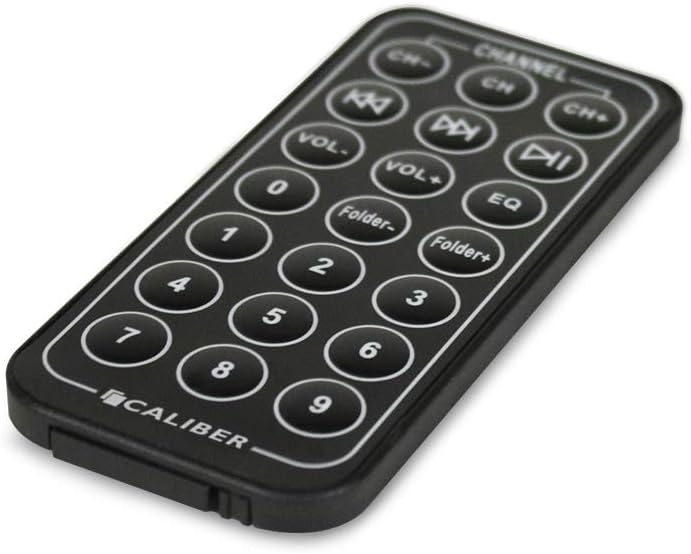
Figure 2: Remote control for the Caliber PMT302. This image shows the layout of buttons on the remote, including channel selection, volume, track navigation, folder navigation, and EQ settings.
- CH-/CH+: Adjust FM frequency.
- VOL-/VOL+: Adjust volume.
- Previous/Next Track: Navigate through music files.
- Play/Pause: Control music playback.
- Folder-/Folder+: Navigate through folders on USB/SD card.
- EQ: Select equalizer presets.
- Numeric Keypad: Direct track selection.
4. Setup
- Insert into Car Power Outlet: Plug the PMT302 into your vehicle's 12V cigarette lighter socket. The device will power on automatically.
- Prepare Music Files:
- For USB: Load MP3 or WMA files onto a USB flash drive (up to 32 GB).
- For SD Card: Load MP3 or WMA files onto an SD card (up to 32 GB).
- Insert Storage Device: Insert the prepared USB flash drive into the USB port or the SD card into the SD card slot on the PMT302. The device will automatically detect and begin playing music.
- Connect External Audio (Optional): If using an external device (e.g., smartphone), connect it to the PMT302's 3.5mm AUX input using the provided AUX cable.
5. Operating Instructions
5.1 Setting the FM Frequency
- Turn on your car's FM radio.
- Tune your car radio to an unused FM frequency (one with static or no broadcast).
- On the PMT302, use the "CH-" or "CH+" buttons (on the device or remote) to match the FM frequency displayed on the PMT302's LCD screen to the frequency set on your car radio.
- Adjust the frequency until the music from the PMT302 is clearly heard through your car speakers.
Note: The PMT302 supports 206 FM channels from 87.5 MHz to 108 MHz. For best audio quality, select a frequency that is clear of strong radio stations.
5.2 Playing Music from USB/SD Card
- Once a USB drive or SD card is inserted, the device will automatically start playing MP3/WMA files.
- Use the Previous/Next Track buttons to skip between songs.
- Use the Play/Pause button to control playback.
- Adjust volume using the VOL-/VOL+ buttons on the device or remote.
- The device has a memory feature that saves the last played frequency, song, and volume settings.
5.3 Loop Playback Modes
The PMT302 offers four loop playback modes:
- Random: Plays songs in a random order.
- Repeat Folder: Repeats all songs within the current folder.
- Repeat All: Repeats all songs on the storage device.
- Repeat One: Repeats the current song.
Refer to the device's on-screen menu or remote control for selecting these modes.
5.4 Using the AUX Input
To play music from an external device:
- Connect your external audio device (e.g., smartphone, MP3 player) to the PMT302's 3.5mm AUX input using the provided cable.
- Ensure the external device is playing audio.
- The PMT302 will automatically switch to AUX input mode or may require manual selection via a mode button (if available).
- Adjust the volume on both the PMT302 and your external device for optimal sound.
6. Maintenance
- Cleaning: Use a soft, dry cloth to clean the device. Do not use liquid cleaners or aerosols.
- Storage: When not in use, store the device in a cool, dry place away from direct sunlight and extreme temperatures.
- Fuse Replacement: If the device stops working, check the fuse located in the tip of the car charger plug. Replace it with a fuse of the same type and rating (a spare fuse is often included).
- Memory Card/USB Care: Handle SD cards and USB drives carefully. Avoid bending or exposing them to moisture.
7. Troubleshooting
| Problem | Possible Cause | Solution |
|---|---|---|
| No power to the device. | Car power outlet is not working, or fuse is blown. | Check if the car power outlet is active. Replace the fuse in the PMT302's plug if necessary. |
| Poor sound quality/static. | FM frequency interference, low volume, or weak signal. | Tune to a different, clear FM frequency on both the PMT302 and your car radio. Increase volume on both devices. Ensure no other strong radio signals are on the chosen frequency. |
| Music not playing from USB/SD card. | Incorrect file format, corrupted files, or card/drive not inserted correctly. | Ensure files are MP3 or WMA format. Reinsert the USB drive/SD card. Try a different USB drive/SD card. |
| Remote control not working. | Battery depleted or line of sight blocked. | Replace the remote control battery. Ensure there is a clear path between the remote and the PMT302. |
| LCD display is dim or not working correctly. | Device malfunction. | This may indicate a hardware issue. If within warranty, contact customer support. |
8. Specifications
- Model: PMT302
- Supported Audio Formats: MP3, WMA
- FM Frequency Range: 87.5 - 108 MHz (206 channels)
- Storage Support: USB Flash Drive (up to 32 GB), SD Card (up to 32 GB)
- Connectivity: Auxiliary (3.5mm), USB 1.1
- Display: LCD
- Power Source: 12V DC Car Cigarette Lighter
- Item Weight: 78 Grams
- Control Method: Touch (on device), Remote Control
- Color: Black
9. Warranty and Support
This Caliber PMT302 FM Transmitter comes with a 15-day exchange warranty from the date of purchase. Please retain your proof of purchase for warranty claims.
For technical support or warranty inquiries, please contact your retailer or the manufacturer, Sondpex Corporation of America.


