
1. Introduction
Thank you for purchasing the Sunstech XD TH-25 Home Cinema 5.1 Subwoofer system. This manual provides essential information for the safe and efficient operation of your new audio system. Please read this manual thoroughly before use and retain it for future reference.
The Sunstech XD TH-25 is designed to deliver an immersive 5.1 surround sound experience, enhancing your movies, music, and gaming. It features MP3 playback capability for versatile audio enjoyment.
2. Safety Information
- Power Source: Ensure the power supply matches the voltage specified on the unit.
- Ventilation: Do not block ventilation openings. Allow adequate space around the unit for proper airflow.
- Water and Moisture: Do not expose the unit to rain, moisture, or dripping/splashing liquids.
- Heat: Keep the unit away from heat sources such as radiators, heat registers, stoves, or other apparatus that produce heat.
- Cleaning: Unplug the unit from the wall outlet before cleaning. Use a soft, dry cloth. Do not use liquid cleaners or aerosol cleaners.
- Servicing: Do not attempt to service this product yourself. Refer all servicing to qualified service personnel.
3. Package Contents
Please check that all items listed below are included in your package:
- 1x Main Unit (DVD Player/Receiver)
- 1x Subwoofer
- 5x Satellite Speakers (Front Left, Front Right, Center, Surround Left, Surround Right)
- 1x Remote Control
- Speaker Cables
- User Manual (this document)
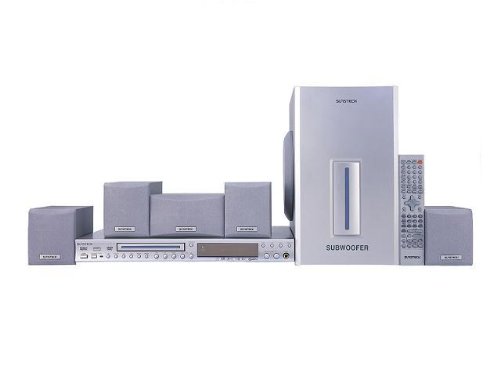
Figure 1: Overview of the Sunstech XD TH-25 Home Cinema 5.1 system components. The image displays the central DVD player/receiver unit, a large subwoofer, five compact satellite speakers, and a remote control.
4. Setup
4.1 Speaker Placement
Proper speaker placement is crucial for an optimal 5.1 surround sound experience. Refer to the diagram below for recommended placement.
- Front Left & Right Speakers: Place these speakers equidistant from your main listening position, forming an equilateral triangle with the listener.
- Center Speaker: Position the center speaker directly above or below your TV/display, aimed towards the listening area.
- Surround Left & Right Speakers: Place these speakers to the sides or slightly behind the main listening position, at ear level or slightly above.
- Subwoofer: The subwoofer can be placed anywhere in the room, but typically performs well in a corner or near a wall to enhance bass response. Experiment with placement for the best sound.
4.2 Connections
Follow these steps to connect your Sunstech XD TH-25 system:
- Connect Satellite Speakers: Connect each satellite speaker to the corresponding output on the main unit using the provided speaker cables. Ensure correct polarity (+ to + and - to -).
- Connect Subwoofer: Connect the subwoofer to the main unit's subwoofer output.
- Connect to TV/Display: Use an appropriate audio/video cable (e.g., HDMI, RCA, Optical) to connect the main unit to your television or display. Refer to your TV's manual for available input options.
- Power Connection: Once all audio/video connections are made, plug the main unit's power cord into a wall outlet.
Note: Always ensure the system is powered off before making or changing any connections.
5. Operating Instructions
5.1 Basic Operation
- Power On/Off: Press the POWER button on the main unit or remote control to turn the system on or off.
- Volume Control: Use the VOL + / - buttons on the remote control or the main unit to adjust the master volume.
- Input Selection: Press the INPUT or SOURCE button to cycle through available audio/video inputs (e.g., DVD, AUX, USB).
- Mute: Press the MUTE button on the remote control to temporarily silence the audio. Press again to restore sound.
5.2 MP3 Playback
The Sunstech XD TH-25 supports MP3 playback, likely via a USB port or disc drive (if applicable). Refer to the main unit's front panel for a USB port or disc tray.
- USB Playback: Insert a USB flash drive containing MP3 files into the USB port. The system should automatically detect the device and switch to USB input, or you may need to select it manually using the INPUT button.
- Disc Playback: Insert an audio CD or data disc with MP3 files into the disc tray. The system should begin playback automatically or allow you to navigate files using the remote control.
- Navigation: Use the PLAY/PAUSE, STOP, SKIP, and FOLDER buttons on the remote control to manage playback and navigate through your MP3 files.
6. Maintenance
- Cleaning the Unit: Use a soft, dry, lint-free cloth to clean the exterior surfaces of the main unit, subwoofer, and speakers. Do not use abrasive cleaners, waxes, or solvents.
- Cleaning Discs (if applicable): For disc playback, clean discs with a soft, dry cloth, wiping from the center outwards.
- Ventilation: Regularly check that the ventilation openings are not obstructed by dust or debris.
- Storage: If storing the unit for an extended period, unplug it from the power outlet and store it in a cool, dry place.
7. Troubleshooting
| Problem | Possible Cause | Solution |
|---|---|---|
| No power | Power cord not securely plugged in. Power outlet not functioning. | Check power cord connection. Test the outlet with another device. |
| No sound | Volume is too low or muted. Incorrect input selected. Speaker cables not connected properly. | Increase volume or unmute. Select the correct input source. Check all speaker connections for proper polarity. |
| Distorted sound | Volume too high. Loose speaker connections. Poor audio source quality. | Reduce volume. Secure all speaker connections. Try a different audio source. |
| Remote control not working | Batteries are dead or inserted incorrectly. Obstruction between remote and unit. | Replace batteries, ensuring correct polarity. Remove any obstructions and point remote directly at the unit's sensor. |
8. Specifications
| Feature | Description |
|---|---|
| Model Name | TH-XD 25 |
| Brand | Sunstech |
| Sound Channel Configuration | 5.1 (5 Satellite Speakers + 1 Subwoofer) |
| Special Feature | MP3 Playback |
| Item Weight | 4.4 Kilograms |
| ASIN | B0055ZKN0W |
9. Warranty and Support
For warranty information, please refer to the warranty card included with your product or contact your local Sunstech dealer or customer support. Keep your proof of purchase for warranty claims.
For technical support or service inquiries, please visit the official Sunstech website or contact their customer service department. Contact details can usually be found on the product packaging or the brand's official website.