Introduction
This manual provides detailed instructions for the safe and efficient use of your Sogo SS-3901 Digital Kitchen Scale. Please read this manual thoroughly before operating the device and retain it for future reference.
Product Overview
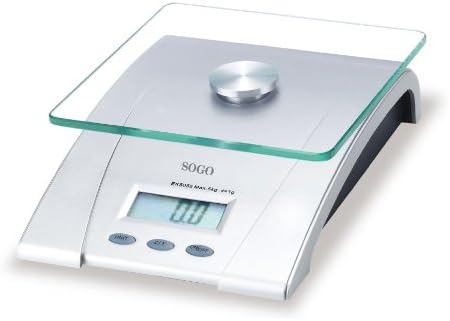
Figure 1: Sogo SS-3901 Digital Kitchen Scale. This image displays the silver-colored base, the clear glass weighing platform, and the front panel with the LCD display and control buttons (UNIT, Z/T, ON/OFF).
The Sogo SS-3901 is a compact and portable digital kitchen scale designed for precise measurement of ingredients. It features a durable glass weighing surface and an easy-to-read LCD display.
Setup
- Unpacking: Carefully remove the scale from its packaging. Inspect for any damage.
- Battery Installation: Locate the battery compartment on the underside of the scale. Insert the required batteries (typically 2x AAA or 1x CR2032, refer to the compartment label) ensuring correct polarity. Close the compartment securely.
- Placement: Place the scale on a firm, flat, and stable surface to ensure accurate readings. Avoid placing it on soft or uneven surfaces, or near strong electromagnetic fields.
Operating Instructions
Turning On/Off
- Press the ON/OFF button to turn the scale on. The display will show '0.0' when ready.
- Press and hold the ON/OFF button for a few seconds to turn the scale off. The scale will also automatically shut off after a period of inactivity to conserve battery life.
Weighing Items
- Ensure the scale is on and displaying '0.0'.
- Gently place the item to be weighed onto the center of the glass platform.
- Read the weight displayed on the LCD screen.
Changing Units
- With the scale on, press the UNIT button to cycle through available measurement units (e.g., grams, ounces, pounds).
- The selected unit will be indicated on the LCD display.
Tare Function (Zero/Tare)
- Place an empty container on the scale. The display will show its weight.
- Press the Z/T (Zero/Tare) button. The display will reset to '0.0'.
- Add the ingredients to the container. The display will show only the weight of the added ingredients.
- To clear the tare, remove all items from the scale and press Z/T again if the display does not automatically return to '0.0'.
Maintenance
- Cleaning: Wipe the scale surface with a soft, damp cloth. Do not use abrasive cleaners or immerse the scale in water. The glass platform can be cleaned with a mild glass cleaner.
- Storage: Store the scale in a cool, dry place. Avoid extreme temperatures and high humidity.
- Battery Replacement: If the display shows a low battery indicator or becomes dim, replace the batteries promptly. Remove batteries if the scale will not be used for an extended period.
- Handling: Handle the scale with care. Avoid dropping it or subjecting it to strong impacts, as this may damage the internal sensors.
Troubleshooting
| Problem | Possible Cause | Solution |
|---|---|---|
| Scale does not turn on | Dead or incorrectly installed batteries. | Check battery polarity or replace batteries. |
| Inaccurate readings | Uneven surface; scale overloaded; interference. | Place on a flat, stable surface. Ensure weight is within maximum capacity. Avoid electronic interference. |
| Display shows "Err" or "O-Ld" | Scale is overloaded (weight exceeds maximum capacity). | Remove excess weight immediately to prevent damage. |
| Display shows "Lo" | Low battery power. | Replace batteries. |
Specifications
- Model: Sogo SS-3901
- Material: Glass (weighing platform)
- Display Type: LCD
- Maximum Capacity: 5 kg
- Measurement Increments: 1 g
- Special Features: Lightweight, Portable


