
1. Introduction
Thank you for purchasing the Timex T2N499DH SL Series Intelligent Quartz Fly-Back Chronograph Watch. This timepiece combines sophisticated design with advanced functionality, featuring Intelligent Quartz technology for precise timekeeping and a versatile fly-back chronograph movement. This manual provides essential information for setting up, operating, and maintaining your watch to ensure its longevity and optimal performance.
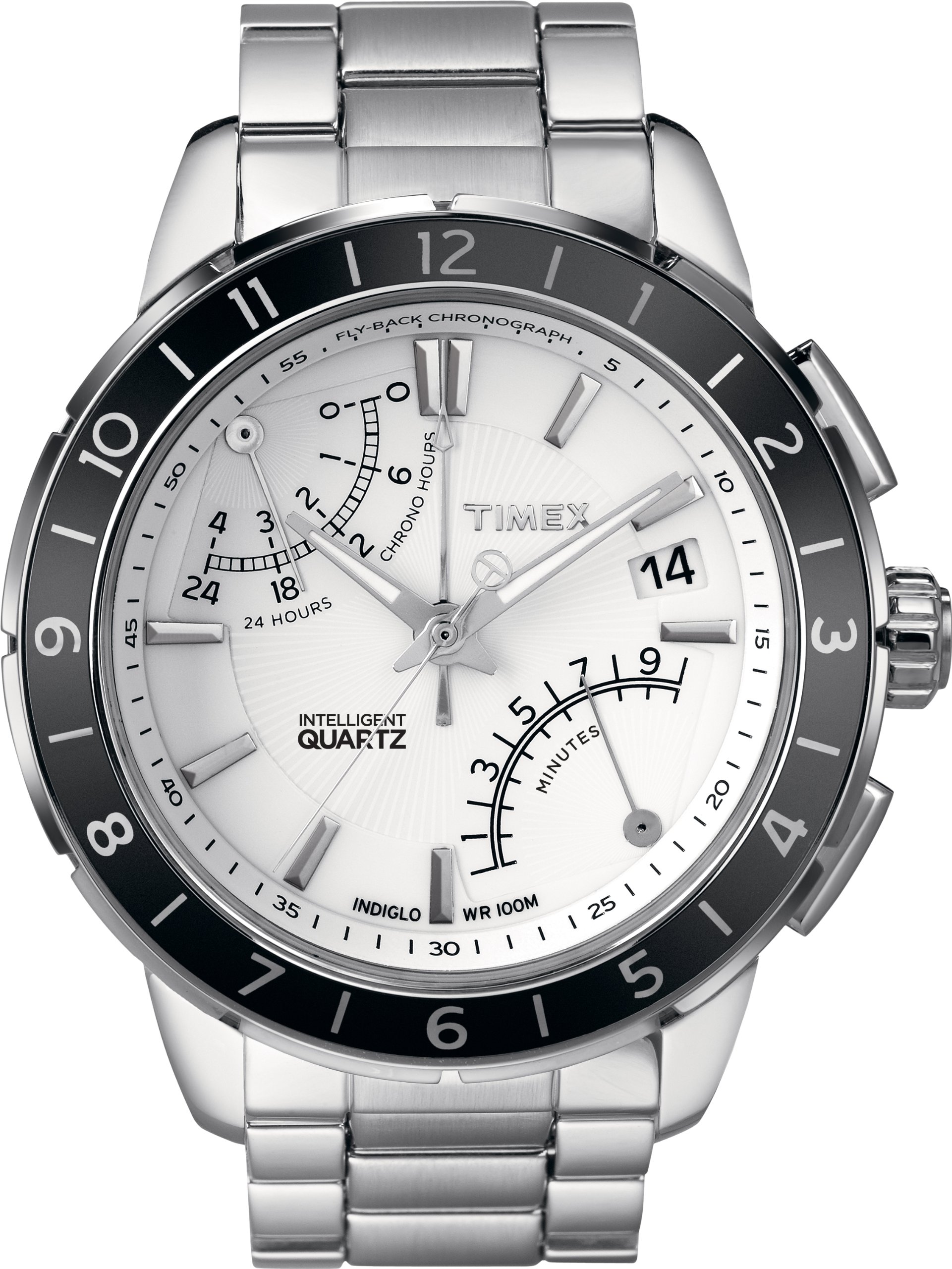
Image 1.1: Front view of the Timex T2N499DH SL Series Intelligent Quartz Fly-Back Chronograph Watch, showcasing its analog display and stainless steel finish.
2. Setup
2.1 Setting the Time
- Pull the crown (the knob on the side of the watch) out to position 2.
- Turn the crown clockwise or counter-clockwise to move the hands to the correct time.
- Push the crown back into position 1 to start the watch.
2.2 Setting the Date (if applicable)
If your watch model includes a date display:
- Pull the crown out to position 1 (the first click).
- Turn the crown clockwise or counter-clockwise to adjust the date.
- Once the correct date is set, push the crown back into its original position.
3. Operating Instructions
3.1 Using the Fly-Back Chronograph
The chronograph function allows for precise measurement of elapsed time. The fly-back feature enables instant reset and restart with a single button press.
- Start: Press the top pusher (button) to start the chronograph. The chronograph hands will begin to move.
- Stop: Press the top pusher again to stop the chronograph. The elapsed time will be displayed.
- Reset: With the chronograph stopped, press the bottom pusher to reset all chronograph hands to zero.
- Fly-Back: While the chronograph is running, press the bottom pusher. The chronograph hands will instantly reset to zero and immediately restart timing. This is useful for measuring consecutive events without stopping and restarting manually.
3.2 Second Time Zone Feature
Your Timex T2N499DH watch includes a second time zone display, typically indicated by an additional hand or sub-dial. Refer to the specific markings on your watch face for its operation.
- Adjustment: The second time zone is usually adjusted independently using a dedicated pusher or by manipulating the crown in a specific position. Consult the detailed diagram that came with your watch for precise instructions on setting the second time zone.
4. Maintenance
4.1 Cleaning Your Watch
To maintain the appearance of your watch, regularly wipe the case and band with a soft, dry cloth. For stainless steel bands, a slightly damp cloth can be used, followed by a dry cloth. Avoid using harsh chemicals or abrasive materials.
4.2 Water Resistance
Your watch is water-resistant to 330 feet (100 meters), making it suitable for swimming and showering. However, it is not recommended for diving. Ensure the crown is fully pushed in before any contact with water. Do not operate the pushers or crown while the watch is wet or submerged.
4.3 Battery Replacement
The watch is powered by a quartz movement requiring a battery. When the battery needs replacement, it is recommended to take your watch to an authorized Timex service center or a reputable watchmaker. This ensures proper battery installation and maintenance of water resistance.
5. Troubleshooting
5.1 Watch Not Running
- Check if the crown is fully pushed into position 1.
- The battery may need replacement. Refer to section 4.3.
5.2 Chronograph Hands Not Resetting to Zero
- Ensure the chronograph is stopped before pressing the reset pusher.
- If hands are misaligned, a calibration procedure may be required. Consult an authorized service center.
5.3 Time or Date Not Advancing
- Verify the crown is fully pushed in after setting.
- If the issue persists, the watch may require professional inspection.
6. Specifications
| Feature | Detail |
|---|---|
| Model Number | T2N499DH |
| Brand | Timex |
| Material | Stainless Steel |
| Display Type | Analog |
| Water Resistance Depth | 330 Feet (100 Meters) |
| Sport Type | Swimming |
| Clasp Type | Fold-over clasp |
| Style | Chronograph |
| Item Shape | Round |
| Band Color | Silver |
| Dial Color | White |
| Case Diameter | 42 Millimeters |
| Band Width | 20 Millimeters |
| Case Thickness | 13 Millimeters |
| Product Dimensions | 15.01 x 15.01 x 15.01 cm; 408.23 g |
| UPC | 753048393732 |
6.1 Watch Size Reference
The Timex T2N499DH features a 42mm case diameter. For a general understanding of watch sizes, refer to the following common measurements:
- Small: 14-28mm
- Medium: 34-44mm
- Large: 44-54mm
Note: The provided image for size comparison illustrates various watch case diameters (14-16mm, 22-24mm, 26-28mm, 34-36mm, 44-48mm, 50-54mm) and general measurements (1 inch, 2 inches) to help visualize watch dimensions. Your T2N499DH model falls within the 34-44mm range, specifically at 42mm.
7. Warranty and Support
Your Timex watch is covered by a limited warranty. For specific warranty terms, conditions, and duration, please refer to the warranty card included with your purchase or visit the official Timex website. For technical support, service, or parts, please contact Timex customer service directly.
Timex Official Website: www.timex.com