
1. Introduction
This manual provides essential instructions for the safe and effective use of your OLYMPUS Voice-Trek VN-7200 IC Recorder. Please read this manual thoroughly before using the device and keep it for future reference.
2. Product Overview
The OLYMPUS Voice-Trek VN-7200 is a portable digital voice recorder designed for easy and reliable audio capture. It features a large LCD display for clear information, intuitive controls, and 2GB of internal storage. The device is optimized for one-handed operation with prominent record and stop buttons.

Figure 2.1: Front view of the OLYMPUS Voice-Trek VN-7200 IC Recorder, showing the large LCD screen, control buttons, and built-in speaker.
3. Setup
3.1. Battery Installation
The VN-7200 operates on two AAA batteries. Ensure correct polarity when inserting the batteries.
- Locate the battery compartment cover on the back of the device.
- Slide the cover in the direction indicated by the arrow to open it.
- Insert two AAA batteries, matching the (+) and (-) terminals as shown inside the compartment.
- Close the battery compartment cover securely.
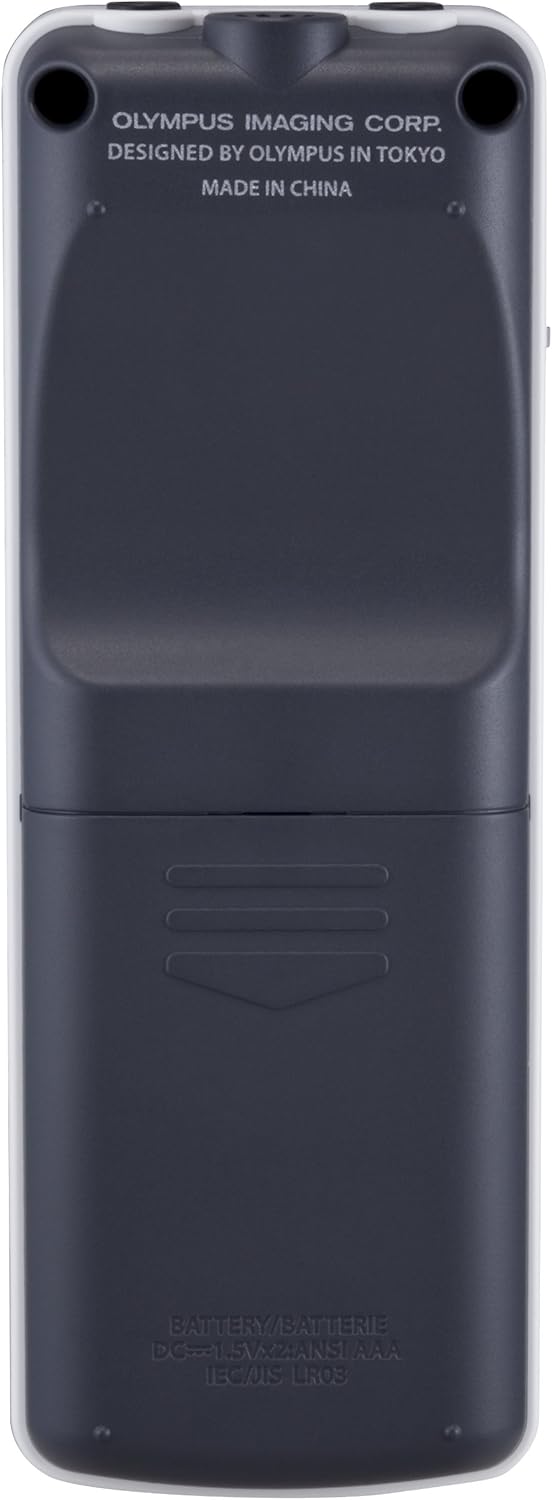
Figure 3.1: Back view of the recorder, illustrating the battery compartment location.
3.2. Power On/Off
To power on or off the device, use the power switch located on the side.
- To turn on: Slide the power switch upwards to the 'ON' position. The LCD screen will illuminate.
- To turn off: Slide the power switch downwards to the 'OFF' position. The screen will turn off.

Figure 3.2: Side view of the recorder, highlighting the power switch and hold function.
3.3. Connecting Headphones/Microphone
The device features dedicated ports for headphones and an external microphone.
- Headphone Jack: Connect standard 3.5mm headphones to the port labeled with a headphone icon for private listening.
- Microphone Jack: Connect an external 3.5mm microphone to the port labeled with a microphone icon for enhanced recording quality or specific recording scenarios.

Figure 3.3: Top view of the recorder, showing the headphone and external microphone input jacks.
4. Operating Instructions
4.1. Recording Audio
To begin recording, press the large red 'REC' button. The device supports voice-activated recording (VCVA) to automatically start and stop recording based on sound levels.
- Ensure the device is powered on.
- Press the REC (Record) button to start recording. The recording indicator will light up.
- To pause recording, press the STOP button once. Press REC again to resume.
- To stop recording completely, press the STOP button twice. The recorded file will be saved.
4.2. Playback
After recording, you can play back your audio files using the control buttons.
- Navigate to the desired file using the Folder/Index button and the Forward/Rewind buttons.
- Press the Play/OK button to start playback.
- During playback, use the Volume (+/-) buttons to adjust the volume.
- Press the STOP button to stop playback.
4.3. File Management
The VN-7200 offers various file management functions including file splitting, moving, and locking.
- File Splitting: This function allows you to divide a long recording into multiple smaller files. Access this option through the menu.
- File Movement: You can move files between different folders on the device to organize your recordings.
- File Lock: To prevent accidental deletion, you can lock important files. Locked files cannot be deleted until unlocked.
- Indexing: Add index marks during recording or playback to easily locate specific points in a file.
4.4. Menu Navigation
The large LCD and intuitive buttons allow for easy navigation through the device's settings and functions.
- Press the Display/Menu button to access the main menu.
- Use the Forward/Rewind buttons to scroll through menu options.
- Press the Play/OK button to select an option or confirm a setting.
- The display shows important information such as date, time, current mode, file information, and warnings in an easy-to-understand format.
5. Maintenance
Proper maintenance ensures the longevity and optimal performance of your IC recorder.
- Cleaning: Use a soft, dry cloth to clean the exterior of the device. Do not use liquid cleaners or abrasive materials.
- Storage: Store the recorder in a cool, dry place away from direct sunlight, extreme temperatures, and high humidity. Remove batteries if the device will not be used for an extended period to prevent leakage.
- Avoid Impact: Protect the device from drops and impacts, which can damage internal components.
6. Troubleshooting
If you encounter issues with your VN-7200, refer to the following common solutions:
| Problem | Solution |
|---|---|
| Device does not power on. | Check if batteries are inserted correctly and have sufficient charge. Ensure the power switch is in the 'ON' position. |
| Cannot record audio. | Verify that there is sufficient free space on the device. Check if the microphone is connected properly (if using external). Ensure the device is not in 'HOLD' mode. |
| No sound during playback. | Adjust the volume. Check if headphones are properly connected (if used). Ensure the speaker is not obstructed. |
| Files cannot be deleted. | Check if the files are locked. Unlock them via the menu before attempting to delete. |
7. Specifications
Key technical specifications for the OLYMPUS Voice-Trek VN-7200 IC Recorder:
| Feature | Detail |
|---|---|
| Brand | OLYMPUS |
| Model Number | VN-7200 |
| Screen Size | 1 inch |
| Storage Capacity | 2 GB |
| Continuous Use Time | Up to 1151 Hours (recording) |
| Compatible Devices | PC |
| Battery Type | 2 x AAA batteries (not included) |
| Item Weight | 249 grams |
| Package Dimensions | 15.6 x 13 x 4.4 cm |
| Release Date | June 24, 2011 |
8. Warranty and Support
For information regarding warranty coverage, technical support, or service, please refer to the warranty card included with your product or visit the official OLYMPUS website. Keep your proof of purchase for warranty claims.


