
Important Safety Instructions
Please read all instructions carefully before using the appliance and retain them for future reference. Failure to follow these instructions may result in electric shock, fire, or serious injury.
- Always ensure the oven is placed on a stable, heat-resistant surface, away from flammable materials.
- Do not touch hot surfaces. Use oven mitts or gloves when handling hot items or parts.
- Unplug the oven from the outlet when not in use and before cleaning. Allow it to cool completely before handling or cleaning parts.
- Do not immerse the cord, plug, or oven in water or other liquids to protect against electrical hazards.
- Close supervision is necessary when any appliance is used by or near children.
- Do not operate any appliance with a damaged cord or plug, or after the appliance malfunctions or has been damaged in any manner.
- Ensure adequate ventilation around the oven during operation. Do not block any ventilation openings.
- Do not place anything on top of the oven while it is operating.
- This appliance is for household use only. Do not use outdoors.
Product Overview
Familiarize yourself with the components of your Bimar B719 electric oven.
Exterior View
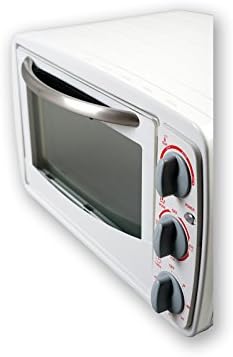
This image shows the Bimar B719 electric oven from a side angle, highlighting the control panel on the right side and the oven door handle.
Control Panel

A detailed view of the control panel, featuring three rotary knobs for temperature, cooking mode, and timer settings, along with a power indicator light.
Interior and Accessories
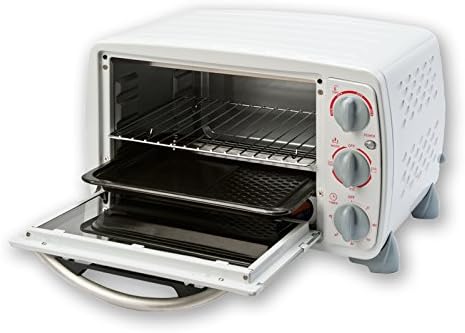
The oven interior is visible with the door open, showing the wire rack and baking tray accessories.
Ventilation
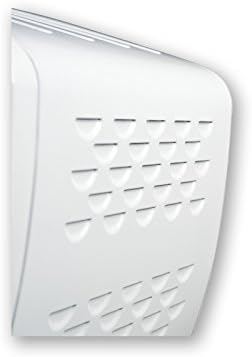
This image displays the side of the oven, showing the ventilation holes designed for heat dissipation.
Setup
Follow these steps to set up your Bimar B719 electric oven for first use.
- Unpack: Carefully remove the oven and all accessories from the packaging. Retain packaging for future transport or storage if needed.
- Placement: Place the oven on a flat, stable, and heat-resistant surface. Ensure there is at least 10-15 cm (4-6 inches) of clear space on all sides and above the oven for proper ventilation.
- Initial Cleaning: Wipe the interior and exterior of the oven with a damp cloth. Wash the wire rack and baking tray with warm, soapy water, rinse thoroughly, and dry completely.
- Power Connection: Plug the power cord into a grounded electrical outlet. Ensure the voltage matches the specifications of the oven (230 Volts).
Operating Instructions
Learn how to use your Bimar B719 electric oven for various cooking tasks.
Before First Use
Before cooking food, operate the oven empty for approximately 15 minutes at the maximum temperature setting (230°C) with the mode set to both top and bottom heating. This helps to burn off any manufacturing residues and odors. Ensure the area is well-ventilated during this process.
Temperature Control
The top rotary knob controls the oven temperature. Turn the knob clockwise to select the desired temperature, ranging from approximately 100°C to 230°C. The power indicator light will illuminate when the oven is heating.
Cooking Mode Selection
The middle rotary knob allows you to select the cooking mode. Available modes typically include:
- Off: Oven is off.
- Top Heating: Heats from the top elements, ideal for browning or grilling.
- Bottom Heating: Heats from the bottom elements, suitable for baking bases.
- Top and Bottom Heating: Heats from both elements, for conventional baking and roasting.
Timer Function
The bottom rotary knob functions as a timer. Turn the knob clockwise to set the desired cooking time, up to 60 minutes. The oven will automatically switch off once the set time has elapsed, indicated by an audible signal. For continuous operation, turn the timer knob to the 'Stay On' position (if available, otherwise set to maximum time and monitor manually).
Automatic Safety Shut-off
The Bimar B719 oven is equipped with an automatic safety shut-off feature. This function ensures the oven turns off after the set timer has completed, preventing overcooking and enhancing safety.
Interior Lighting
The oven includes interior lighting, allowing you to monitor the cooking process without opening the door and losing heat. The light typically activates when the oven is in operation.
Cold Door Feature
The oven features a 'cold door' design, which helps to keep the exterior glass cooler to the touch during operation, reducing the risk of accidental burns. However, caution should still be exercised as surfaces can become hot.
Maintenance and Cleaning
Regular cleaning and maintenance will ensure the longevity and optimal performance of your oven.
- Always Unplug: Before cleaning, always unplug the oven from the power outlet and allow it to cool completely.
- Exterior Cleaning: Wipe the exterior surfaces with a soft, damp cloth. Do not use abrasive cleaners, scouring pads, or harsh chemicals, as these can damage the finish.
- Interior Cleaning: For the interior, wipe with a damp cloth and mild detergent. For stubborn food residues, a non-abrasive oven cleaner designed for conventional ovens can be used, following the product instructions carefully. Ensure all cleaner residue is wiped away.
- Accessories: The wire rack and baking tray can be washed in warm, soapy water. Rinse thoroughly and dry completely before placing them back in the oven.
- Glass Door: Clean the glass door with a glass cleaner or a damp cloth. Avoid scratching the glass.
- Do Not Immerse: Never immerse the oven body, cord, or plug in water or any other liquid.
Troubleshooting
If you encounter any issues with your Bimar B719 electric oven, refer to the table below for common problems and solutions.
| Problem | Possible Cause | Solution |
|---|---|---|
| Oven does not turn on. | Not plugged in; power outlet malfunction; timer not set. | Ensure the oven is securely plugged into a working outlet. Check the circuit breaker. Set the timer knob to the desired cooking time or 'Stay On' position. |
| Food not cooking evenly. | Incorrect rack position; uneven food placement; door opened too frequently. | Adjust rack position for optimal heat distribution. Arrange food evenly on the tray. Avoid opening the door unnecessarily during cooking. |
| Smoke or burning smell during first use. | Manufacturing residues burning off. | This is normal for the first use. Ensure good ventilation. If it persists after initial burn-off, contact support. |
| Timer not working. | Timer knob not set correctly. | Ensure the timer knob is turned past the 0 mark and set to a specific time. |
Specifications
Technical details for the Bimar B719 Electric Oven.
- Brand: Bimar
- Model Number: B719
- Color: White
- Capacity: 19 Liters
- Power/Wattage: 1300 Watts
- Voltage: 230 Volts
- Product Dimensions: 45 x 35 x 28 cm
- Weight: 7.5 kg
- Material: Glass (door)
- Control Type: Rotary Knobs
- Door Style: Drop-down door
- Special Features: Automatic Safety Shut-off, Interior Lighting, Conventional Heating, Cold Door
Warranty and Support
For information regarding warranty coverage, service, or technical support, please refer to the warranty card included with your product or contact Bimar customer service directly. Keep your proof of purchase for warranty claims.
