
1. Product Overview
The Sloan Optima EAF-100-ISM is a commercial-grade, sensor-activated, touch-free faucet designed for bathroom use. It features a 1.5 GPM flow rate, hardwired power, and a deck-mounted mid-body design with a polished chrome finish. This faucet is engineered for durability and hygiene in high-traffic commercial environments, offering advanced water management and user convenience.

Image 1.1: Front view of the Sloan Optima EAF-100-ISM Sensor Activated Touch-Free Faucet.
2. Key Features
- Innovative Water Management: The revamped Optima Faucets from Sloan feature fewer parts and more standardized components, designed to reduce installation and maintenance. The control unit can be powered by batteries, hardwire with battery backup, or an optional hybrid energy turbine.
- 1.5 GPM Flow Rate: Designed to optimize water usage, delivering an efficient flow rate of 1.5 gallons per minute.
- Integrated Side Mixer: Features an integrated side-mixer on the spout, allowing users to conveniently control water temperature.
- Touch-Free Sensor Technology: Equipped with Sloan Optima sensor technology for hands-free operation. The advanced sensor detects hand movements, triggering instant water flow and promoting improved hygiene.
- Commercial Grade Durability: Constructed with robust, commercial-grade materials to withstand rigorous daily use, ensuring durability and longevity in high-traffic areas.
- Easy Installation and Maintenance: Designed for straightforward installation with standard connections and clear instructions. User-friendly design facilitates easy maintenance, including accessible parts and cartridge replacement.
- Self-Adapting Sensor Technology: Adjusts sensing range and sensitivity based on user behavior for seamless operation and reduced false activations.
- Double Infrared Sensors: Two infrared sensors automatically set up and calibrate, ensuring accurate and reliable detection. An indicator light provides visual feedback.
- Magnetic Solenoid Valve: Provides quick and precise control of water flow, reducing water waste and improving efficiency.
- 24 Hour Sentinel Activation: Offers an optional feature for continuous water flow for a specified period, useful in certain commercial applications.
3. Setup and Installation
This faucet is designed for easy installation, including all necessary product and mounting hardware. Follow these general steps for proper setup:
- Unpack and Inspect: Carefully remove all components from the packaging and inspect for any damage. Ensure all parts listed in the packing list are present.
- Prepare Mounting Surface: Ensure the deck-mounted surface is clean, dry, and properly prepared for faucet installation.
- Mount Faucet: Secure the faucet body to the deck using the provided mounting hardware. Ensure a stable and watertight seal.
- Connect Water Lines: Connect the hot and cold water supply lines to the appropriate inlets on the faucet. Tighten all connections securely to prevent leaks.
- Connect Power: Connect the hardwired power supply to the faucet's control unit as per electrical codes and instructions.
- Test Operation: Once installed, turn on the water supply and power. Test the faucet for proper sensor activation and water flow. Check for any leaks.

Image 3.1: View of the faucet with exposed mounting hardware, illustrating the installation components.
4. Operating Instructions
The Sloan Optima EAF-100-ISM faucet is designed for intuitive, touch-free operation.
4.1. Sensor Activation
To activate water flow, simply place your hands within the sensing range of the faucet. The double infrared sensors will detect your presence and initiate water flow instantly. Water will stop automatically once your hands are removed from the sensing area, conserving water.
4.2. Temperature Control
The faucet features an integrated side mixer. Use the lever on the side of the faucet to adjust the water temperature to your desired setting. Move the lever towards the red indicator for hotter water and towards the blue indicator for colder water.
4.3. Self-Adapting Sensor
The self-adapting sensor technology continuously adjusts its range and sensitivity based on environmental factors and user behavior, ensuring consistent and reliable performance.
4.4. 24 Hour Sentinel Activation (Optional)
For specific commercial applications requiring continuous water flow for a set period, the optional 24-hour sentinel activation feature can be configured. Refer to advanced settings in the full technical manual for details on enabling and disabling this function.
Video 4.1: An official video from Sloan Marketplace demonstrating the features and operation of Sloan EAF Faucets, including the touch-free activation and design.
5. Maintenance
Regular maintenance ensures the longevity and optimal performance of your Sloan Optima EAF-100-ISM faucet.
5.1. Cleaning
Clean the polished chrome finish regularly with a soft cloth and mild, non-abrasive cleaner. Avoid harsh chemicals or abrasive pads that could damage the finish or sensor lens. Ensure the sensor lens remains clear of obstructions or buildup for proper operation.
5.2. Cartridge Replacement
The faucet is designed with accessible parts for easy maintenance, including cartridge replacement. If water flow issues or leaks occur, consult a qualified plumber for cartridge inspection and replacement. Use only genuine Sloan replacement parts.
6. Troubleshooting
If you encounter issues with your faucet, refer to the following common troubleshooting tips:
- No Water Flow:
- Check if the water supply valves are fully open.
- Verify that the power supply to the faucet is active.
- Ensure the sensor lens is clean and free from obstructions.
- Continuous Water Flow:
- Check for any objects within the sensor's detection range.
- Clean the sensor lens to remove any debris.
- If the issue persists, the sensor may require recalibration or service.
- Inconsistent Sensor Activation:
- Clean the sensor lens.
- Ensure adequate lighting in the area, as extreme light conditions can sometimes affect sensor performance.
- Low Water Pressure:
- Check the water supply pressure to the building.
- Inspect the aerator for clogs and clean if necessary.
For persistent issues, contact Sloan customer support or a certified technician.
7. Specifications
| Feature | Specification |
|---|---|
| Brand | Sloan |
| Model Name | EAF-100-ISM |
| Recommended Uses | Bathroom |
| Mounting Type | Deck Mount |
| Finish Type | Chrome |
| Material | Metal |
| Color | Chrome |
| Number of Handles | 1 (Integrated Side Mixer) |
| Included Components | Product and Mounting Hardware |
| Special Feature | Touchless |
| Flow Rate | 1.5 Gallons Per Minute |
| Is Electric | Yes (Hardwired-Powered) |
| Style Name | Modern |
| Spout Design | Gooseneck High-Arc |
| Item Weight | 0.01 Ounces |
| Manufacturer | Sloan Valve Co. |
| Installation Method | Single Hole |
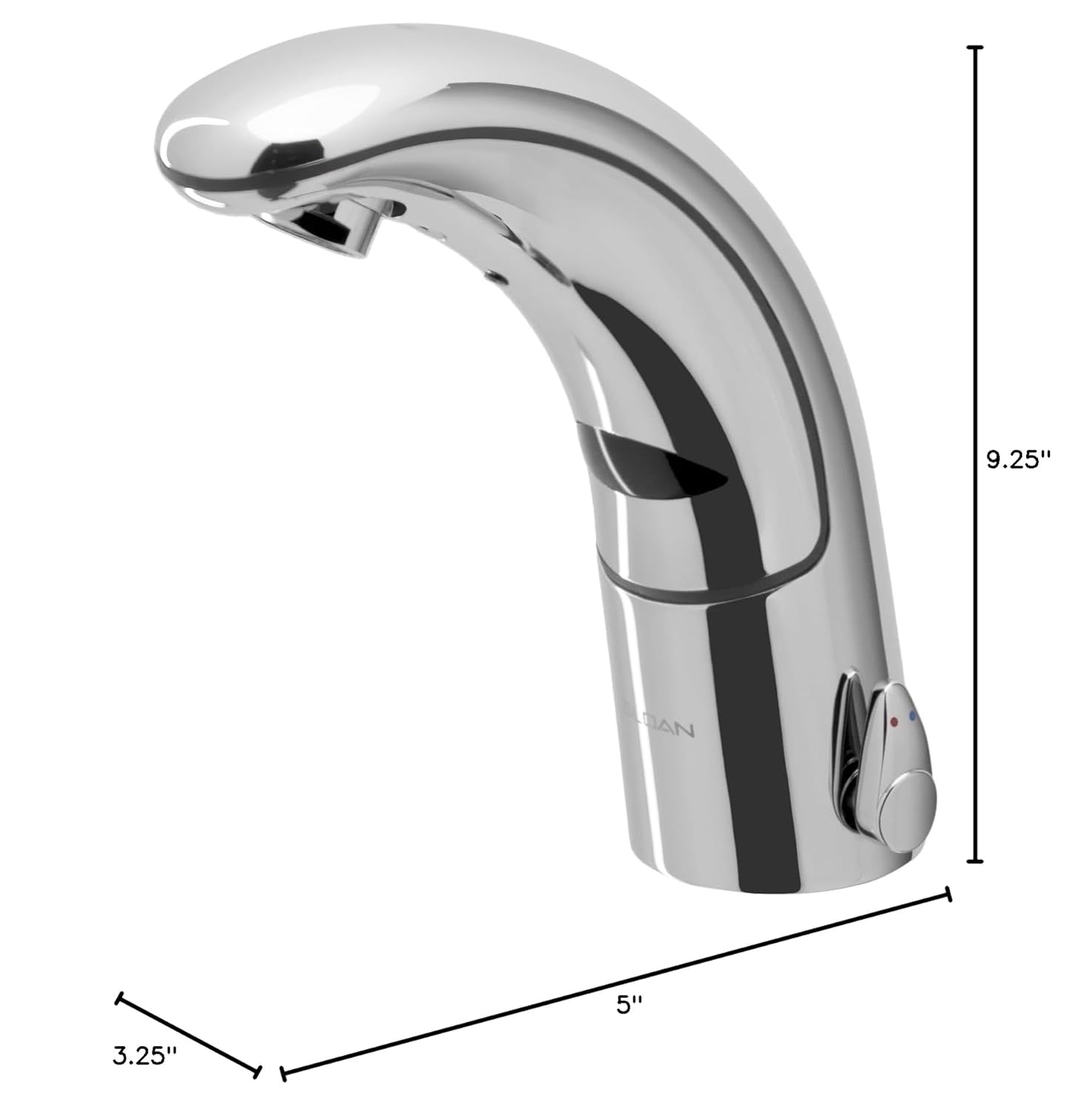
Image 7.1: Dimensional drawing of the Sloan Optima EAF-100-ISM Faucet, showing key measurements.
8. Warranty Information
The Sloan Optima EAF-100-ISM Sensor Activated Touch-Free Faucet comes with a limited warranty. For specific terms, conditions, and duration of the warranty, please refer to the warranty documentation included with your product or visit the official Sloan website.
9. Customer Support
For technical assistance, replacement parts, or further inquiries, please contact Sloan customer support:
- Website: Visit the official Sloan website for product information, FAQs, and support resources.
- Contact: Refer to the contact section on the Sloan website for phone numbers or email support.


