
1. Introduction
The Crown XTi4002 is a two-channel power amplifier designed for professional audio applications. This amplifier is part of the XTi 2 Series, known for its performance and reliability in demanding environments. This manual provides essential information for the safe and effective setup, operation, and maintenance of your XTi4002 amplifier.

Figure 1: Front view of the Crown XTi4002 Two-channel Power Amplifier.
2. Safety Information
Please read and understand all safety instructions before operating the amplifier. Retain this manual for future reference.
- Electrical Safety: Always connect the amplifier to a grounded power outlet. Do not expose the unit to rain or moisture. Disconnect power before making any connections or servicing.
- Ventilation: Ensure adequate airflow around the amplifier. Do not block ventilation openings. Maintain at least 2 inches (5 cm) of clear space on all sides.
- Handling: The amplifier features integrated cast-aluminum handles for safe handling. Always lift with care.
- Servicing: Refer all servicing to qualified service personnel. Do not attempt to open the amplifier enclosure.
- Proposition 65 Warning: This product may contain chemicals known to the State of California to cause cancer and birth defects or other reproductive harm.
3. Unpacking and Contents
Carefully unpack your Crown XTi4002 amplifier. Inspect the unit for any signs of damage that may have occurred during transit. If damage is found, notify your dealer immediately.
The package should contain:
- One (1) Crown XTi4002 Two-channel Power Amplifier
- Power Cord
- User Manual (this document)
4. Product Overview
4.1 Front Panel
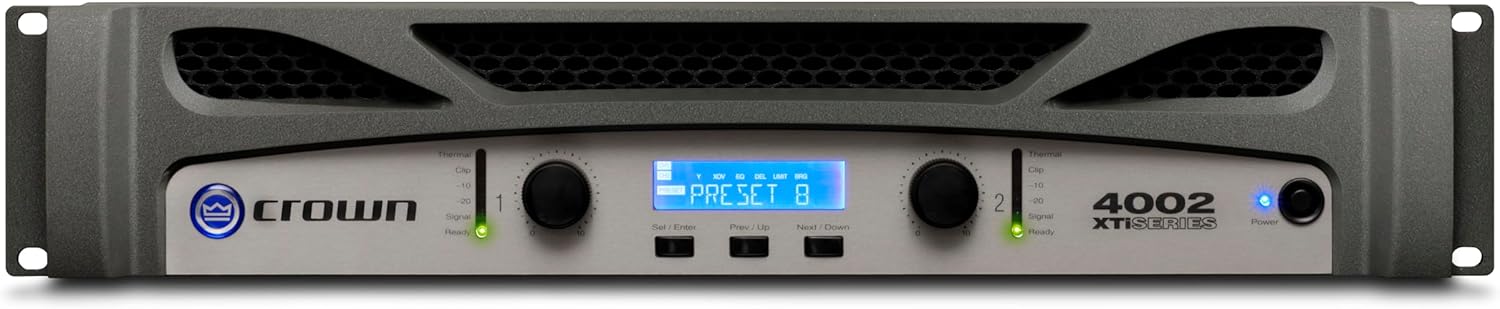
Figure 2: Front Panel of the XTi4002.
The front panel of the XTi4002 features controls for each channel, including gain knobs and signal/clip indicators. A central LCD display provides access to the amplifier's Digital Signal Processing (DSP) functions and system status. The power button and power indicator are also located on the front.
4.2 Rear Panel

Figure 3: Rear Panel of the XTi4002.
The rear panel provides all necessary input and output connections. This includes two XLR input connectors, two XLR output connectors (for linking to other amplifiers), two Speakon output connectors, and two pairs of binding post output connectors. The AC power inlet and a USB port for computer control are also present.
5. Setup
5.1 Physical Placement and Rack Mounting
The XTi4002 is designed for standard 19-inch rack mounting. Ensure the rack provides adequate ventilation. The integrated cast-aluminum handles facilitate safe installation and removal from a rack.

Figure 4: Multiple XTi Series amplifiers, suitable for rack installation.
5.2 Audio Connections
Connect your audio source (e.g., mixer, processor) to the XLR input connectors on the rear panel. Connect your loudspeakers to the amplifier's output connectors. The XTi4002 offers versatile output options:
- XLR Outputs: For linking the audio signal to additional amplifiers.
- Speakon Connectors: For secure and high-current connections to loudspeakers.
- Binding Post Connectors: For connecting loudspeakers using bare wire or banana plugs.
Ensure all connections are secure before powering on the amplifier.
5.3 Power Connection
Connect the supplied AC power cord to the amplifier's power inlet and then to a suitable grounded power outlet.
6. Operating Instructions
6.1 Powering On/Off
Press the power button on the front panel to turn the amplifier on or off. The power indicator will illuminate when the unit is active.
6.2 Gain Control
Adjust the gain knobs for each channel to set the desired output level. Monitor the signal and clip indicators to prevent distortion. The signal indicator illuminates when an audio signal is present, and the clip indicator warns of signal overload.

Figure 5: Close-up of the XTi4002 front panel, showing display and gain controls.
6.3 Digital Signal Processing (DSP) Features
The XTi4002 includes integrated DSP for advanced audio control. Access these features via the front panel LCD display and navigation buttons.
- Peak x Plus Limiters: These limiters provide system protection by allowing precise control over threshold, attack, and release parameters. This helps prevent speaker damage from excessive signal levels.
- Enhanced Subharmonic Synth: This section allows user control over frequency, gain, and filter type for system-specific low-frequency tuning.
- User-defined Fan Modes: Three fan modes (normal, early, and full speed) are available to match fan performance to specific application requirements, optimizing cooling and noise levels.
For detailed configuration of DSP settings, connect the amplifier to a computer via the USB port and use the dedicated Crown software.
7. Maintenance
The Crown XTi4002 is designed for reliable operation with minimal maintenance.
- Cleaning: Periodically wipe the exterior with a soft, dry cloth. Do not use liquid cleaners or solvents.
- Ventilation: Regularly check that the ventilation grilles are free from dust and debris to ensure proper cooling.
- Storage: If storing the amplifier for an extended period, ensure it is in a dry, temperature-controlled environment.
8. Troubleshooting
If you encounter issues with your XTi4002 amplifier, refer to the following common troubleshooting steps:
| Problem | Possible Cause | Solution |
|---|---|---|
| No Power | Power cord disconnected; power outlet faulty; amplifier fuse blown. | Check power cord connection; test power outlet; consult qualified service personnel for fuse replacement. |
| No Sound Output | Input cables disconnected; output cables disconnected; gain set too low; source device not sending signal. | Verify all input and output cable connections; increase gain; check audio source. |
| Distorted Sound | Input signal too high (clipping); speaker impedance mismatch; faulty speaker. | Reduce input signal level; verify speaker impedance matches amplifier specifications; test with a different speaker. |
| Overheating | Blocked ventilation; excessive load; prolonged high-power operation in poor ventilation. | Ensure clear ventilation paths; reduce load or operating level; improve ambient cooling. |
If the problem persists after attempting these solutions, contact Crown customer support or a qualified service technician.
9. Specifications
| Feature | Detail |
|---|---|
| Brand | Crown |
| Model Number | XTi4002 |
| Number of Channels | 2 |
| Output Power (per channel) | 1200W at 4Ω, 650W at 8Ω |
| Output Power (bridged) | 1600W at 2Ω |
| Minimum Supply Voltage | 100.0V |
| Input Connectors | XLR (x2) |
| Output Connectors | XLR (x2), Speakon (x2), Binding Post (x2 pair) |
| Compatible Devices | Speaker |
| Dimensions (L x W x H) | 12.24 x 19.02 x 3.5 inches |
| Item Weight | 21.6 pounds |
| Material | Stainless Steel |
| Color | Black |
10. Warranty and Support
The Crown XTi4002 amplifier is covered by a manufacturer's warranty. Please refer to the warranty card included with your product or visit the official Crown website for detailed warranty terms and conditions.
For technical support, service, or inquiries, please contact Crown customer service through their official channels.