
Product Overview
The KIMEX 042-3416 is a motorized electric projection screen designed for both professional and home use. It features a white PVC screen with a gain of 1.05, providing optimal image quality. The screen is framed with 4 cm black borders to enhance contrast. Control options include a wall switch and a radio frequency (RF) remote control, allowing for precise adjustment of the screen's position. The adjustable blackdrop of 45 cm and a memory function enable users to save their preferred screen height for convenience. The ultra-slim casing (278 x 7.5 x 8.5 cm) allows for versatile installation on walls, ceilings, or in front of windows due to its opaque back panel. This screen is recommended for projectors with standard focal length.
Setup and Installation
Before beginning installation, ensure you have the necessary tools and that the mounting surface (wall or ceiling) is strong enough to support the screen's weight (approximately 17 kg).
- Unpack the Screen: Carefully remove the projection screen and all accessories from its packaging. Inspect for any damage.
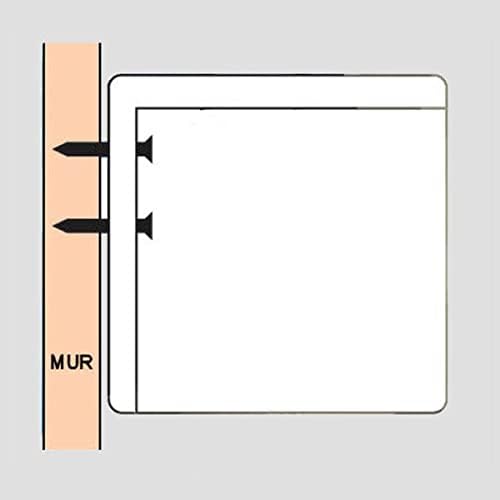
- Choose Mounting Location: The screen can be mounted on a wall or ceiling. Due to its opaque back panel, it can also be installed in front of a window. Ensure the chosen location provides adequate space for the screen to fully extend and retract.
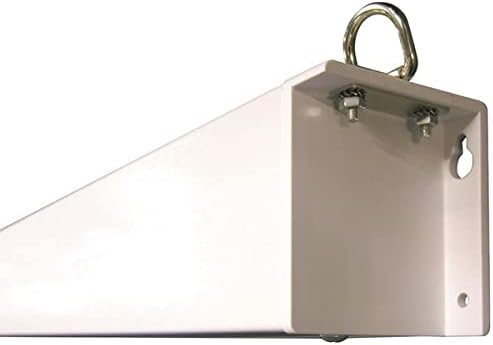
- Mark Drilling Points: Hold the screen casing in the desired position and mark the drilling points for the mounting brackets. The casing dimensions are 278 x 7.5 x 8.5 cm.
- Install Mounting Hardware: Drill holes at the marked points and securely attach the mounting brackets using appropriate screws and anchors for your wall or ceiling type.
- Mount the Screen: Carefully lift the screen and attach it to the installed mounting brackets. Ensure it is securely fastened.
- Connect Power: Connect the screen's power cable to a suitable electrical outlet.

Operating Instructions
The KIMEX 042-3416 electric projection screen can be operated using either the included wall switch or the radio frequency (RF) remote control.
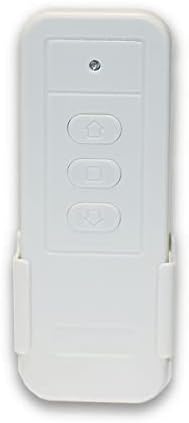
Using the Remote Control
The RF remote control allows you to operate the screen wirelessly from a distance.
- Up Button (▲): Press to raise the screen.
- Down Button (▼): Press to lower the screen.
- Stop Button (■): Press to stop the screen at any desired position.
Using the Wall Switch
The wall switch provides a fixed control point for the screen.
- Operate the screen using the corresponding up, down, and stop buttons on the wall switch.
Adjusting and Saving Screen Position
The screen features an adjustable blackdrop of up to 45 cm, allowing you to fine-tune the image height. Once you have set the screen to your desired position, you can save it in memory using the manual adjustment system. This ensures the screen returns to your preferred viewing height with each use.
Maintenance
Proper maintenance ensures the longevity and optimal performance of your projection screen.
- Screen Cleaning: The screen surface is made of white PVC. To clean, gently wipe with a soft, damp cloth. Avoid using harsh chemicals, abrasive cleaners, or excessive water, as these can damage the screen material.
- Casing Cleaning: Wipe the steel casing with a dry or slightly damp cloth to remove dust.
- Motor Care: The electric motor is designed for durability. Avoid continuous operation for extended periods without rest to prevent overheating.
- Storage: When not in use, keep the screen retracted into its casing to protect the surface from dust and damage.
Important Note on Screen Flatness: Non-tensioned screens are naturally subject to slight curling at the edges. A maximum tolerance of 3% of the total width on each side is considered normal for this type of screen.
Troubleshooting
If you encounter issues with your KIMEX 042-3416 projection screen, refer to the following common problems and solutions:
- Screen Does Not Respond:
- Check if the screen is properly plugged into a working power outlet.
- Ensure the remote control batteries are not depleted. Replace if necessary.
- Verify that there are no obstructions blocking the signal between the remote and the screen's receiver.
- Screen Stops Mid-Operation:
- This could indicate a temporary motor overload. Allow the motor to rest for a few minutes before attempting to operate the screen again.
- Check for any physical obstructions preventing the screen from moving freely.
- Screen Edges Appear Curled:
- As a non-tensioned screen, slight curling at the edges is a natural characteristic. This is within the product's design specifications and does not typically affect viewing quality significantly.
- Ensure the screen has been allowed to hang fully extended for some time, as this can sometimes reduce minor curling.
- Remote Control Not Working:
- Replace the batteries in the remote control.
- If the wall switch works but the remote does not, the remote may need to be re-paired with the screen (refer to specific pairing instructions if provided in a separate guide, as none are available here).
If these steps do not resolve the issue, please contact customer support.
Specifications
| Feature | Detail |
|---|---|
| Model Number | 042-3416 |
| Brand | KIMEX |
| Screen Dimensions (W x H) | 260 x 146 cm |
| Aspect Ratio | 16:9 |
| Screen Material | White PVC (Gain 1.05) |
| Black Borders | 4 cm |
| Casing Material | Steel |
| Casing Dimensions (L x W x H) | 278 x 7.5 x 8.5 cm |
| Weight | 17 kg |
| Operation Mode | Electric (Motorized) |
| Control Methods | Wall Switch, RF Remote Control |
| Adjustable Blackdrop | Up to 45 cm |
| Mounting Type | Wall, Ceiling |
| Country of Origin | France |
| Recommended Projector | Standard focal length |
Warranty and Support
Warranty: The KIMEX 042-3416 Electric Projection Screen comes with a 3-year product warranty from the date of purchase. This warranty covers manufacturing defects under normal use. Please retain your proof of purchase for warranty claims.
Support: For technical assistance, troubleshooting beyond the scope of this manual, or warranty inquiries, please contact KIMEX customer service through their official website or the retailer where the product was purchased. Provide your model number (042-3416) and a detailed description of the issue to facilitate support.