
Introduction
This manual provides detailed instructions for the safe installation, operation, and maintenance of your Utilitech 3-Light 123-Watt Bronze Dusk-to-Dawn Security Light. Please read all instructions carefully before beginning installation and retain this manual for future reference. This security light is designed for outdoor use and features a built-in motion sensor and photo-control for automated operation.
Safety Information
WARNING: Risk of electric shock. Disconnect power at the fuse or circuit breaker before installation or servicing.
- This product must be installed in accordance with the applicable installation code by a person familiar with the construction and operation of the product and the hazards involved.
- Ensure the supply voltage is 120 Volts AC, 60 Hz.
- Use only suitable bulbs as specified in the 'Specifications' section.
- Do not attempt to modify the fixture. Any modifications may void the warranty and create a safety hazard.
- This fixture is UL Safety Listed, ensuring compliance with recognized safety standards.
Package Contents
Before beginning installation, ensure all parts are present. If any part is missing or damaged, do not attempt to assemble, install, or operate the product.
- Security Light Fixture (1)
- Mounting Hardware (screws, wire nuts, etc.)
- Instruction Manual (1)
Setup and Installation
This security light is designed for wall mount installation and requires hardwiring to an existing electrical circuit.
1. Prepare for Installation
- Turn off power at the circuit breaker or fuse box to the outlet box where the fixture will be installed.
- Carefully unpack the fixture and its components.
2. Mounting the Fixture
- Attach the mounting bracket to the electrical junction box using the provided screws. Ensure it is securely fastened.
- Feed the electrical wires from the junction box through the center hole of the mounting bracket.
3. Wiring Connections
- Connect the bare copper ground wire from the fixture to the ground wire from the junction box using a wire nut.
- Connect the white (neutral) wire from the fixture to the white (neutral) wire from the junction box using a wire nut.
- Connect the black (hot) wire from the fixture to the black (hot) wire from the junction box using a wire nut.
- Carefully tuck all wires into the junction box.
4. Securing the Fixture and Installing Bulbs
- Align the fixture with the mounting bracket and secure it with the provided screws. Ensure a tight seal against the mounting surface to prevent water intrusion.
- Install three (3) Halogen or compact fluorescent bulbs (not included) into the sockets. Do not exceed the maximum wattage specified in the 'Specifications' section.
- Adjust the light heads to the desired direction.
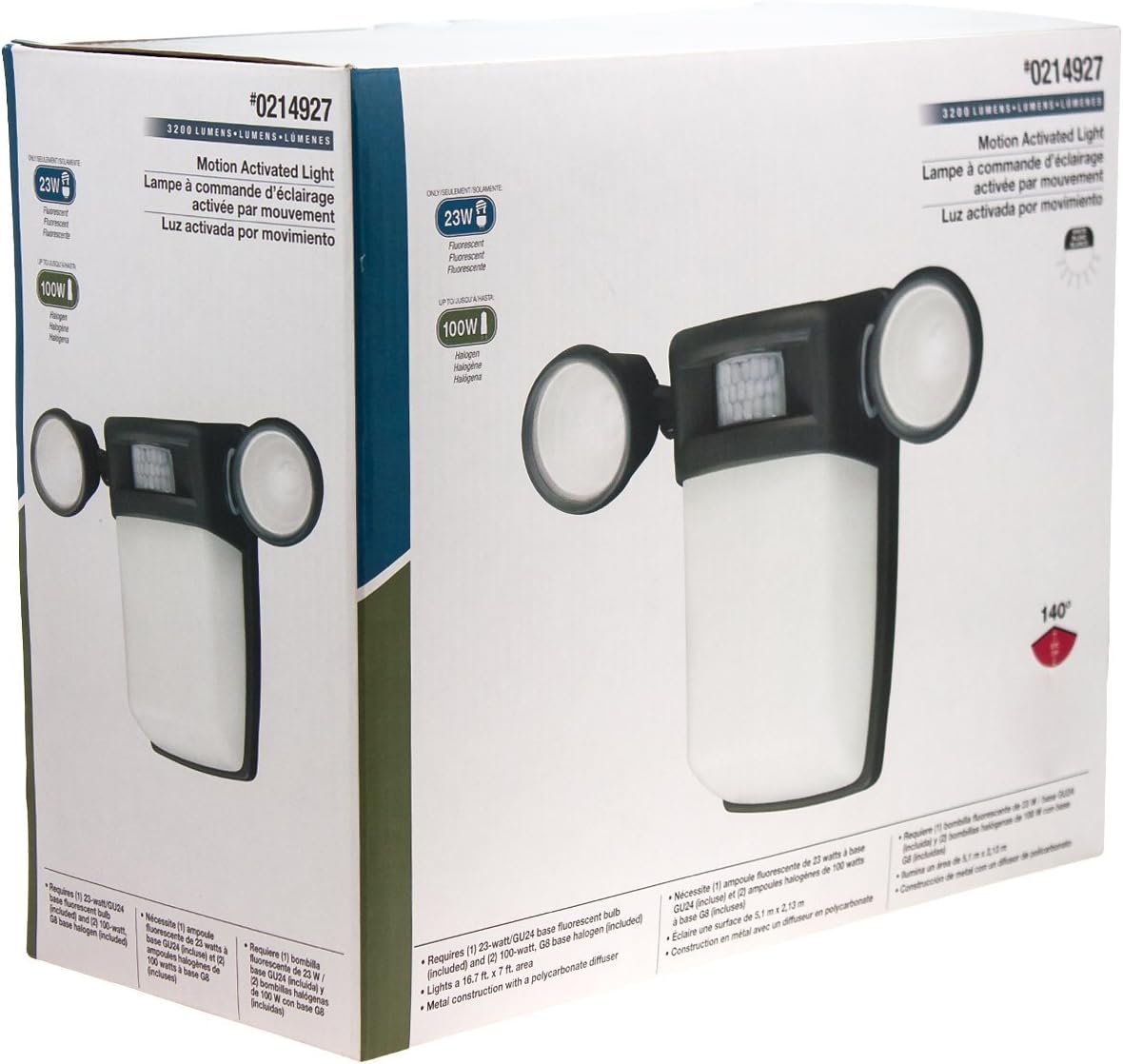
Figure 1: Front view of the Utilitech 3-Light 123-Watt Bronze Dusk-to-Dawn Security Light in its retail packaging. This image shows the overall design with three adjustable light heads and the central motion sensor.

Figure 2: Side view of the Utilitech 3-Light 123-Watt Bronze Dusk-to-Dawn Security Light in its retail packaging. This perspective highlights the depth of the fixture and the positioning of the light heads relative to the main body.
Operating Instructions
This security light is equipped with both a photo-control sensor for dusk-to-dawn operation and a 140° automatic motion sensor for enhanced security.
Dusk-to-Dawn Feature
The integrated photo-control sensor detects ambient light levels. The light will automatically turn on at dusk and turn off at dawn, providing continuous illumination during nighttime hours. No manual adjustment is typically required for this feature.
Motion Sensor Operation
The 140° automatic motion sensor detects movement within its range. When motion is detected, the light will activate for a set duration. The fixture may include adjustable settings for sensitivity and duration. Refer to the specific controls on your fixture for adjustment. Some models may also feature remote control capabilities for these settings.
Adjusting Light Heads
The three light heads are adjustable. Gently pivot each light head to direct illumination to your desired coverage area.
Maintenance
Regular maintenance ensures optimal performance and extends the lifespan of your security light.
- Cleaning: Periodically clean the fixture with a soft, damp cloth. Do not use abrasive cleaners or solvents, as they may damage the finish or electrical components. Ensure power is off before cleaning.
- Bulb Replacement: Turn off power at the circuit breaker before replacing bulbs. Allow bulbs to cool completely before handling. Replace with three (3) Halogen or compact fluorescent bulbs of the specified wattage.
- Sensor Cleaning: Keep the motion sensor lens and photo-control sensor free of dirt, dust, and obstructions to ensure proper operation.
Troubleshooting
If your security light is not functioning as expected, refer to the following common issues and solutions:
| Problem | Possible Cause | Solution |
|---|---|---|
| Light does not turn on at all. | No power, faulty bulbs, wiring issue, or defective sensor. | Check circuit breaker. Ensure bulbs are correctly installed and not burnt out. Verify wiring connections. If issues persist, consult a qualified electrician. |
| Light stays on continuously. | Motion sensor sensitivity too high, duration setting too long, or photo-control sensor obstructed/faulty. | Adjust motion sensor sensitivity and duration settings. Ensure photo-control sensor is not blocked by debris or external light sources. |
| Light turns on during the day. | Photo-control sensor is obstructed or in a shaded area. | Ensure the photo-control sensor is exposed to natural daylight and not covered by dirt or obstructions. |
| Motion sensor does not detect movement. | Sensor sensitivity too low, obstructed view, or incorrect angle. | Increase sensor sensitivity. Clear any obstructions from the sensor's field of view. Adjust the sensor's angle to cover the desired area. |
Specifications
| Feature | Specification |
|---|---|
| Brand | Utilitech |
| Model Number | 0214927 |
| Voltage | 120 Volts AC, 60 Hz |
| Wattage | 123 Watts (total) |
| Bulb Type | Halogen or Compact Fluorescent (3 bulbs required) |
| Light Heads | 3, adjustable |
| Motion Sensor Angle | 140 degrees |
| Dusk-to-Dawn Feature | Yes, photo-control sensor |
| Material | Metal |
| Finish | Bronze |
| Mounting Type | Wall Mount |
| Dimensions (H x W x D) | 10.25 in x 13.5 in x 5.75 in |
| Item Weight | 3.5 pounds |
| Safety Listing | UL Listed |


