1. Introduction
This manual provides instructions for the proper setup, operation, and maintenance of your Genius GX HS-G500V Gaming Headset. Please read this manual thoroughly before use to ensure optimal performance and longevity of your device.
2. Product Overview
The Genius GX HS-G500V is a wired gaming headset designed for PC use. It features an over-ear design with a comfortable leather headband, an integrated microphone, and in-line controls for volume, vibration, and microphone mute. The headset also includes a vibration function for an enhanced audio experience.

Figure 1: Genius GX HS-G500V Gaming Headset with in-line controls.
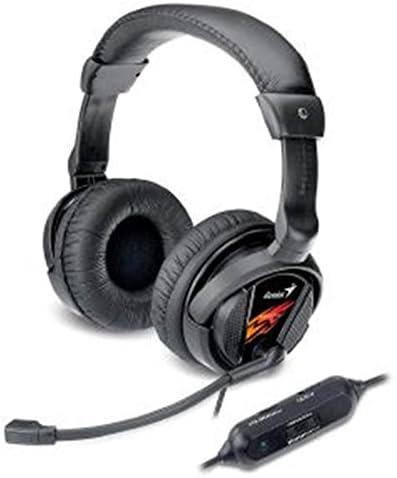
Figure 2: Side view of the Genius GX HS-G500V Gaming Headset.
3. Setup
- Connect the Headset: Locate the 3.5mm audio jack on your headset cable. Plug this jack into the corresponding audio output port (usually green) and microphone input port (usually pink) on your computer or audio device.
- Verify Connection: Ensure the connectors are fully inserted into their respective ports.
- Adjust System Settings: On your computer, navigate to your sound settings and ensure the headset is selected as the default playback and recording device.
4. Operating Instructions
The Genius GX HS-G500V features convenient in-line controls for easy adjustments during use.
- Volume Control: Use the 'VOL' slider on the in-line control unit to increase or decrease the audio output volume.
- Microphone Mute: Use the 'MUTE-M' switch on the in-line control unit to toggle the microphone on or off. When muted, your voice will not be transmitted.
- Vibration Control: Use the 'VIBRATION' slider on the in-line control unit to adjust the intensity of the headset's vibration function. This feature enhances immersion by providing tactile feedback during gameplay or media consumption.
- Comfort Adjustment: The leather headband is designed for comfortable wear. Adjust the earcups to fit securely over your ears.
5. Maintenance
Proper care will extend the life of your headset.
- Cleaning: Use a soft, dry cloth to clean the headset. Avoid using liquid cleaners or abrasive materials.
- Storage: Store the headset in a cool, dry place away from direct sunlight and extreme temperatures.
- Cable Care: Avoid bending or twisting the cable excessively. Do not pull on the cable to disconnect the headset from your device.
6. Troubleshooting
If you encounter issues with your headset, refer to the following common solutions:
- No Sound:
- Ensure the 3.5mm audio jack is fully connected to your device.
- Check the 'VOL' slider on the in-line control unit and increase the volume.
- Verify your computer's sound settings to ensure the headset is selected as the default playback device and the system volume is not muted.
- Microphone Not Working:
- Check the 'MUTE-M' switch on the in-line control unit to ensure the microphone is not muted.
- Verify your computer's sound settings to ensure the headset microphone is selected as the default recording device and its input volume is adequate.
- Vibration Function Not Working:
- Ensure the headset is properly connected.
- Adjust the 'VIBRATION' slider on the in-line control unit to increase the intensity.
- Distorted Sound:
- Reduce the volume on both the headset and your device.
- Ensure the audio cable is securely connected and not damaged.
7. Specifications
| Item Model Number | HS-G500V |
| Brand | Genius |
| Color | Black |
| Headphones Ear Placement | On Ear |
| Headphones Form Factor | On Ear |
| Noise Control | None (as per product features) |
| Headphones Jack | 3.5 mm Jack |
| Connectivity Technology | Wired |
| Product Dimensions | 15 x 22 x 35 cm |
| Item Weight | 350 g |
| Included Components | Headband |
8. Warranty and Support
For warranty information and technical support, please refer to the documentation provided with your purchase or visit the official Genius website. Keep your proof of purchase for any warranty claims.


