
Acctim 14193
Acctim 14193 Eclipse Solar Dual Power Alarm Clock User Manual
Model: 14193 | Brand: Acctim
1. Introduction
This manual provides instructions for the setup, operation, and maintenance of your Acctim 14193 Eclipse Solar Dual Power Alarm Clock. This clock features a hybrid power system, utilizing solar energy during the day and battery power at night. It includes a crescendo alarm with snooze functionality and Smartlite technology for automatic display illumination in low light conditions.
2. Safety Information
- Do not expose the clock to extreme temperatures, direct sunlight for prolonged periods (beyond normal operation), or high humidity.
- Avoid dropping the clock or subjecting it to strong impacts.
- Do not attempt to disassemble or repair the clock yourself. Refer to qualified service personnel.
- Dispose of used batteries according to local regulations.
3. Package Contents
Please check that all items are present:
- Acctim 14193 Eclipse Solar Dual Power Alarm Clock
- 2 x AA Batteries (pre-installed or included separately)
4. Product Overview
Familiarize yourself with the clock's components and controls.
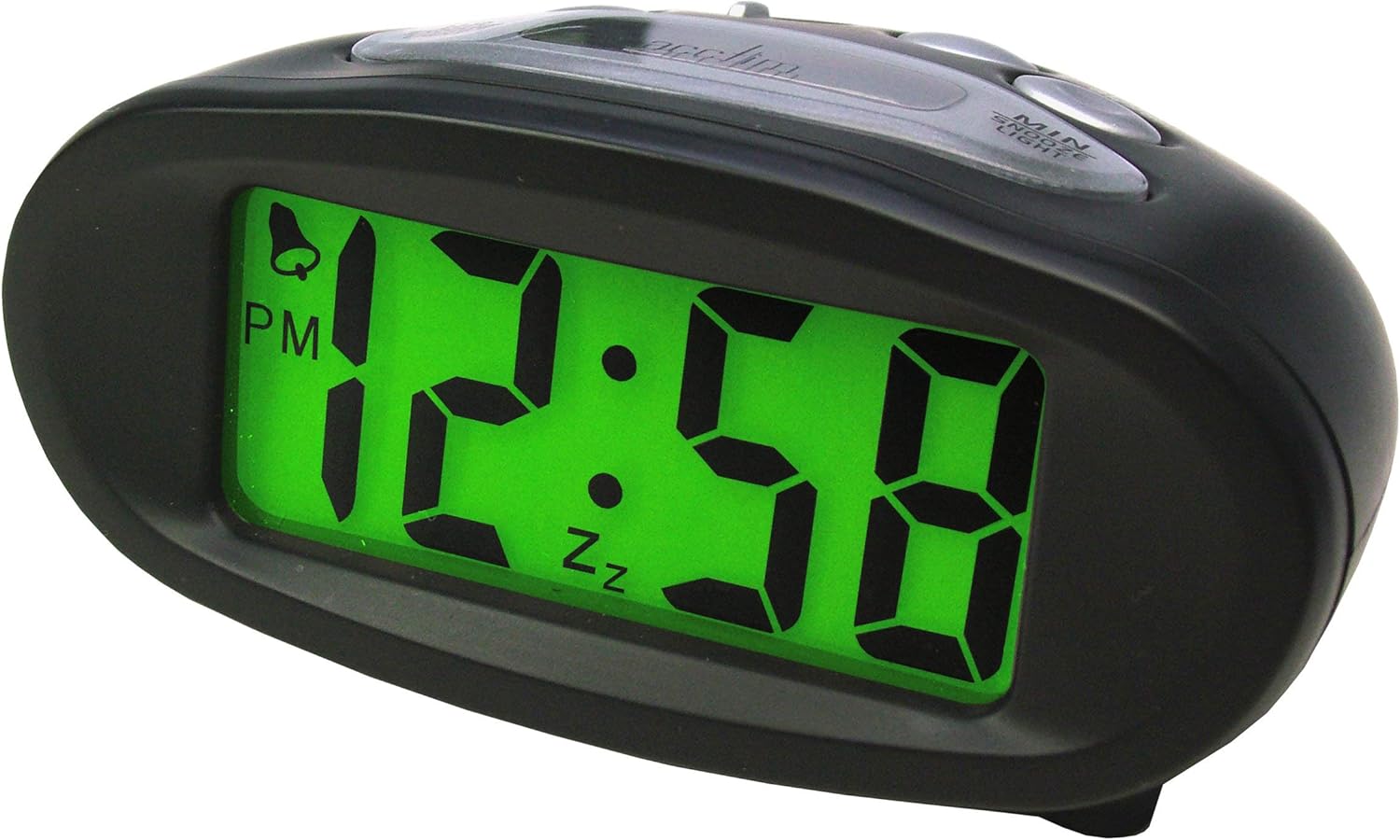
Figure 4.1: Front View (Illuminated Display)
This image shows the front of the Acctim 14193 alarm clock with its digital display illuminated in green, showing the time 12:58 PM. The clock has a black, oval-shaped casing.

Figure 4.2: Front View (Unilluminated Display)
This image displays the front of the Acctim 14193 alarm clock with its digital display unilluminated, showing the time 12:58 PM. The clock maintains its black, oval-shaped design.

Figure 4.3: Top and Rear View (Controls)
This image provides a top-rear view of the Acctim 14193 alarm clock, highlighting the control buttons and the solar panel. The buttons are labeled for functions such as ALARM ON/OFF, ALARM SET, TIME SET, and a LIGHT switch with OFF, LO, and HI settings. The solar panel is visible on the top surface.
4.1 Controls and Features
- Display: Digital time display.
- Solar Panel: Located on the top surface, charges the clock during daylight.
- HR Button: Used to adjust hours.
- MIN Button: Used to adjust minutes.
- SNOOZE/LIGHT Button: Activates snooze during alarm, provides temporary backlight.
- ALARM ON/OFF Switch: Toggles the alarm function.
- ALARM SET Button: Enters alarm setting mode.
- TIME SET Button: Enters time setting mode.
- LIGHT Switch (OFF/LO/HI): Controls the Smartlite backlight intensity.
5. Setup
5.1 Battery Installation
The clock requires 2 x AA batteries (included). If batteries are not pre-installed or need replacement:
- Locate the battery compartment cover on the underside of the clock.
- Remove the cover.
- Insert 2 AA batteries, ensuring correct polarity (+ and -).
- Replace the battery compartment cover securely.
5.2 Solar Power Functionality
The Acctim Eclipse clock utilizes a hybrid power system. The solar panel on top of the clock charges the internal system during daylight hours, reducing battery consumption. For optimal performance, place the clock in an area that receives ambient light during the day. The clock will automatically switch to battery power at night or in low-light conditions.
6. Operating Instructions
6.1 Setting the Time
- Press and hold the TIME SET button until the hour digits begin to flash.
- Press the HR button repeatedly to adjust the hour. Pay attention to the AM/PM indicator.
- Press the TIME SET button again to confirm the hour and move to minute setting. The minute digits will flash.
- Press the MIN button repeatedly to adjust the minutes.
- Press the TIME SET button one last time to confirm the minutes and exit time setting mode.
6.2 Setting the Alarm
- Press and hold the ALARM SET button until the alarm hour digits begin to flash.
- Press the HR button repeatedly to adjust the alarm hour. Observe the AM/PM indicator.
- Press the ALARM SET button again to confirm the alarm hour and move to alarm minute setting. The alarm minute digits will flash.
- Press the MIN button repeatedly to adjust the alarm minutes.
- Press the ALARM SET button one last time to confirm the alarm minutes and exit alarm setting mode.
6.3 Activating/Deactivating the Alarm
Use the ALARM ON/OFF switch located on the top of the clock to enable or disable the alarm. When the alarm is active, an alarm icon (often a bell) will appear on the display.
6.4 Snooze Function
When the alarm sounds, press the large SNOOZE/LIGHT button on the top of the clock. The alarm will temporarily stop and sound again after approximately 5-10 minutes (standard snooze duration).
6.5 Backlight Functions (Smartlite & Manual)
- Smartlite Technology: The clock features Smartlite technology, which automatically illuminates the display for easy night time viewing. Control its intensity using the LIGHT switch (OFF/LO/HI).
- OFF: Smartlite feature is disabled.
- LO: Low intensity automatic backlight.
- HI: High intensity automatic backlight.
- Manual Backlight: Press the SNOOZE/LIGHT button at any time to activate a temporary blue backlight for approximately 4 seconds, providing additional illumination.
7. Maintenance
7.1 Cleaning
Wipe the clock with a soft, dry cloth. Do not use abrasive cleaners or chemical solvents, as these may damage the casing or display.
7.2 Battery Replacement
When the display dims significantly or the clock functions become erratic, it may be time to replace the batteries. Refer to Section 5.1 for battery installation instructions. Always replace both AA batteries simultaneously with new ones.
8. Troubleshooting
| Problem | Possible Cause | Solution |
|---|---|---|
| Display is dim or blank. | Low batteries or insufficient light for solar charging. | Replace batteries (Section 5.1). Ensure the clock is placed in an area with adequate ambient light for solar charging. |
| Alarm does not sound. | Alarm is not activated or alarm time is incorrect. | Check the ALARM ON/OFF switch (Section 6.3). Verify the alarm time is set correctly (Section 6.2). |
| Time is incorrect. | Time was not set correctly or batteries were removed. | Reset the time (Section 6.1). |
| Smartlite backlight not working. | LIGHT switch is set to OFF or insufficient ambient light. | Ensure the LIGHT switch is set to LO or HI (Section 6.5). Test in a darker environment. |
9. Specifications
| Brand | Acctim |
| Model Number | 14193 |
| Color | Black |
| Display Type | Digital |
| Power Source | Battery Powered, Solar Powered (Hybrid) |
| Batteries | 2 x AA (included) |
| Special Features | Alarm, Snooze, Smartlite Automatic Backlight, Manual Blue Backlight |
| Dimensions (L x W x H) | 105mm x 50mm x 75mm (approx. 4.13 x 1.97 x 2.95 inches) |
| Item Weight | 0.11 Kilograms (approx. 3.87 ounces) |
10. Warranty and Support
The Acctim 14193 Eclipse Solar Dual Power Alarm Clock comes with a 1-year guarantee from the date of purchase. This warranty covers manufacturing defects under normal use.
For warranty claims, technical support, or further assistance, please contact your retailer or the manufacturer directly. Please retain your proof of purchase.
Related documents14193

Ask a question about this manual
Ask about setup, troubleshooting, compatibility, parts, safety, or missing instructions. Manuals+ will review the question and use this page’s manual context to help answer it.