
1. Introduction
Thank you for choosing the Sirui T2205X TX Series Carbon Fiber Tripod Legs. This manual provides detailed instructions for the safe and effective use, setup, operation, and maintenance of your tripod. Please read this manual thoroughly before using the product to ensure optimal performance and longevity.

Image 1.1: Sirui T2205X TX Series Carbon Fiber Tripod Legs. This image shows the tripod fully extended, demonstrating its five-section leg design and overall structure.
2. Safety Information
- Always ensure all leg locks and the center column lock are securely tightened before mounting equipment or leaving the tripod unattended.
- Do not exceed the maximum load capacity of 26.5 lb (12 kg) to prevent damage to the tripod or attached equipment.
- Avoid placing the tripod on unstable or uneven surfaces.
- Keep hands and fingers clear of leg sections when extending or retracting to prevent pinching.
- Do not carry the tripod with a camera or heavy equipment attached over long distances or in crowded areas.
- Clean the tripod regularly, especially after use in sandy, dusty, or wet environments, to maintain smooth operation.
3. Package Contents
Verify that all items are present in the package:
- Sirui T2205X Carbon Fiber Tripod Legs
- Short Center Column
- Tripod Bag
- Tools (Allen keys)
- Shoulder Strap

Image 3.1: Sirui T2205X Tripod Bag. The included padded bag provides convenient storage and transport for the tripod and its accessories.
4. Product Features
- 8x Carbon Fiber Legs: Provides high strength and low weight for portability and stability.
- 5-Section Legs: Allows for a compact folded size and extended maximum height.
- Rapid/Reversible Center Column: Offers quick height adjustment and the ability to invert for low-angle shooting.
- Forged Aluminum Chassis: Ensures durability and robust support.
- Retractable Spiked Feet: Provides enhanced grip on soft or uneven terrain.
- Twist Leg Locks: Securely fastens leg sections in place.

Image 4.1: Sirui T2205X Tripod folded size. This image illustrates the compact folded dimensions of the tripod, approximately 15 inches (39 cm), for easy transport.
5. Setup
5.1 Unfolding the Tripod
- Release the leg angle locks on each leg and swing the legs outwards until they click into one of the three available angle positions.
- To achieve the most compact folded size, the legs can be folded upwards 180 degrees over the center column. To unfold, swing the legs down past the angle lock positions.
5.2 Attaching a Tripod Head
The Sirui T2205X consists of tripod legs only. A separate tripod head (e.g., ball head, pan-tilt head) is required and can be attached to the mounting plate at the top of the center column. Ensure the head is securely screwed onto the 3/8-inch mounting screw.
5.3 Extending and Retracting Legs
- To extend a leg section, twist the leg lock counter-clockwise approximately a quarter turn to loosen it. Pull the leg section out to the desired length.
- Twist the leg lock clockwise to tighten and secure the leg section. Repeat for all sections of each leg.
- To retract, loosen the lock, push the leg section in, and then tighten the lock.

Image 5.1: Tripod Leg Detail. This image highlights the twist-lock mechanism for extending and retracting leg sections, and the retractable spiked foot.
5.4 Using the Center Column
- Extending/Retracting: Loosen the center column locking knob, adjust the column to the desired height, and then tighten the knob securely.
- Reversing: For low-angle or macro photography, the center column can be reversed. Unscrew the hook at the bottom of the column, loosen the center column lock, pull the column out completely, flip it, and reinsert it from below. Secure the lock and reattach the hook.
- Short Center Column: For extremely low-angle shots, replace the standard center column with the included short center column. Unscrew the cap/hook at the bottom of the main column, remove the main column, insert the short column, and reattach the cap/hook if desired.
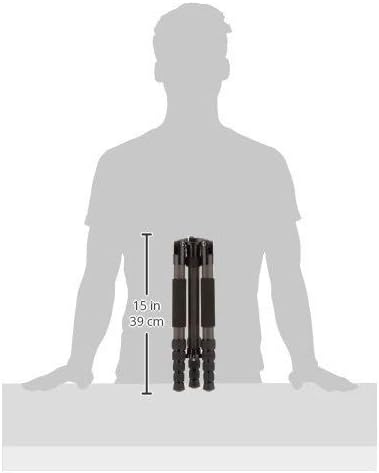
Image 5.2: Short Center Column. This accessory allows for extremely low-angle shooting by replacing the standard center column.
5.5 Using Spiked Feet
The rubber feet can be twisted to reveal integrated metal spikes. These spikes provide improved stability on soft ground, ice, or other slippery outdoor surfaces. Ensure the rubber feet are securely tightened when not using the spikes.
6. Operating Instructions
6.1 Securing Your Camera
Once your tripod head is attached, mount your camera or other equipment to the head according to the head's instructions. Always ensure the camera is securely fastened to the head and the head is securely fastened to the tripod before use.
6.2 Adjusting Height and Stability
Adjust the leg lengths and center column height to achieve the desired camera position. For maximum stability, extend the thicker leg sections first and minimize the use of the center column. The hook at the bottom of the center column can be used to hang a weight (e.g., a camera bag) to increase stability in windy conditions or with heavy equipment.

Image 6.1: Sirui T2205X Tripod in use. This image shows the tripod with a camera and ball head mounted, demonstrating its full extension and operational setup.
7. Maintenance
- Cleaning: After each use, especially in harsh environments, wipe down the tripod with a soft, dry cloth. If used in sand or saltwater, rinse with fresh water and dry thoroughly before storage.
- Lubrication: Do not apply oil or grease to the leg locks or center column. The mechanisms are designed for dry operation.
- Inspection: Periodically check all screws, bolts, and leg locks for tightness. Use the provided Allen keys to tighten any loose components.
- Storage: Store the tripod in its bag in a cool, dry place away from direct sunlight and extreme temperatures.
8. Troubleshooting
- Legs not extending/retracting smoothly: Check for dirt or debris in the leg sections or twist locks. Clean thoroughly. Ensure the twist locks are fully loosened.
- Tripod feels unstable: Ensure all leg locks and the center column lock are fully tightened. Verify that the leg angles are set correctly and evenly. Avoid over-extending the center column, especially with heavy loads. Hang a weight from the center column hook for added stability.
- Center column stuck: Ensure the center column locking knob is fully loosened. Check for any obstructions or debris.
9. Specifications
| Feature | Specification |
|---|---|
| Model Name | T-2205X |
| Material | Carbon Fiber, Aluminum |
| Number of Leg Sections | 5 |
| Maximum Height | 144.5 Centimeters (56.9 Inches) |
| Minimum Height | 13.5 Centimeters |
| Folded Size | 14.6 Inches |
| Item Weight | 1200 Grams (2.65 Pounds) |
| Weight Limit (Load Capacity) | 26.5 Pounds (12 kg) |
| Compatible Devices | Camera |
| Head Type | Designed for Ball Heads (Head not included) |
10. Warranty and Support
10.1 Warranty Information
Sirui offers a 6-year warranty on most gear, including this tripod. A 1-year warranty applies to mobile/lens accessories. This warranty is valid for purchases made from U.S. authorized dealers only. Please retain your proof of purchase for warranty claims.
10.2 Customer Support
For technical assistance, warranty claims, or spare parts, please contact your authorized Sirui dealer or visit the official Sirui website for support contact information.
