
1. Introduction
Thank you for choosing the Cameron Sino Extended Battery. This manual provides essential information for the safe and effective use of your new battery. Please read it thoroughly before installation and operation.
This extended battery is designed to provide longer playtime for your Sony PSP-1000 series console. It is compatible with the following models:
- Sony PSP-1000
- Sony PSP-1000G1
- Sony PSP-1000G1W
- Sony PSP-1000K
- Sony PSP-1000KCW
2. Safety Information
WARNING: Failure to follow these safety instructions may result in fire, electric shock, injury, or damage to the product or property.
- Do not disassemble, open, crush, bend, deform, puncture, or shred the battery.
- Do not modify or remanufacture the battery, attempt to insert foreign objects into the battery, or immerse or expose it to water or other liquids.
- Do not expose the battery to fire, explosion, or other hazards.
- Only use the battery with a charging system qualified with the device.
- Promptly dispose of used batteries according to local regulations.
- Avoid dropping the battery or subjecting it to severe impacts.
- Keep the battery out of reach of children.
3. Product Specifications
| Specification | Detail |
|---|---|
| Brand | Cameron Sino |
| Model Number | CS-SP110XL |
| Battery Cell Composition | Lithium Polymer |
| Battery Capacity | 3650 mAh |
| Voltage | 3.7 Volts |
| Battery Weight | 110 g |
| Reusability | Rechargeable |
| Certifications | CE, FCC, RoHS |
| Recommended Use | Gaming Console (Sony PSP-1000 Series) |
4. Setup and Installation
Follow these steps to install the extended battery into your Sony PSP-1000 series console:
- Power Off: Ensure your PSP console is completely powered off before beginning.
- Remove Battery Cover: Locate the battery compartment on the back of your PSP. Slide the battery cover latch to unlock it, then remove the cover.
- Remove Old Battery: Carefully lift and remove the existing battery from the compartment.
- Insert New Battery: Align the Cameron Sino Extended Battery with the battery compartment. Ensure the metal contacts on the battery match the contacts in the PSP. Gently push the battery into place until it sits securely.
- Attach Extended Battery Cover: The extended battery is thicker than the standard battery. Use the specialized extended battery cover (if included) to accommodate the larger battery. Align the cover and slide it into place, ensuring it latches securely. It may require a firm but gentle push to fit correctly.
- Power On: Once the battery is installed and the cover is secured, power on your PSP to confirm proper installation.
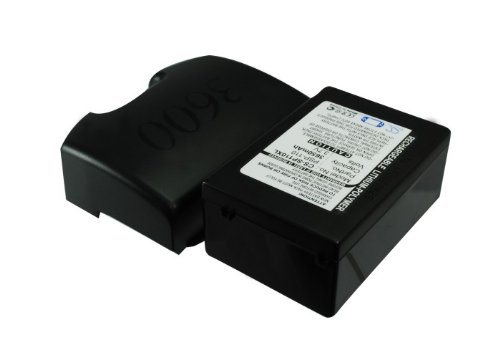
Image 1: Cameron Sino Extended Battery (Model CS-SP110XL). This image shows the overall design of the extended battery, highlighting its form factor and connection points for installation into the Sony PSP-1000 series.
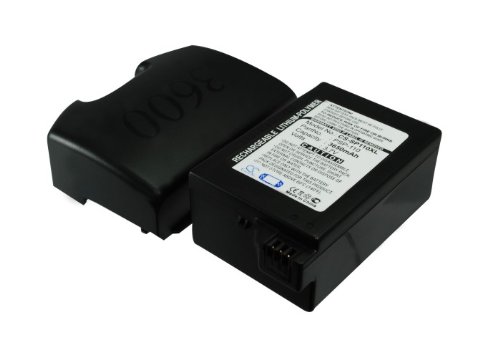
Image 2: Top view of the Cameron Sino Extended Battery. This perspective provides a clearer view of the battery's top surface, including any labels or markings, which can be helpful for identification and proper orientation during installation.
5. Operating Instructions
After successful installation, follow these guidelines for optimal battery performance:
- Initial Charge: For the first use, fully charge the battery for at least 8-12 hours, even if the PSP indicates a full charge sooner. This helps to calibrate the battery for optimal performance.
- Charging: Connect your PSP to its original AC adapter or a compatible USB charging cable. The PSP's charging indicator will show when the battery is charging.
- Discharging: It is recommended to fully discharge the battery and then fully recharge it every few months to maintain its health and accuracy of the battery level indicator.
- Usage: The extended capacity of this battery will provide significantly longer playtime compared to the standard PSP battery. Actual battery life will vary based on game intensity, screen brightness, and Wi-Fi usage.
6. Maintenance
Proper maintenance can extend the lifespan of your extended battery:
- Temperature: Avoid exposing the battery to extreme temperatures (hot or cold). Optimal operating temperature is between 0°C and 45°C (32°F and 113°F).
- Storage: If storing the battery for an extended period, ensure it is charged to approximately 50-60% and stored in a cool, dry place. Avoid storing it fully charged or completely depleted.
- Cleaning: Keep the battery contacts clean and free from dust or debris. Use a dry, soft cloth to wipe them if necessary.
- Avoid Physical Damage: Protect the battery from drops, impacts, and crushing, which can damage the internal cells.
7. Troubleshooting
If you encounter issues with your extended battery, consider the following:
- Battery Not Charging:
- Ensure the PSP's AC adapter or USB cable is properly connected to both the console and a power source.
- Verify that the battery is correctly seated in the compartment and the contacts are clean.
- Try using a different charging cable or power adapter if available.
- Check if the PSP's charging port is damaged.
- Battery Not Holding Charge:
- Perform a full charge-discharge cycle (charge to 100%, then use until the PSP powers off, then recharge).
- Ensure the battery has been fully charged for the recommended initial period.
- Battery capacity naturally degrades over time and with usage cycles. If the battery life has significantly decreased after many months or years of use, it may be reaching the end of its lifespan.
- PSP Does Not Power On:
- Confirm the battery is fully charged.
- Ensure the battery is correctly installed.
- Try powering on the PSP while connected to the AC adapter without the battery inserted (if your PSP model supports this) to rule out a console issue.
If problems persist, please contact customer support.
8. Warranty and Support
For warranty information and customer support regarding your Cameron Sino Extended Battery, please refer to the documentation provided with your purchase or contact Cameron Sino directly through their official website or authorized retailers.
Please have your product model number (CS-SP110XL) and proof of purchase ready when contacting support.