
Introduction
This manual provides instructions for the proper installation, function, and maintenance of the Pentair JV50 Quick Disconnect Swivel. This component is a replacement part designed for use with specific Pentair Jet-Vac automatic pool cleaner models.
The Pentair JV50 Quick Disconnect Swivel facilitates hose movement and prevents tangling, ensuring efficient operation of your automatic pool cleaner. It includes a barb for secure hose connection.
Compatibility
The Pentair JV50 Quick Disconnect Swivel is compatible with the following Pentair Jet-Vac automatic pool cleaner models:
- Pentair Jet-Vac JV105
- Pentair Jet-Vac JV209
- Pentair Jet-Vac JV504C
Ensure your pool cleaner model is listed above for proper fit and function.
Setup and Installation
Follow these steps to install the Pentair JV50 Quick Disconnect Swivel:
- Preparation: Before beginning, ensure your pool cleaner is disconnected from its power source and removed from the pool.
- Remove Old Swivel: Carefully disconnect the existing swivel from the pool cleaner hose. This may involve unscrewing or unlatching the old component.
- Attach New Swivel: Connect the new Pentair JV50 Quick Disconnect Swivel to the pool cleaner hose. Ensure the barb is properly seated within the hose for a secure fit.
- Secure Connection: Firmly secure the swivel to the hose. Verify that all connections are tight to prevent leaks or disconnections during operation.
- Verify Tail Installation: If your pool cleaner uses a tail, ensure it is correctly installed and securely attached to the cleaner body.
- Test Operation: Once installed, place the pool cleaner back into the pool and reconnect its power source. Observe the cleaner's movement to ensure the swivel allows for free rotation and prevents hose tangling.
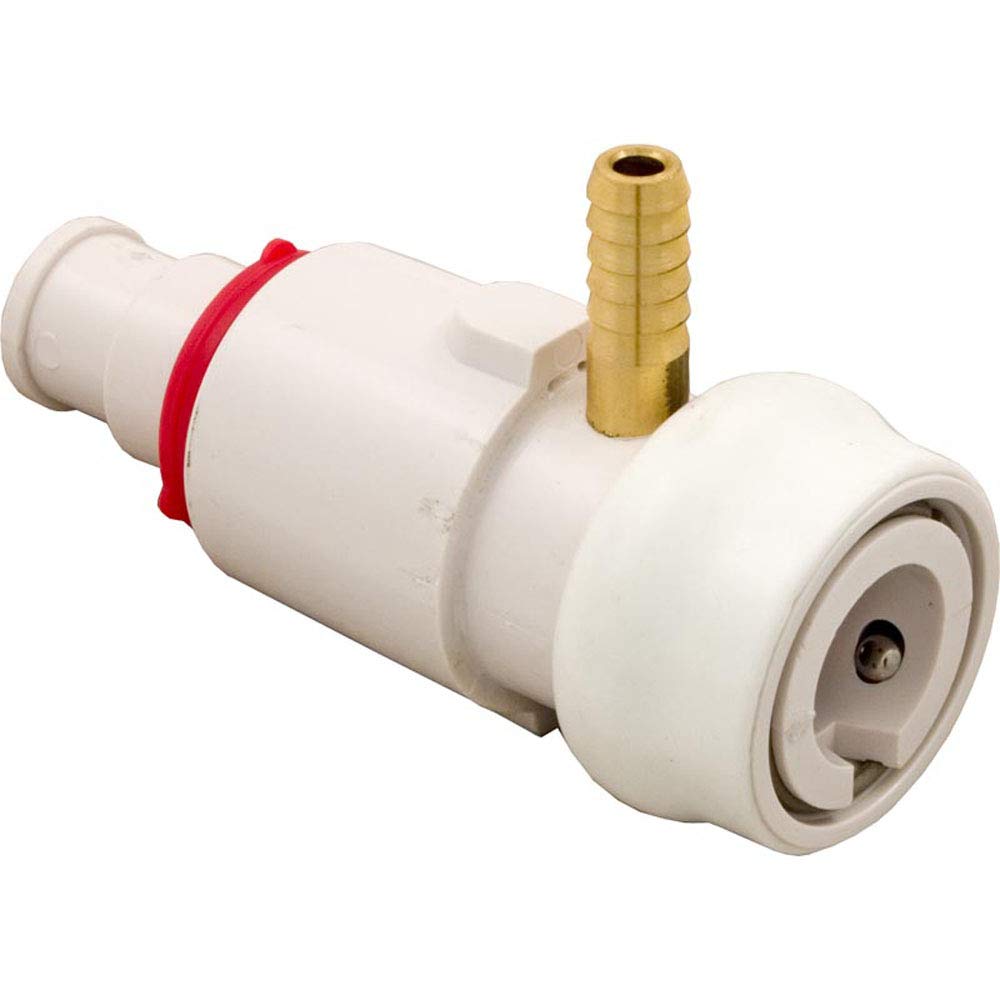
Image: The Pentair JV50 Quick Disconnect Swivel, showing its design and integrated barb for hose connection. This component is crucial for the flexible movement of the pool cleaner hose.
Operating Function
The Pentair JV50 Quick Disconnect Swivel is a passive component designed to enhance the mobility of your automatic pool cleaner. Its primary function is to allow the cleaner's hose to rotate freely, preventing kinks and tangles that can impede the cleaner's movement and coverage of the pool surface.
Once installed, the swivel operates continuously as the cleaner moves, ensuring uninterrupted cleaning cycles by maintaining hose flexibility.
Maintenance
Regular inspection and simple maintenance can extend the life of your Pentair JV50 Quick Disconnect Swivel:
- Visual Inspection: Periodically inspect the swivel for any signs of wear, cracks, or damage. Check for debris that might be lodged in the swivel mechanism.
- Cleanliness: Rinse the swivel with fresh water regularly to remove chlorine, chemicals, and debris that can accumulate and affect its rotation.
- Freedom of Movement: Ensure the swivel rotates freely. If it feels stiff or restricted, check for obstructions or damage.
- Replacement: If the swivel shows significant wear, cracking, or no longer rotates smoothly, it should be replaced to maintain optimal cleaner performance and prevent hose damage.
Troubleshooting
If you experience issues with your pool cleaner's hose tangling or restricted movement, consider the following troubleshooting steps related to the swivel:
- Hose Tangling: If the hose is tangling, inspect the swivel for proper rotation. It might be jammed with debris or worn out.
- Leaks at Connection: Check that the swivel is securely attached to the hose and the cleaner. Ensure the barb is fully inserted and there are no cracks in the swivel body.
- Restricted Movement: Remove the cleaner from the pool and manually test the swivel's rotation. If it's stiff, clean it thoroughly or consider replacement if damage is visible.
- Incorrect Part: Verify that you have the correct JV50 swivel for your specific Pentair Jet-Vac model (JV105, JV209, JV504C).
If problems persist after troubleshooting, contact Pentair customer support or a qualified pool technician.
Specifications
| Attribute | Detail |
|---|---|
| Model Number | JV50 |
| Manufacturer | Pentair |
| Product Dimensions | 6 x 4 x 6 inches |
| Item Weight | 0.16 ounces |
| Part Type | Quick Disconnect Swivel |
| Compatibility | Pentair Jet-Vac JV105, JV209, JV504C Automatic Pool Cleaners |
Warranty and Support
For information regarding warranty coverage or technical support for your Pentair JV50 Quick Disconnect Swivel, please refer to the official Pentair website or contact Pentair customer service directly. Keep your purchase receipt as proof of purchase.
Pentair Customer Support: Visit Pentair Support