
1. Introduction
The Meade Instruments TE256W Slim Line Personal Weather Station provides accurate indoor and outdoor temperature and humidity readings, along with an atomic clock for precise timekeeping. Its ultra-slim design allows for versatile placement, either wall-mounted or on a desktop. This manual will guide you through the setup, operation, and maintenance of your weather station.
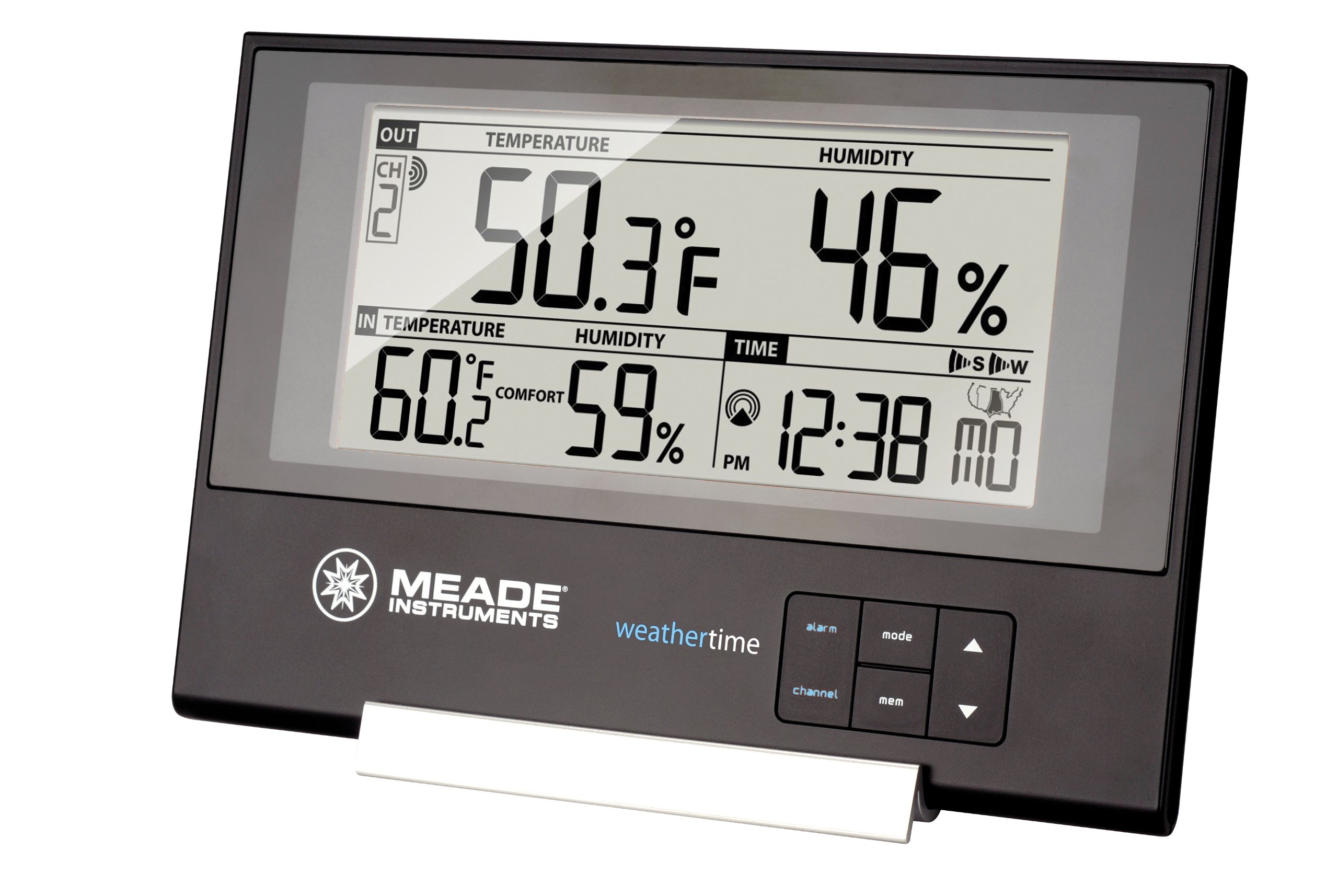
Image: The Meade Instruments TE256W Slim Line Personal Weather Station, showcasing its main display unit and the included wireless remote sensor.
2. Package Contents
Please verify that all components are present in your package:
- TE256W Main Display Unit
- TS13C Wireless Remote Sensor (1 unit)
- User Manual (this document)
3. Setup
3.1 Battery Installation
- Remote Sensor (TS13C): Open the battery compartment on the back of the remote sensor. Insert two (2) AAA batteries (not included), observing the correct polarity (+/-). Close the compartment securely.
- Main Display Unit: Open the battery compartment on the back of the main unit. Insert two (2) AAA batteries (not included), observing the correct polarity (+/-). Close the compartment securely. The unit will power on and begin searching for the remote sensor and atomic clock signal.
3.2 Remote Sensor Placement
For accurate outdoor temperature and humidity readings, proper placement of the remote sensor is crucial:
- Place the sensor in a shaded, dry location, protected from direct sunlight and rain. Direct sunlight will cause artificially high temperature readings.
- Ensure the sensor is within the effective transmission range (typically up to 100 feet or 30 meters) of the main unit, minimizing obstructions like thick walls or metal objects.
- Mount the sensor securely using the integrated mounting hole or place it on a flat surface.
3.3 Atomic Clock Synchronization
The TE256W automatically sets its time to the U.S. Atomic Clock (WWVB signal). This process may take several minutes to several hours, depending on your location and signal strength. For best reception, place the main unit near a window and away from electronic interference.
- The atomic clock icon will flash during synchronization and become solid once the time is successfully received.
- If the signal is not received, you may need to manually set the time (refer to Section 4.2).
4. Operating Instructions
4.1 Display Information
The main display unit shows the following information:
- Outdoor Temperature and Humidity: Displayed prominently at the top.
- Indoor Temperature and Humidity: Displayed below the outdoor readings.
- Time and Calendar: Automatically set by the atomic clock.
- Comfort Level Indicator: An icon indicating current indoor comfort levels.
- Min/Max Memory: Records the highest and lowest temperature and humidity readings for both indoor and outdoor.
4.2 Setting Time and Date (Manual)
If the atomic clock signal is not available or you prefer to set the time manually:
- Press and hold the 'SET' button (location varies, refer to unit's back) for a few seconds until the time display flashes.
- Use the '+' or '-' buttons to adjust the hour, then press 'SET' to confirm.
- Repeat for minutes, year, month, and day.
- You can also select 12-hour or 24-hour time format during this process.
4.3 Alarm and Snooze Function
The unit features a crescendo alarm with a snooze function:
- Setting Alarm: Press the 'ALARM' button once to display the alarm time. Press and hold 'ALARM' to enter alarm setting mode. Use '+' or '-' to adjust, and 'ALARM' to confirm.
- Activating/Deactivating Alarm: Press 'ALARM' once to show the alarm time, then press '+' to toggle the alarm on/off. An alarm icon will appear when active.
- Snooze: When the alarm sounds, press the 'SNOOZE' button (often the same as 'LIGHT' or a dedicated button) to temporarily silence it. The alarm will sound again after a few minutes.
4.4 Min/Max Temperature and Humidity
To view the minimum and maximum recorded values:
- Press the 'MIN/MAX' button once to display maximum values.
- Press 'MIN/MAX' again to display minimum values.
- Press 'MIN/MAX' a third time to return to current readings.
- To clear the recorded Min/Max values, press and hold the 'MIN/MAX' button while the Min/Max values are displayed.
5. Maintenance
5.1 Battery Replacement
Replace batteries in both the main unit and remote sensor when the low battery indicator appears on the display. Always replace all batteries in a unit at the same time with new ones of the same type. For outdoor sensors, consider using lithium batteries in extreme cold for extended performance.
5.2 Cleaning
Wipe the display unit and remote sensor with a soft, damp cloth. Do not use abrasive cleaners or solvents, as these may damage the plastic parts and LCD screen. Ensure no moisture enters the battery compartments.
6. Troubleshooting
- No Outdoor Temperature/Humidity Reading:
- Check if the remote sensor batteries are installed correctly and are not depleted.
- Ensure the remote sensor is within range of the main unit and free from major obstructions.
- Try resetting both units by removing batteries, waiting a few minutes, and then reinserting them, starting with the remote sensor.
- Inaccurate Temperature/Humidity Readings:
- Verify the remote sensor is not in direct sunlight or near heat sources/vents.
- Ensure the main unit is not placed near heat-emitting appliances or in direct sunlight.
- Allow sufficient time for the sensors to stabilize after initial setup or relocation.
- Atomic Clock Not Synchronizing:
- Place the main unit near a window, away from electronic devices that may cause interference.
- Ensure you are within range of the WWVB signal (continental U.S.).
- Allow up to 24 hours for initial synchronization. If unsuccessful, manually set the time.
- Display is Faint or Blank:
- Replace the batteries in the main unit.
- Ensure the unit is not exposed to extreme temperatures.
7. Specifications
| Feature | Specification |
|---|---|
| Model Number | TE256W |
| Display Type | LCD |
| Power Source | Battery Powered (AAA batteries, not included) |
| Item Dimensions (Main Unit) | 7 x 0.38 x 4.75 inches |
| Item Weight | 8 ounces |
| Special Features | Alarm, Atomic Clock, Wireless Indoor/Outdoor Temperature and Humidity, Min/Max Memory, Comfort Level Indicators |
| Remote Sensors Supported | Up to 3 (one TS13C included) |
8. Warranty and Support
8.1 Warranty Information
The Meade Instruments TE256W Slim Line Personal Weather Station comes with a 1-year warranty from the date of purchase. This warranty covers defects in materials and workmanship under normal use. It does not cover damage caused by misuse, accident, unauthorized modification, or improper installation.
8.2 Customer Support
For technical assistance, warranty claims, or further inquiries, please contact Meade Instruments customer support. Refer to the official Meade Instruments website for the most current contact information.


