
1. Introduction
This manual provides essential instructions for the installation, operation, and maintenance of the Cisa 11931 Electric Lock RHO. This electric lock features a galvanised finish, an inside manual exit button, and a latch hold-open device. It is designed for secure access control with a key override barrel cylinder.
Key features include:
- Inside manual exit button for quick egress.
- Latch hold-open device for temporary unlocked access.
- Key override barrel cylinder for mechanical access (3 keys supplied).
- Functionality to block the red exit button for enhanced security.
2. Product Overview
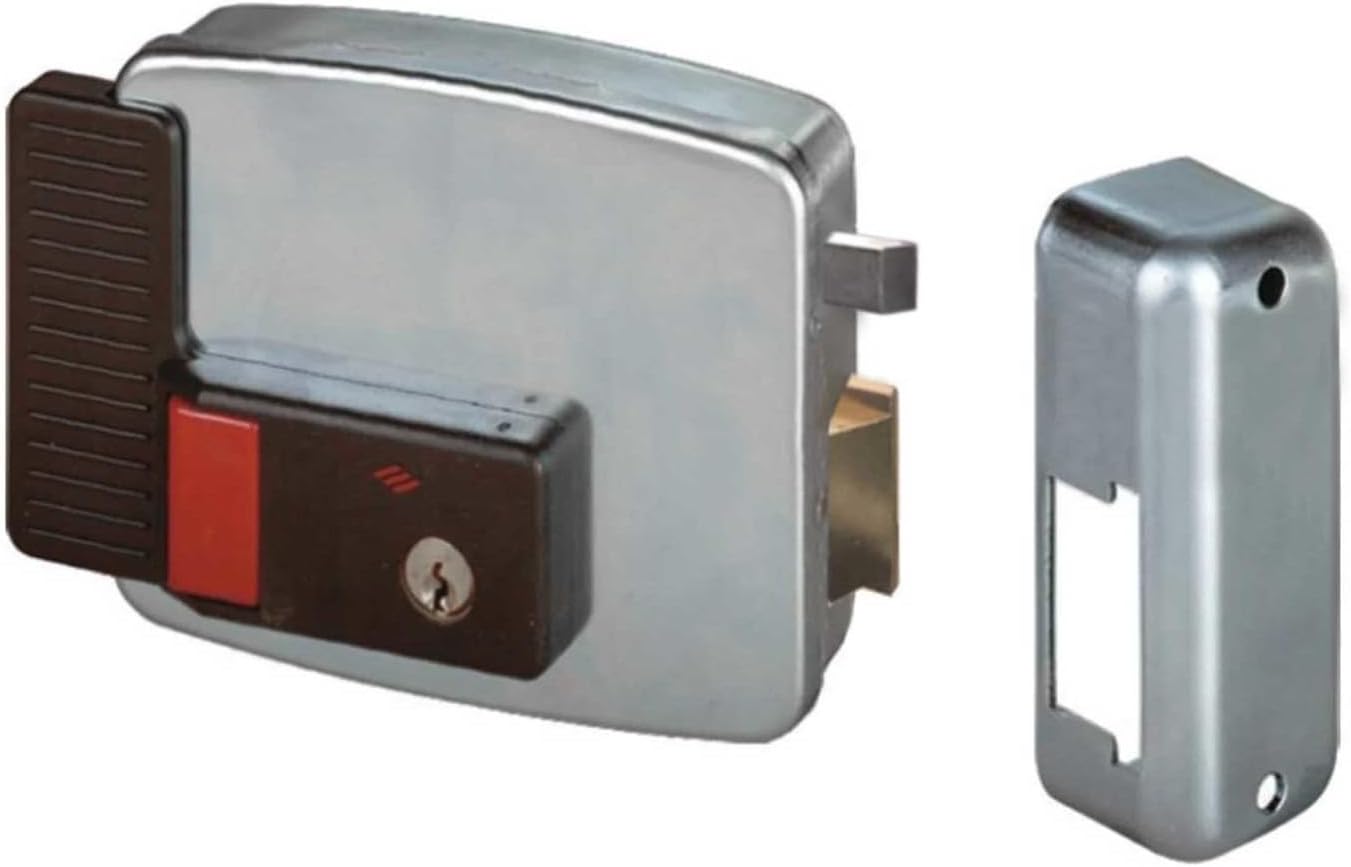
Figure 1: Cisa 11931 Electric Lock RHO, showing the main lock unit and the separate strike plate. The lock features a galvanised finish, a dark brown housing for the internal mechanism with a red push button, and a key cylinder.
The Cisa 11931 Electric Lock RHO is a handed lock, meaning its orientation (left or right) is specific to the door's swing direction. Ensure the correct handing is selected for your application. It operates on 12vAC (1.6 amp) power supply.
3. Setup and Installation Considerations
Installation of the Cisa 11931 Electric Lock RHO requires careful attention to electrical connections and mechanical alignment. It is recommended that installation be performed by a qualified professional.
- Power Supply: The lock requires a 12vAC power source with a minimum current of 1.6 amps. Ensure the power supply is stable and correctly wired according to local electrical codes.
- Backset: This lock has a 60mm backset. Proper measurement and preparation of the door and frame are crucial for correct fitment.
- Handing: Verify the lock's handing matches the door's opening direction before installation. Incorrect handing will affect operation.
- Key Cylinder: The lock comes with a key override barrel cylinder and three keys. Install the cylinder securely to allow for mechanical unlocking from the outside.
Refer to the detailed installation template (not included in this manual) for precise drilling and mounting instructions.
4. Operating Instructions
4.1. Unlocking from the Inside
To unlock the door from the inside, press the manual exit button located on the lock's interior housing. This will retract the latch, allowing the door to open.
4.2. Unlocking from the Outside
To unlock the door from the outside, insert one of the supplied keys into the barrel cylinder and turn it to retract the latch.
4.3. Latch Hold-Open Device
The lock is equipped with a latch hold-open device. To activate this feature, operate the internal mechanism (specific action not detailed in product description, typically involves a switch or a specific button press/turn) to keep the latch retracted, allowing the door to remain unlocked without manual intervention.
4.4. Blocking the Exit Button
For situations requiring restricted exit, the red exit button can be blocked. To do this, push the red exit button inwards and simultaneously turn the inside key. This action will prevent the button from being used to unlock the door, enhancing security from the interior side.
5. Maintenance
Regular maintenance ensures the longevity and reliable operation of your Cisa 11931 Electric Lock RHO.
- Cleaning: Keep the lock's exterior clean using a soft, dry cloth. Avoid abrasive cleaners or solvents that could damage the galvanised finish.
- Lubrication: Periodically apply a small amount of graphite-based lubricant to the key cylinder to ensure smooth key operation. Do not use oil-based lubricants.
- Inspection: Regularly check all mounting screws for tightness and inspect electrical connections for any signs of wear or damage.
- Functionality Test: Periodically test all lock functions (manual exit, key override, latch hold-open, and button block) to ensure they operate correctly.
6. Troubleshooting
If you encounter issues with your Cisa 11931 Electric Lock RHO, refer to the following common troubleshooting steps:
- Lock Not Engaging/Disengaging Electrically:
- Check the 12vAC power supply. Ensure it is active and providing the correct voltage and current (1.6 amp).
- Inspect all electrical wiring connections for looseness or damage.
- Verify that the lock's internal solenoid (if applicable) is receiving power.
- Key Not Turning Smoothly:
- Apply graphite lubricant to the key cylinder.
- Ensure the key is fully inserted and is not bent or damaged.
- Latch Not Retracting Fully:
- Check for any obstructions in the door frame or strike plate.
- Ensure the lock is properly aligned with the strike plate.
- Verify that the manual exit button or key mechanism is not jammed.
- Exit Button Blocked Accidentally:
- If the red exit button is blocked, turn the inside key while ensuring the button is not simultaneously pushed in. This should release the blocking mechanism.
If problems persist after following these steps, contact a qualified technician or Cisa customer support for assistance.
7. Specifications
| Feature | Detail |
|---|---|
| Brand | Cisa |
| Model Number | 11931.60.3 |
| Part Number | 11931-60-3 |
| Lock Type | Electric Lock, Key Lock |
| Special Feature | Key Lock, Latch Hold Open & Button Block Function |
| Finish Type | Galvanised Finish |
| Controller Type | Push Button |
| Control Method | Touch |
| Power Requirement | 12vAC (1.6 amp) |
| Backset | 60mm |
| Dimensions (H x W x D) | 111mm x 130mm x 35mm |
| Item Weight | 3.53 Pounds |
| Color | Red (referring to the button) |
| Batteries Required | No |
| Handing | This Lock is Handed |
8. Warranty and Support
For warranty information, please refer to the documentation provided with your purchase or contact Cisa customer service directly. Keep your proof of purchase for any warranty claims.
For technical support or further assistance, please visit the official Cisa website or contact their authorized service centers.


