
Introduction
Thank you for choosing the Comfort Zone CZ121BK 12-inch Oscillating Table Fan. This manual provides important information regarding the safe operation, assembly, maintenance, and troubleshooting of your new fan. Please read it thoroughly before use and retain it for future reference.

Image: The Comfort Zone CZ121BK 12-inch Oscillating Table Fan, showcasing its compact design suitable for various rooms.
Important Safety Instructions
Always follow basic safety precautions when using electrical appliances to reduce the risk of fire, electric shock, and injury to persons. This fan is for indoor use only.
- Do not operate any fan with a damaged cord or plug. Discard fan or return to an authorized service facility for examination and/or repair.
- Do not run cord under carpeting. Do not cover cord with throw rugs, runners, or similar coverings. Arrange cord away from traffic area and where it will not be tripped over.
- To disconnect the fan, turn controls to OFF, then remove plug from outlet.
- Do not insert or allow fingers or foreign objects to enter any ventilation or exhaust opening as this may cause an electric shock or fire, or damage the fan.
- Do not block air intakes or exhaust openings in any manner.
- Do not use on soft surfaces, like a bed, where openings may become blocked.
- Always place the fan on a stable, flat surface during operation to prevent tipping.
- This fan is not intended for use in wet or damp locations.
Package Contents
Upon unpacking, ensure all components are present and undamaged:
- Fan Head Assembly (with motor and blades)
- Front and Rear Grills
- Plastic Base
- Mounting Hardware (nuts, bolts, washers)
- Instruction Manual
Assembly Instructions
The Comfort Zone CZ121BK fan is designed for quick and effortless setup. Follow these steps for assembly:
- Attach the Base: Securely attach the fan head assembly to the plastic base using the provided mounting hardware. Ensure it is stable.
- Install Rear Grill: Place the rear grill onto the fan motor housing, aligning the notches.
- Attach Fan Blades: Slide the fan blades onto the motor shaft until they click into place.
- Secure Front Grill: Attach the front grill to the rear grill, ensuring all clips are securely fastened around the perimeter. The metal grill provides protection for the blades.

Image: Icon indicating easy assembly process.
Operating Instructions
Your Comfort Zone CZ121BK fan offers customizable airflow with simple controls.
1. Power and Speed Control
The fan features convenient push-button controls located on the base. Press the buttons to select your desired speed:
- 0: Off
- 1: Low Speed
- 2: Medium Speed
- 3: High Speed

Image: Icon representing the three-speed control options.
2. Oscillation Feature
To activate the wide-area oscillation, pull up the oscillation control knob located on the top rear of the fan motor housing. To stop oscillation and direct airflow in a fixed direction, push the knob down.

Image: Icon representing the oscillation function for wider air distribution.
3. Adjustable Tilt
The fan head can be adjusted vertically to customize the direction of airflow. Gently tilt the fan head up or down to achieve your desired angle. This feature allows for targeted cooling or broader air circulation.

Image: Icon representing the adjustable tilt capability of the fan head.

Image: Visual representation of the fan's adjustable tilt and wide-area oscillation features.
Maintenance
Regular cleaning and maintenance will ensure optimal performance and longevity of your fan.
- Always unplug the fan before cleaning.
- Use a soft, damp cloth to wipe the exterior surfaces. Do not use abrasive cleaners or solvents.
- To clean the blades, carefully remove the front grill. Wipe the blades with a soft cloth. Ensure the blades are completely dry before reattaching the grill.
- Do not immerse the fan in water or allow water to drip into the motor housing.
- Store the fan in a cool, dry place when not in use.
Troubleshooting
If your fan is not operating correctly, refer to the following common issues and solutions:
| Problem | Possible Cause | Solution |
|---|---|---|
| Fan does not turn on. | Not plugged in; power outlet not working; speed button not pressed. | Ensure fan is securely plugged into a working outlet. Press a speed button (1, 2, or 3). |
| Fan is noisy or vibrating. | Loose parts; fan not on a stable surface; debris in blades. | Check for loose screws or grill components. Place fan on a flat, stable surface. Unplug and clean blades. |
| Oscillation not working. | Oscillation knob is pushed down. | Pull up the oscillation control knob on the top rear of the motor housing. |
| Weak airflow. | Fan speed set too low; dirty blades. | Increase fan speed. Unplug and clean fan blades. |
Specifications
| Feature | Detail |
|---|---|
| Brand | Comfort Zone |
| Model Number | CZ121BK |
| Color | Black |
| Electric Fan Design | Table Fan |
| Power Source | Corded Electric |
| Product Dimensions (D x W x H) | 8.25"D x 13.75"W x 13.75"H |
| Special Features | Adjustable Tilt, Lightweight, Oscillating, Portable |
| Number of Speeds | 3 |
| Noise Level | 55 Decibels |
| Wattage | 37.2 watts |
| Number of Blades | 3 |
| Air Flow Capacity | 210 Cubic Feet Per Minute |
| Voltage | 120V |
| Material | Acrylonitrile Butadiene Styrene (Plastic) |
| Blade Material | Plastic |
| Item Weight | 4.2 Pounds |
| Manufacturer | Mr. Brands, LLC. |
| UPC | 075877023773 |
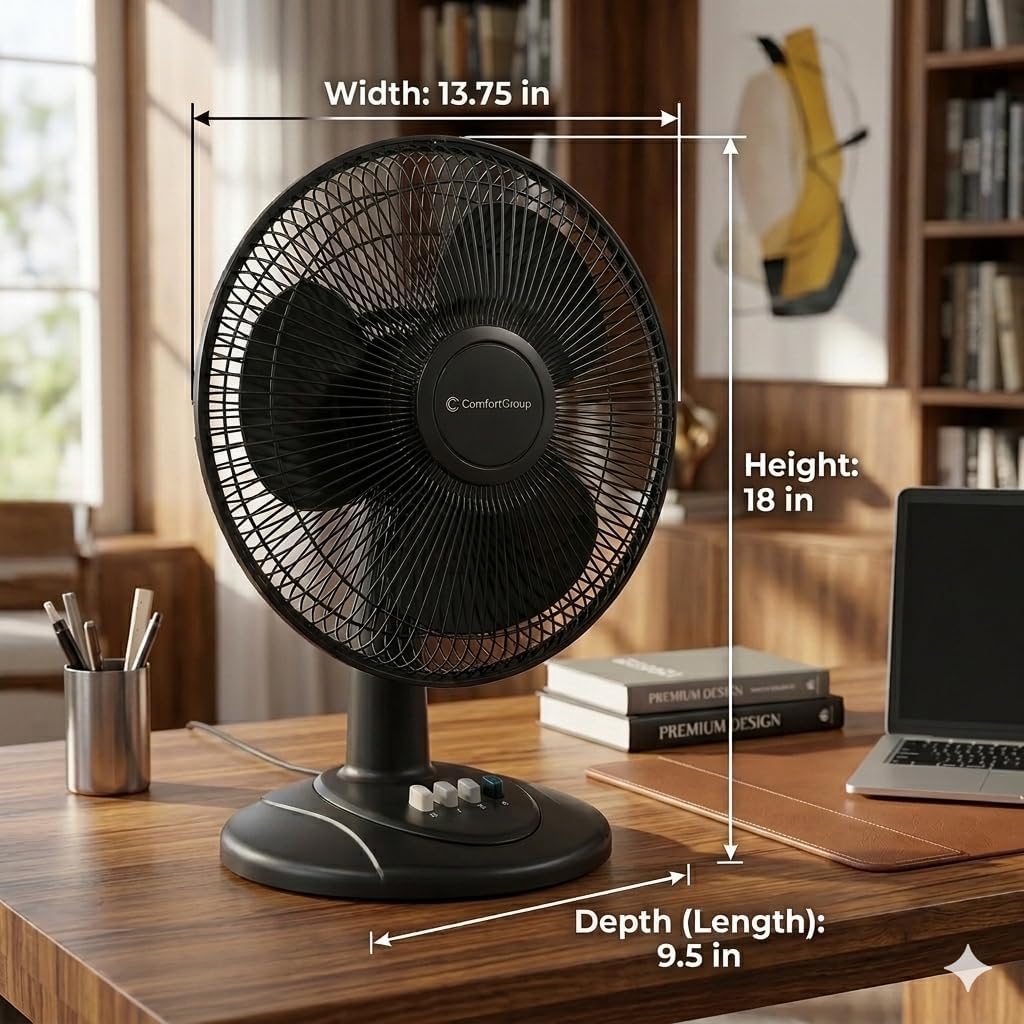
Image: The Comfort Zone CZ121BK fan with its dimensions (Width: 13.75 in, Height: 18 in, Depth: 9.5 in) clearly marked.
Warranty and Support
Warranty Information
This Comfort Zone fan comes with a 1 Year Warranty Against Manufacturer Defects. Please retain your proof of purchase for warranty claims.
Customer Support
For technical assistance, parts, or warranty inquiries, please contact the manufacturer, Mr. Brands, LLC. Refer to the product packaging or their official website for current contact information.
Product Overview Video
Video: An official overview of the Comfort Zone fan lineup, showcasing various models and their features.


