
1. Introduction
The Philips SDV6122T/27 Digital TV Antenna is designed to receive free over-the-air digital and HDTV broadcasts. This amplified indoor antenna provides stable, high-quality signal reception for UHF and VHF channels. It is an ideal solution for accessing local channels without a monthly subscription.
This manual provides instructions for the proper installation, operation, and maintenance of your Philips Digital TV Antenna. Please read it thoroughly before use and retain it for future reference.
2. Safety Information
- Indoor Use Only: This antenna is designed for indoor use. Do not install it outdoors.
- Power Source: Connect the antenna's power adapter only to a standard wall outlet. Ensure the voltage matches the requirements specified on the adapter.
- Avoid Moisture: Do not expose the antenna to rain, moisture, or extreme humidity.
- Ventilation: Ensure proper ventilation around the antenna. Do not cover it or place it in an enclosed space that restricts airflow.
- Cleaning: Disconnect the power before cleaning. Use a soft, dry cloth. Do not use liquid or aerosol cleaners.
- Servicing: Do not attempt to service this product yourself. Refer all servicing to qualified service personnel.
- Placement: Place the antenna away from heat sources such as radiators, heat registers, stoves, or other heat-producing appliances. Avoid placing it near strong electromagnetic fields.
3. Package Contents
Verify that all items are present in the package:
- Philips SDV6122T/27 Digital TV Antenna
- Power Adapter
- Coaxial Cable
- User Manual (this document)

Image: The retail packaging for the Philips SDV6122T/27 Digital TV Antenna, showing the antenna itself and key features.
4. Product Overview
Familiarize yourself with the components of your Philips Digital TV Antenna:
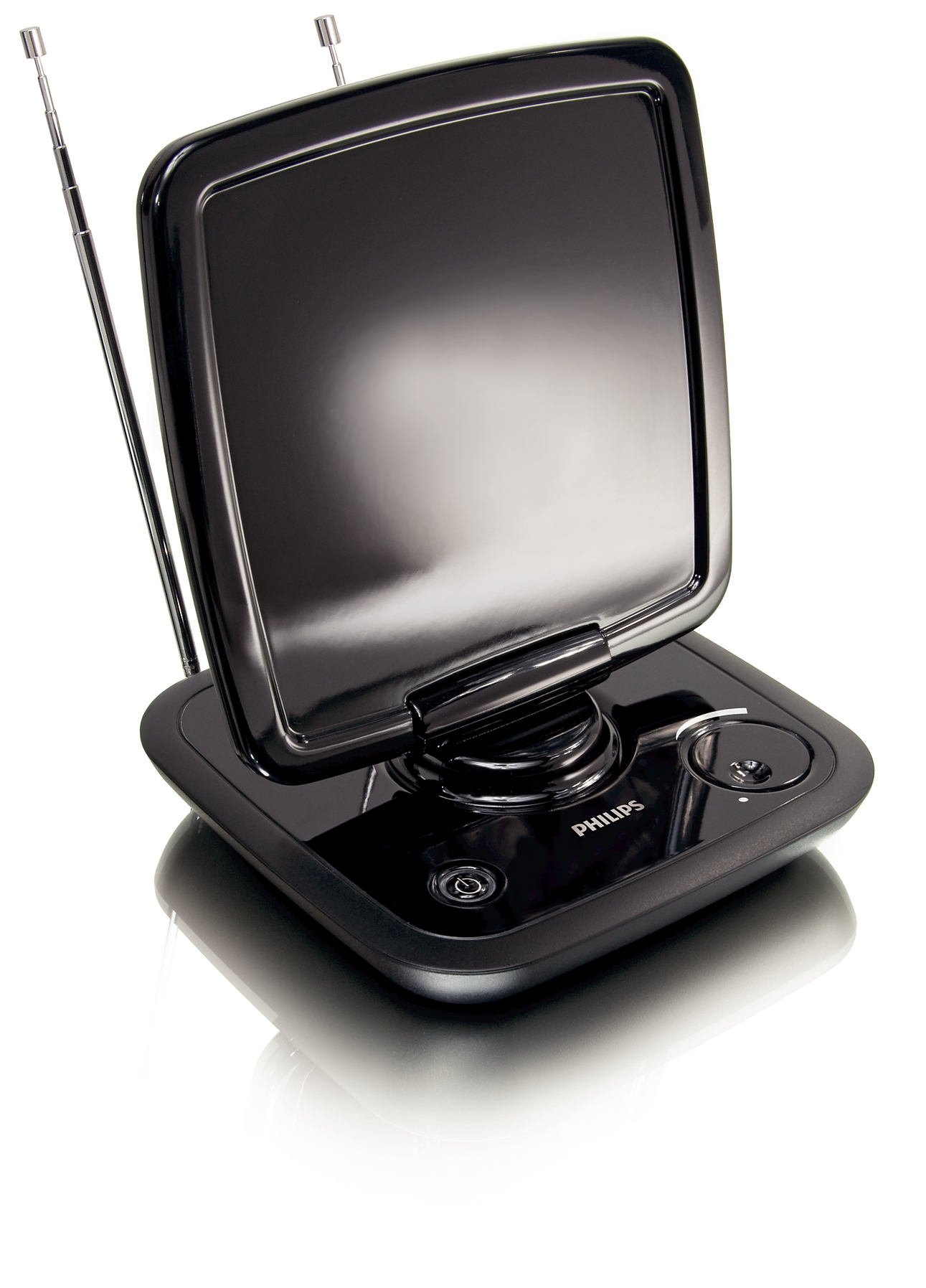
Image: Front view of the Philips SDV6122T/27 Digital TV Antenna, showing the main panel, telescopic dipoles, and base controls.
- Main Panel: The flat, rectangular surface designed for optimal signal reception.
- Telescopic Dipoles: Extendable rods for enhanced VHF signal reception.
- Base Unit: Contains controls and connection ports.
- Gain Control Knob: Adjusts signal amplification (if applicable).
- Power LED Indicator: Illuminates when the antenna is powered on.
- Coaxial Output: Connects to your TV or digital converter box.
- Power Input: Connects to the provided power adapter.

Image: Angled view of the Philips SDV6122T/27 Digital TV Antenna, highlighting its sleek design and adjustable panel.
5. Setup
Follow these steps to set up your Philips Digital TV Antenna:
- Choose a Location: Place the antenna in a location that provides the best possible reception. Generally, higher locations and positions near a window facing the broadcast towers are ideal. Avoid placing it near large metal objects or other electronic devices that may cause interference.
- Connect Coaxial Cable: Connect one end of the supplied coaxial cable to the "ANT IN" or "RF IN" port on your television or digital converter box. Connect the other end of the coaxial cable to the coaxial output port on the Philips antenna.
- Connect Power Adapter: Plug the small end of the power adapter into the power input port on the antenna. Plug the other end of the power adapter into a standard electrical wall outlet. The Power LED indicator on the antenna should illuminate.
- Extend Dipoles: Fully extend the telescopic dipoles for optimal VHF signal reception. Adjust their angle for best results.
- Position Antenna: Adjust the main panel of the antenna by tilting and swiveling it to find the best orientation for signal reception.
6. Operating
After setup, perform a channel scan on your television:
- Access TV Menu: Turn on your television and press the "Menu" or "Settings" button on your TV remote control.
- Select Input/Source: Navigate to the input or source selection and ensure it is set to "Antenna" or "Air".
- Perform Channel Scan: Look for an option like "Channel Scan," "Auto Program," "Auto Tune," or "Search for Channels" in your TV's menu. Select this option to begin scanning for available channels. This process may take several minutes.
- Adjust Antenna for Best Reception: After the scan, if you are not receiving all desired channels or if the picture quality is poor, try repositioning the antenna (tilting, swiveling, adjusting dipoles) and then perform another channel scan. Repeat this process until you achieve the best possible reception.
- Adjust Gain Control (if applicable): If your antenna has a gain control knob, experiment with different settings. A higher gain may boost weak signals, but too high a gain can sometimes overload strong signals, leading to distortion.
Note: The number and quality of channels received depend on various factors, including distance from broadcast towers, terrain, building materials, and electromagnetic interference.
7. Maintenance
To ensure the longevity and optimal performance of your antenna:
- Cleaning: Disconnect the antenna from the power outlet before cleaning. Use a soft, dry, lint-free cloth to wipe the exterior surfaces. Do not use abrasive cleaners, waxes, or solvents.
- Storage: If storing the antenna for an extended period, disconnect it from power and your TV, and store it in a cool, dry place.
- Cable Inspection: Periodically check the coaxial cable and power adapter for any signs of damage. Replace damaged components immediately.
8. Troubleshooting
| Problem | Possible Cause | Solution |
|---|---|---|
| No channels found or poor reception. |
|
|
| Power LED not illuminated. |
|
|
| Picture is pixelated or freezes. |
|
|
9. Specifications
| Model Number | SDV6122T/27 |
| Antenna Type | Indoor Amplified Digital TV Antenna |
| Frequency Range | UHF, VHF, HDTV |
| Impedance | 75 Ohm |
| Dimensions (L x W x H) | 2.6 x 8.3 x 14 inches (approximate) |
| Weight | 1.62 pounds (approximate) |
| Color | Black |
| Power Supply | External Power Adapter (included) |
10. Warranty and Support
For warranty information and technical support, please refer to the documentation provided with your purchase or visit the official Philips support website. Keep your proof of purchase for warranty claims.
Online Support: For the most up-to-date information, FAQs, and troubleshooting guides, please visit the Philips support website.
Contact Information: Specific contact details for customer service may vary by region. Please check the Philips website for local support numbers or email addresses.