
Introduction
This manual provides detailed instructions for the installation, operation, and maintenance of your BOSS Audio Systems 637UA Single-DIN CD MP3 Player Receiver. Please read this manual thoroughly before using the product to ensure proper function and to prevent damage.
The 637UA is designed to provide high-quality audio playback from various sources, including CDs, USB devices, MP3 players, and AM/FM radio. It features a detachable front panel for security.
Key Features
- 60 Watts x 4 Max Power, with Balance/Fader/Bass/Treble controls and Preset built-in EQ.
- Supports playback of CD/USB, MP3 files, FM/AM radio, and smartphones.
- Compatible with audio output from smartphones and MP3 players via USB and Auxiliary Inputs.
- Features Front Pre Amp Outputs.
- Equipped with a Detachable Front Panel for enhanced security.
What's in the Box
- BOSS Audio Systems 637UA Single-DIN In-dash CD Receiver with Detachable Front Panel
- Wiring Harness
- Mounting Hardware
- User Manual (this document)
Setup and Installation
Proper installation is crucial for optimal performance and safety. If you are unsure about any steps, consult a qualified professional.
Wiring Connections
The receiver requires three main power connections to function correctly:
- Yellow Wire: Connect to a constant +12 VDC power source, such as the positive (+) post of the vehicle's battery. This provides continuous power for memory retention.
- Red Wire: Connect to a switched +12 VDC power source, typically the Accessory (ACC) line of the ignition key. This allows the unit to turn on and off with the vehicle's ignition.
- Black Wire: Connect to a chassis ground (-). This provides the necessary ground connection for the unit.
Important: All three wires (Yellow, Red, and Black) must be correctly connected to their respective terminals for the radio to power on. If only one of the +12VDC wires (Yellow or Red) is connected along with the Black ground wire, the unit will not turn on.
For testing the unit outside of a vehicle, ensure both the Red and Yellow wires receive +12VDC, and the Black wire is connected to a reliable ground source.

Image: Rear view of the receiver with the wiring harness. This image illustrates the various color-coded wires for power, ground, and speaker connections.
Detachable Front Panel
The front panel of the 637UA is detachable for security purposes. To detach, press the release button (usually located on the left side of the panel) and gently pull the panel away from the main unit. To reattach, align the panel with the main unit and push until it clicks into place.
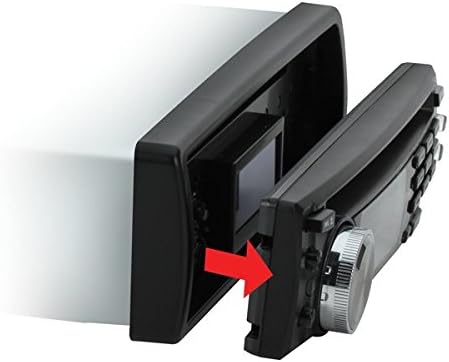
Image: Detaching the front panel. An arrow indicates the direction to pull the panel for removal.
Operating Instructions
This section covers the basic operation of your 637UA receiver.

Image: Front view of the 637UA receiver. This image highlights the display, control knob, and various buttons for operation.
Power On/Off
Press the POWER button (usually the volume knob) to turn the unit on or off. When connected correctly, the unit will also power on/off with the vehicle's ignition.
Source Selection
Press the MODE button to cycle through available audio sources: FM/AM Radio, CD, USB, and Auxiliary Input.
Radio Operation (FM/AM)
- Tuning: Use the TUNE buttons (usually forward/backward arrows) to manually tune to a station or press and hold for automatic seek tuning.
- Preset Stations: Save your favorite stations by tuning to the desired frequency, then pressing and holding one of the numbered preset buttons (1-6). To recall a preset, simply press the corresponding button.
- Band Selection: Press the BAND button to switch between FM1, FM2, FM3, AM1, and AM2 bands.
CD/USB/MP3 Playback
- CD: Insert a CD into the disc slot. Playback will begin automatically.
- USB: Insert a USB flash drive into the USB port. The unit will automatically switch to USB mode and begin playing compatible audio files (e.g., MP3, WMA).
- Auxiliary Input: Connect your smartphone or MP3 player to the 3.5mm AUX input jack using an audio cable. Select AUX mode using the MODE button.
- Track Control: Use the SKIP buttons (forward/backward arrows) to change tracks. Press and hold for fast forward/rewind.
- Play/Pause: Press the PLAY/PAUSE button to pause or resume playback.
Audio Settings
Press the AUDIO or MENU button (often the volume knob press) to access audio settings such as Bass, Treble, Balance, and Fader. Rotate the volume knob to adjust values. The unit also features a Preset Built-in EQ; press the EQ button to cycle through different equalization modes (e.g., Pop, Rock, Classic, Flat).
Maintenance
- Cleaning the Unit: Use a soft, dry cloth to clean the unit's surface. Do not use abrasive cleaners or solvents.
- Detachable Panel Care: When the front panel is detached, store it in a protective case to prevent scratches or damage. Avoid touching the electrical contacts on the back of the panel.
- CD Care: Handle CDs by their edges. Keep them clean and free of scratches. Use a soft, lint-free cloth to wipe CDs from the center outwards.
- USB Port: Keep the USB port free of dust and debris.
Troubleshooting
If you encounter issues with your 637UA receiver, refer to the following common problems and solutions:
| Problem | Possible Cause | Solution |
|---|---|---|
| Unit does not power on. | Incorrect wiring connections (Yellow, Red, or Black wires). | Verify that the Yellow wire has constant +12VDC, the Red wire has switched +12VDC, and the Black wire is connected to ground. All three must be correctly connected. |
| No sound. | Volume too low, mute activated, or speaker wiring issues. | Increase volume. Check if mute is active. Inspect speaker wiring for proper connection and shorts. |
| CD/USB playback skips or stops. | Damaged CD, incompatible file format, or unstable USB connection. | Clean or replace CD. Ensure USB files are MP3/WMA format. Reinsert USB drive securely. |
| Radio reception is poor. | Antenna not connected or damaged, or weak signal area. | Check antenna connection. Try tuning to a stronger station. |
| Front panel does not attach securely. | Obstruction or misalignment. | Ensure no debris is blocking the connection. Align the panel carefully and push firmly until it clicks. |
Specifications
| Feature | Detail |
|---|---|
| Brand | BOSS Audio Systems |
| Model Number | 637UA |
| Connectivity Technology | Auxiliary, USB |
| Compatible Devices | Smartphone, Speaker |
| Connector Type | 3.5mm Jack, USB |
| Color | Black |
| Item Weight | 3.25 Pounds |
| Output Power (Max) | 60 Watts x 4 Channels |
| Total Output Wattage | 240 Watts |
| Audio Output Type | Internal |
| Supported Audio Format | WMA (and MP3 via USB/CD) |
| Built-In Media | Single-DIN In-dash CD Receiver with Detachable Front Panel |
Warranty and Support
This product is covered by a 3 Year BOSS Audio Platinum Online Dealer Warranty. Please retain your proof of purchase for warranty claims.
For technical support, troubleshooting assistance beyond this manual, or warranty inquiries, please contact BOSS Audio Systems customer service. Refer to the official BOSS Audio Systems website for the most current contact information.
You can visit the official BOSS Audio Systems store for more information: BOSS Audio Systems Store


