
1. Introduction
The Tecsun PL-360 is a compact, portable digital radio featuring PLL synthesized tuning and Digital Signal Processing (DSP) technology. It is designed to receive AM, FM, and Shortwave (SW) broadcasts, offering clear audio quality and a range of tuning options. This manual provides detailed instructions for the proper setup, operation, and maintenance of your PL-360 radio.
2. Safety Precautions
- Do not expose the radio to extreme temperatures, direct sunlight, or high humidity.
- Avoid dropping the radio or subjecting it to strong impacts.
- Use only specified batteries (AA) and ensure correct polarity during installation.
- Do not attempt to disassemble or modify the radio. Refer servicing to qualified personnel.
- Keep the radio away from strong magnetic fields.
3. Package Contents
Verify that all items are present in the package:
- Tecsun PL-360 Radio
- Stereo Earphones
- External AM Antenna
- Soft Antenna (for enhanced SW/FM reception)
- Carrying Pouch
- User Manual (English)
- USB Charging Cable (Mini-USB)


4. Product Overview
Familiarize yourself with the radio's controls and features.


4.1. Controls and Ports
- LCD Display: Shows frequency, time, signal strength, temperature, and other indicators.
- Power Button: Turns the radio on/off.
- Tuning Knob: For manual frequency adjustment.
- Volume Control: Adjusts audio output level.
- Band Buttons (AM, FM, SW): Selects the desired frequency band.
- ETM Button: Activates Easy Tuning Mode for comprehensive scanning.
- ATS Button: Initiates Automatic Tuning Storage.
- Memory (MEM) Buttons: For storing and recalling favorite stations.
- Alarm/Sleep Timer Buttons: Configures alarm and sleep functions.
- DC-IN 5V (Mini-USB) Port: For external power and charging rechargeable batteries.
- Earphone Jack: For connecting stereo earphones or external antennas.
- External AM Antenna Jack: Dedicated input for the high-sensitivity AM antenna.
5. Setup
5.1. Battery Installation
The PL-360 requires three (3) AA batteries (not included). Open the battery compartment cover on the back of the radio. Insert the batteries according to the polarity markings (+/-) inside the compartment. Close the cover securely.
5.2. External Power and Charging
The radio can be powered via its 5V mini-USB DC input jack. When using rechargeable AA batteries (Ni-MH recommended), connecting the radio to a 5V USB power source (e.g., computer USB port, USB wall adapter) will charge the batteries. The radio features a built-in charging circuit for this purpose.
6. Operating Instructions
6.1. Power On/Off and Volume
- Power On: Press the POWER button.
- Power Off: Press the POWER button again.
- Volume Adjustment: Rotate the VOLUME knob on the side of the radio to increase or decrease the sound level.
6.2. Band Selection
Press the corresponding band button to switch between frequency ranges:
- FM: For Frequency Modulation broadcasts (87-108 MHz).
- AM (MW): For Amplitude Modulation broadcasts (520-1710 KHz).
- SW: For Shortwave broadcasts (2300-21950 KHz).
6.3. Tuning Methods
The PL-360 offers several methods for tuning into stations:
6.3.1. Manual Tuning (Tuning Knob)
Rotate the TUNING knob on the side of the radio to manually scan through frequencies. The frequency displayed on the LCD will change accordingly.
6.3.2. Automatic Tuning Storage (ATS)
ATS automatically scans and stores strong stations within the current band into memory. Press and hold the ATS button to activate this function. The radio will scan and save stations, typically filling memory slots from the beginning.
6.3.3. Easy Tuning Mode (ETM)
ETM is a unique feature that performs a comprehensive scan of all receivable frequencies without occupying permanent memory spaces. This is ideal for travelers or for quickly finding active stations on Shortwave. Press the ETM button to initiate an ETM scan. Once complete, you can browse the temporarily stored stations using the tuning knob or arrow buttons.
6.3.4. Memory Tuning
The radio has 450 memory presets. To store a station:
- Tune to the desired station.
- Press the MEM button. The memory location will flash.
- Use the tuning knob or arrow buttons to select a desired memory slot.
- Press MEM again to confirm storage.
To recall a stored station, press the VM (View Memory) button, then use the tuning knob or arrow buttons to navigate through stored stations.
6.4. Advanced Features
- Alarm Clock: Press the ALARM button to set the alarm time. The radio can wake you up to a set frequency.
- Sleep Timer: Press the SLEEP button to set a duration (e.g., 120, 90, 60, 30, 10 minutes) after which the radio will automatically turn off.
- Thermometer: The radio includes a built-in thermometer. Press the DISPLAY button to cycle through display modes, including temperature.
- Key Lock: To prevent accidental button presses, press and hold the LOCK button (often combined with another function button). Repeat to unlock.
- Display Backlight: The LCD display has a backlight for low-light conditions. It typically activates with a button press and turns off after a few seconds.
6.5. Antenna Usage
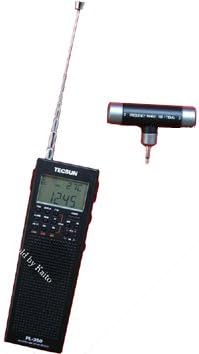
- Telescopic Antenna: For optimal FM and Shortwave reception, extend the telescopic antenna fully. Adjust its angle and direction for best signal.
- External AM Antenna: For enhanced AM (MW) reception, plug the provided high-sensitivity external AM antenna into its dedicated jack. Position this antenna away from the radio and rotate it for the strongest signal.
- Soft Antenna: For improved Shortwave reception, connect the soft wire antenna to the earphone jack. Extend the wire as much as possible.
7. Maintenance
- Cleaning: Wipe the radio with a soft, dry cloth. Do not use abrasive cleaners or solvents.
- Storage: If storing the radio for an extended period, remove the batteries to prevent leakage. Store in a cool, dry place.
- Antenna Care: Handle the telescopic antenna carefully to avoid bending or breaking.
8. Troubleshooting
| Problem | Possible Cause | Solution |
|---|---|---|
| No power | Dead batteries; Incorrect battery installation; Power button not pressed. | Replace batteries; Check polarity; Press POWER button. |
| Poor reception | Weak signal; Antenna not extended/positioned correctly; Interference. | Extend/adjust antenna; Use external AM/soft antenna; Move away from electronic devices. |
| No sound | Volume too low; Earphones connected; Mute activated. | Increase volume; Disconnect earphones; Check for mute function. |
| Display not working | Low battery; Radio off. | Replace batteries; Turn radio on. |
9. Specifications
- Frequency Coverage:
- FM: 87-108 MHz
- AM (MW): 520-1710 KHz
- SW: 2300-21950 KHz
- Tuning Methods: Manual, ATS, ETM, Memory
- Memory Presets: 450
- Power Source: 3 x AA batteries (not included) or 5V DC via Mini-USB
- Charging: Built-in charger for rechargeable AA batteries
- Audio Output: Stereo (via earphones)
- Special Features: DSP Technology, Alarm Clock, Sleep Timer, Thermometer, Key Lock
- Dimensions: Approximately 1.02"D x 2.09"W x 6.26"H (26 x 53 x 159 mm)
- Weight: Approximately 4.5 ounces (128 grams) without batteries
10. Warranty and Support
The Tecsun PL-360 radio typically comes with a 1-year manufacturer's warranty from the date of purchase. Please retain your proof of purchase for warranty claims.
For technical support or warranty inquiries, please refer to the contact information provided by your retailer or the official Tecsun website.


