
1. Introduction
The Rosewill RTK-002 Anti-Static Wrist Strap is designed to protect sensitive electronic components from electrostatic discharge (ESD) damage. When working with computer hardware, circuit boards, or other delicate electronics, static electricity can build up on your body and discharge into components, potentially causing irreversible damage. This wrist strap provides a safe and effective way to ground yourself, preventing static buildup and ensuring the longevity of your electronic devices.
2. Product Overview and Components
The Rosewill RTK-002 Anti-Static Wrist Strap consists of three primary components: an adjustable wristband, a coiled grounding cord, and an alligator clip. These components work together to create a safe path for static electricity to dissipate.
- Adjustable Wristband: Designed to fit comfortably around your wrist, ensuring continuous skin contact.
- Coiled Grounding Cord: An extra-long, coiled cord providing flexibility and a wide range of movement while maintaining a secure connection. It contains a 1M Ohm ±10% resistor for safety.
- Alligator Clip: Used to securely attach the grounding cord to a grounded object.
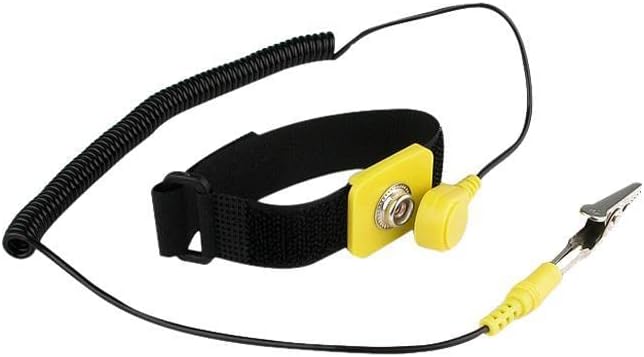
Figure 2.1: Rosewill Anti-Static Wrist Strap components.
3. Setup and Usage
Follow these steps to properly set up and use your anti-static wrist strap:
- Wear the Wristband: Place the adjustable wristband snugly around your bare wrist. Ensure the metal plate on the inside of the wristband makes direct contact with your skin. The strap should be comfortable but not loose.
- Connect the Cord: Snap the coiled grounding cord onto the metal button located on the outside of the wristband.
- Ground the Alligator Clip: Attach the alligator clip at the other end of the coiled cord to a reliable ground point. Common ground points include:
- An unpainted metal part of your computer case (e.g., the power supply casing) while the power supply is plugged into a grounded outlet (but the computer is turned off).
- The center screw of a grounded wall outlet faceplate (ensure the outlet is properly grounded).
- A dedicated grounding mat or grounding point on an ESD-safe workbench.
- Verify Connection: Once connected, you are safely grounded. You can now begin working on your electronic components with reduced risk of ESD damage.

Figure 3.1: Rosewill Anti-Static Wrist Strap in its retail packaging.
4. Operating Principles
The anti-static wrist strap operates by providing a continuous, safe path for any static electricity that accumulates on your body to flow to a grounded object. The built-in resistor in the coiled cord limits the current flow in case of accidental contact with a voltage source, protecting both the user and the sensitive electronics. This controlled discharge prevents sudden electrostatic shocks that can damage delicate integrated circuits and other components.
5. Care and Maintenance
Proper care and maintenance will ensure the longevity and effectiveness of your anti-static wrist strap:
- Cleaning: Wipe the wristband and cord with a damp cloth. Do not use harsh chemicals or abrasive cleaners. Ensure the wristband is dry before use.
- Storage: Store the wrist strap in a clean, dry place away from direct sunlight and extreme temperatures. Avoid kinking or excessively bending the coiled cord.
- Inspection: Periodically inspect the wristband, cord, and alligator clip for any signs of wear, fraying, or damage. Replace the strap if any damage is observed.
- Testing: For critical applications, regularly test the resistance of the wrist strap using an ESD wrist strap tester to ensure it is functioning within specifications (typically < 10K Ohm for the wrist strap and 1M Ohm for the cord).
6. Troubleshooting
If you encounter issues with your anti-static wrist strap, consider the following:
| Issue | Possible Cause | Solution |
|---|---|---|
| Strap does not seem to be working (e.g., static shocks still occur). | Poor skin contact, faulty connection, or improper grounding. | Ensure wristband is snug against bare skin. Check that the coiled cord is securely snapped to the wristband. Verify the alligator clip is attached to a known good ground point. Test the strap with an ESD tester if available. |
| Coiled cord tangles frequently. | Improper handling or storage. | Gently extend and retract the cord. Store it neatly when not in use to prevent excessive tangling. |
| Wristband feels uncomfortable or too tight/loose. | Incorrect adjustment. | Adjust the strap to a comfortable fit that maintains consistent skin contact without restricting circulation. |
7. Technical Specifications
- Model: RTK-002
- Wrist Strap Resistance: < 10K Ohm
- Cord Resistance: 1M Ohm ±10%
- Grounding Cord Length: 6 Feet (approx. 1.83 meters)
- Product Dimensions (approx.): 4 x 4 x 2 inches (10.16 x 10.16 x 5.08 cm)
- Item Weight (approx.): 1.6 ounces (45.36 grams)
- Color: ESD Wrist Strap (Black/Yellow)
8. Warranty and Support
For information regarding product warranty, returns, or technical support, please refer to the official Rosewill website or contact Rosewill customer service directly. Keep your purchase receipt as proof of purchase for any warranty claims.
Legal Disclaimer: All brand names and logos mentioned are registered trademarks of their respective owners.
Visit the official Rosewill Store for more products and information: Rosewill Store
