
Edifier M1360
Edifier M1360 Wired Multimedia Speaker System User Manual
Model: M1360
1. Introduction
Thank you for purchasing the Edifier M1360 Wired Multimedia Speaker System. This 2.1 speaker system is designed to provide a convenient and high-quality audio solution for various multimedia applications, including computers, laptops, gaming consoles, and MP3 players. Featuring upward-angled satellites and a downward-angled subwoofer, the system delivers clear sound with steady bass output. The wired remote control offers easy volume adjustment and includes a headphone jack for private listening.
2. Important Safety Information
- Read these instructions thoroughly before operating the product.
- Keep this manual for future reference.
- Do not expose the unit to rain or moisture to prevent fire or electric shock.
- Do not block any ventilation openings. Install in accordance with the manufacturer's instructions.
- Do not install near any heat sources such as radiators, heat registers, stoves, or other apparatus (including amplifiers) that produce heat.
- Protect the power cord from being walked on or pinched, particularly at plugs, convenience receptacles, and the point where they exit from the apparatus.
- Only use attachments/accessories specified by the manufacturer.
- Unplug this apparatus during lightning storms or when unused for long periods of time.
- Refer all servicing to qualified service personnel. Servicing is required when the apparatus has been damaged in any way, such as power-supply cord or plug is damaged, liquid has been spilled or objects have fallen into the apparatus, the apparatus has been exposed to rain or moisture, does not operate normally, or has been dropped.
3. Package Contents
Please check the contents of your package. If any items are missing or damaged, contact your retailer.
- 1x Edifier M1360 Subwoofer
- 2x Satellite Speakers
- 1x Wired Remote Control
- 1x 3.5mm Audio Input Cable
- 1x User Manual (this document)
4. Product Overview
4.1 System Components
- Subwoofer: Houses the main amplifier and bass driver. Connects to the satellite speakers and the audio source.
- Satellite Speakers: Two compact speakers for mid-range and high-frequency audio.
- Wired Remote Control: Features a volume dial, power switch, and headphone output.
4.2 Component Identification

Figure 1: Front view of the Edifier M1360 speaker system, showing the central subwoofer, two angled satellite speakers, and the wired remote control unit.
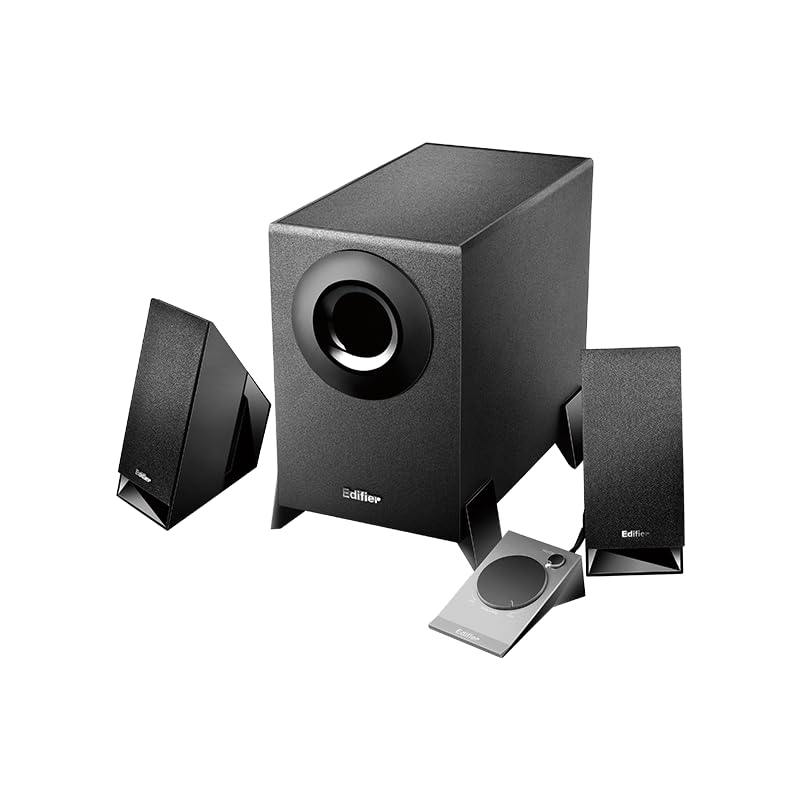
Figure 2: Another perspective of the Edifier M1360 speaker system, highlighting the compact design of the satellite speakers and the wired remote's placement.
5. Setup
5.1 Placement
- Place the subwoofer on the floor or a sturdy surface near your computer or audio source.
- Position the satellite speakers on either side of your monitor or listening area, ensuring they are angled towards you for optimal sound.
- Ensure adequate ventilation around all components.
5.2 Connections
- Connect the satellite speakers to the corresponding output jacks on the back of the subwoofer. Ensure the left and right speakers are connected correctly.
- Connect the wired remote control cable to the dedicated port on the subwoofer.
- Connect the 3.5mm audio input cable from the "AUDIO IN" port on the subwoofer to the audio output (headphone jack) of your computer, laptop, MP3 player, or other audio source.
- Plug the power cord of the subwoofer into a standard AC power outlet.
6. Operating Instructions
6.1 Power On/Off
- To turn on the speaker system, press the power button located on the wired remote control. The power indicator light will illuminate.
- To turn off the speaker system, press the power button again. The power indicator light will turn off.
6.2 Volume Control
- Rotate the large dial on the wired remote control clockwise to increase the volume.
- Rotate the large dial counter-clockwise to decrease the volume.
6.3 Headphone Output
- To listen privately, plug your headphones into the 3.5mm headphone jack on the wired remote control.
- When headphones are connected, the speaker output will automatically mute.
- Unplug the headphones to resume audio playback through the speakers.
7. Maintenance and Care
- Cleaning: Use a soft, dry cloth to clean the surfaces of the speakers and subwoofer. Do not use liquid cleaners or aerosol sprays.
- Ventilation: Ensure that the ventilation openings on the subwoofer are not blocked. Proper airflow prevents overheating.
- Storage: If storing the system for an extended period, disconnect it from power and store it in a cool, dry place away from direct sunlight and extreme temperatures.
- Avoid Moisture: Keep the speaker system away from water, humidity, and other liquids.
8. Troubleshooting
| Problem | Possible Cause | Solution |
|---|---|---|
| No sound |
|
|
| Distorted sound |
|
|
| One speaker not working |
|
|
9. Specifications
| Feature | Detail |
|---|---|
| Model Name | M1360 |
| Speaker Type | Multimedia |
| Surround Sound Channel Configuration | 2.1 |
| Connectivity Technology | Wired (3.5mm stereo input) |
| Audio Output Mode | Stereo |
| Speaker Maximum Output Power | 8.5 Watts |
| Subwoofer Diameter | 5 Inches |
| Tweeter Diameter | 1 Inches |
| Signal-to-Noise Ratio | 85 dB |
| Frequency Response | 20 KHz (Note: This is likely the upper limit, not the full range. Common for speakers to list only max freq.) |
| Compatible Devices | Smartphone, Laptop, Desktop, Gaming Console, MP3 Player |
| Product Dimensions | 6.4D x 11.2W x 14H Centimeters |
| Item Weight | 2.5 kg (2500 Grams) |
| Power Source | AC |
| Colour | Black |
| Country of Origin | China |
10. Warranty and Support
For detailed warranty information and customer support, please refer to the warranty card included with your product packaging or visit the official Edifier website.
Manufacturer: Edifier
Importer: Nikita Distributors - Green Terrace Building, Lane Number 5, South Koregaon Park, Pune 411001, MH, India
Related documentsM1360


Ask a question about this manual
Ask about setup, troubleshooting, compatibility, parts, safety, or missing instructions. Manuals+ will review the question and use this page’s manual context to help answer it.