
Introduction
The KNIPEX 97 22 240 Crimping Pliers are a versatile hand tool designed for various electrical tasks. These pliers feature a black lacquered finish for durability, multi-component grips for comfortable handling, and a bolted joint for enhanced stability and smooth operation. This manual provides essential information for the safe and effective use of your crimping pliers.

Image 1: Overview of the KNIPEX 97 22 240 Crimping Pliers, showcasing the black lacquered finish and ergonomic multi-component grips.
Setup
The KNIPEX 97 22 240 Crimping Pliers are ready for use directly out of the packaging. No assembly is required.
- Unpacking: Carefully remove the pliers from their packaging.
- Initial Inspection: Before first use, inspect the pliers for any signs of damage or manufacturing defects. Ensure the jaws open and close smoothly and the handles provide a secure grip.
- Safety Check: Always wear appropriate personal protective equipment, such as safety glasses, when working with hand tools.
Operating Instructions
The KNIPEX 97 22 240 is a multi-functional tool designed for cutting, stripping, and crimping wires, as well as cutting bolts.
1. Wire Cutting
Use the designated wire cutting section at the tip of the pliers. Ensure the wire fits securely within the cutting edges. Apply firm, steady pressure to cut the wire cleanly.

Image 2: The pliers positioned on a workbench, demonstrating their use in a typical electrical wiring environment with various wire types and connectors.
2. Wire Stripping
The pliers feature multiple stripping holes for different wire gauges. Identify the correct stripping hole for your wire's diameter. Insert the wire into the appropriate hole, close the handles firmly to cut the insulation, and then pull the pliers away to remove the insulation, exposing the conductor.

Image 3: A close-up view of the pliers in action, precisely stripping the insulation from a blue electrical wire, revealing the copper conductor.
3. Crimping Terminals
The pliers are equipped with various crimping profiles for different terminal types (insulated and non-insulated). Match the terminal size and type to the corresponding crimping jaw. Insert the stripped wire into the terminal, then place the terminal into the correct crimping profile. Squeeze the handles completely to ensure a secure crimp.
- Insulated Terminals: Use the color-coded crimping points (red, blue, yellow) for insulated terminals.
- Non-Insulated Terminals: Use the designated crimping profiles for non-insulated terminals.

Image 4: A detailed shot showing the pliers crimping a blue ring terminal onto a wire, highlighting the precision of the crimping jaws.

Image 5: The pliers are shown crimping a red insulated terminal, demonstrating the tool's capability with various connector types.
4. Bolt Cutting
The pliers include threaded holes for cutting bolts of specific diameters (M2.6, M3, M3.5, M4, M5). Thread the bolt into the appropriate hole until it protrudes slightly from the other side. Squeeze the handles firmly to cut the bolt. The threads in the hole will re-form the bolt's threads, allowing for easy removal after cutting.
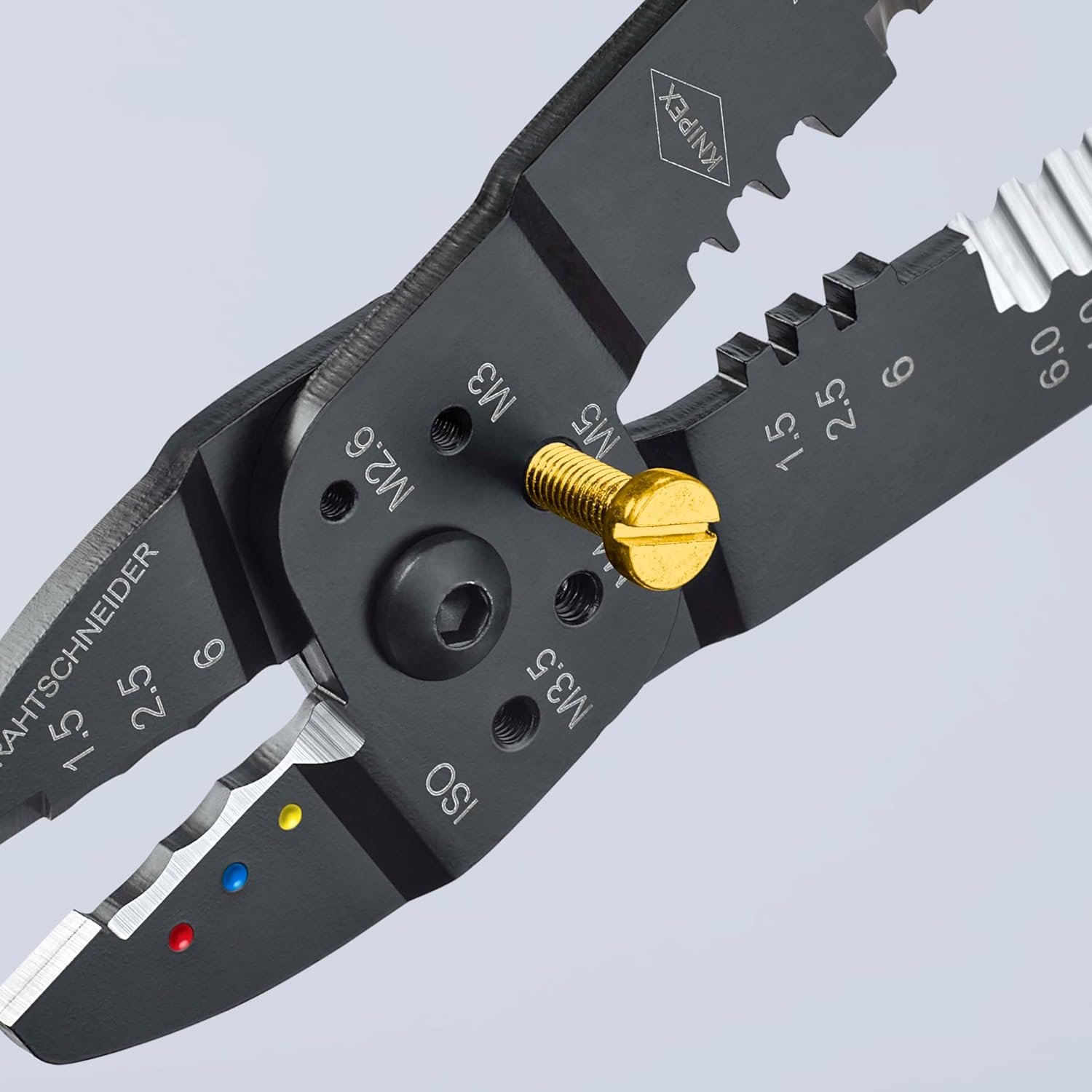
Image 6: A detailed view of the pliers cutting a bolt, demonstrating the integrated bolt cutter function.
Maintenance
Proper maintenance ensures the longevity and optimal performance of your KNIPEX pliers.
- Cleaning: After each use, wipe the pliers clean with a dry cloth to remove any dirt, dust, or debris. For stubborn grime, a mild solvent can be used, followed by thorough drying.
- Lubrication: Periodically apply a small amount of light machine oil to the bolted joint to ensure smooth operation and prevent rust.
- Storage: Store the pliers in a dry environment to prevent corrosion. Keep them away from excessive moisture and corrosive substances.
- Inspection: Regularly inspect the cutting edges, stripping holes, and crimping jaws for wear or damage. Replace the tool if significant wear or damage is observed to maintain safety and performance.
Troubleshooting
This section addresses common issues you might encounter with your crimping pliers.
- Pliers feel stiff or difficult to open/close:
Apply a small amount of light machine oil to the joint and work the handles back and forth to distribute the lubricant. Ensure no debris is obstructing the joint.
- Poor crimp quality (loose or damaged terminals):
Verify that you are using the correct crimping profile for the specific terminal and wire gauge. Ensure the wire is stripped to the correct length and fully inserted into the terminal before crimping. Apply sufficient pressure during the crimping process.
- Wire not stripping cleanly:
Ensure you are using the correct stripping hole for the wire's diameter. The cutting edges may be worn if the issue persists across different wire sizes. Consider replacing the tool if the stripping function is consistently ineffective.
- Difficulty cutting bolts:
Ensure the bolt is threaded into the correct size hole. Apply firm and steady pressure. If the bolt is too hard or too large for the designated size, it may not cut cleanly or could damage the tool.
If you encounter issues not covered here or if problems persist, contact KNIPEX customer support for assistance.
Specifications
| Feature | Detail |
|---|---|
| Brand | KNIPEX |
| Model Number | 97 22 240 |
| Item Weight | 270 Grams (9.5 ounces) |
| Product Dimensions | 9.45"L x 2.44"W |
| Handle Material | Steel, Brass |
| Grip Type | Ergonomic, Multi-component grips |
| Material | Special steel |
| Finish | Black lacquered, Burnished |
| Power Source | Hand-operated |
| Special Features | For cable cutting, stripping wires, and crimping |
| Measurement System | Metric (for stripping/bolt cutting indications) |
Warranty and Support
Specific warranty details for the KNIPEX 97 22 240 Crimping Pliers are typically provided with the product at the time of purchase or can be found on the official KNIPEX website. For technical support, spare parts, or warranty claims, please refer to the contact information provided by KNIPEX or your authorized dealer.
You can visit the official KNIPEX store for more information: KNIPEX Store


