
Introduction
Thank you for choosing the Ground Zero GZRB 250BPX Bandpass Subwoofer. This manual provides essential information for the proper installation, operation, and maintenance of your new audio component. Please read this manual thoroughly before attempting to install or operate the subwoofer to ensure optimal performance and safety.
The GZRB 250BPX is a high-performance 25 cm (10-inch) bandpass subwoofer designed to deliver powerful and precise bass. It features switchable LED illumination (white or blue) and a robust enclosure for enhanced acoustic output.
Safety Information
Always observe the following safety precautions to prevent injury or damage to the equipment:
- Professional Installation Recommended: Installation of car audio equipment can be complex. If you are unsure about any part of the installation process, seek assistance from a qualified professional.
- Disconnect Battery: Before beginning any electrical work, disconnect the vehicle's negative battery terminal to prevent electrical shorts and damage.
- Proper Wiring: Ensure all wiring is correctly connected according to the wiring diagrams. Incorrect wiring can lead to damage to the subwoofer, amplifier, or vehicle's electrical system.
- Ventilation: Ensure adequate ventilation around the subwoofer enclosure to prevent overheating, especially if paired with a powerful amplifier.
- Secure Mounting: Mount the subwoofer enclosure securely to prevent it from shifting during vehicle movement, which could cause injury or damage.
- Volume Levels: Prolonged exposure to high volume levels can cause hearing damage. Adjust volume to a comfortable level.
- Avoid Moisture: Do not expose the subwoofer to moisture or extreme temperatures.
Setup and Installation
This section outlines the general steps for setting up your GZRB 250BPX subwoofer. Specific wiring diagrams for your amplifier should be consulted in conjunction with these instructions.
Unpacking
Carefully remove the subwoofer from its packaging. Inspect the unit for any signs of damage that may have occurred during shipping. If damage is present, contact your dealer immediately.
Placement
The GZRB 250BPX is a bandpass enclosure, which typically performs well in the trunk or cargo area of a vehicle. Experiment with different orientations and positions to find the optimal sound for your vehicle's acoustics. Ensure the enclosure is not obstructing any safety features or vehicle controls.
Wiring Connections
The subwoofer features a 50 mm 2 x 2 Ohm voice coil. Proper impedance matching with your amplifier is crucial for optimal performance and to prevent damage. Refer to your amplifier's manual for recommended wiring configurations (e.g., series or parallel) to achieve the desired impedance (e.g., 1 Ohm, 2 Ohm, or 4 Ohm).
- Power Wiring: Connect the amplifier's power input to the vehicle's battery using an appropriately gauged power cable, fused close to the battery.
- Ground Wiring: Connect the amplifier's ground terminal to a clean, unpainted metal surface on the vehicle chassis.
- Remote Turn-On: Connect the amplifier's remote turn-on terminal to your head unit's remote output.
- Signal Input: Connect the RCA outputs from your head unit or line output converter to the amplifier's RCA inputs.
- Subwoofer Connection: Connect the speaker output terminals of your amplifier to the input terminals on the GZRB 250BPX enclosure. Ensure correct polarity (+ to + and - to -).
LED Illumination
The GZRB 250BPX features switchable LED illumination between white and blue. Consult the specific wiring or switch on the enclosure for controlling this feature. Typically, this will involve a separate power connection or a switch on the enclosure itself.
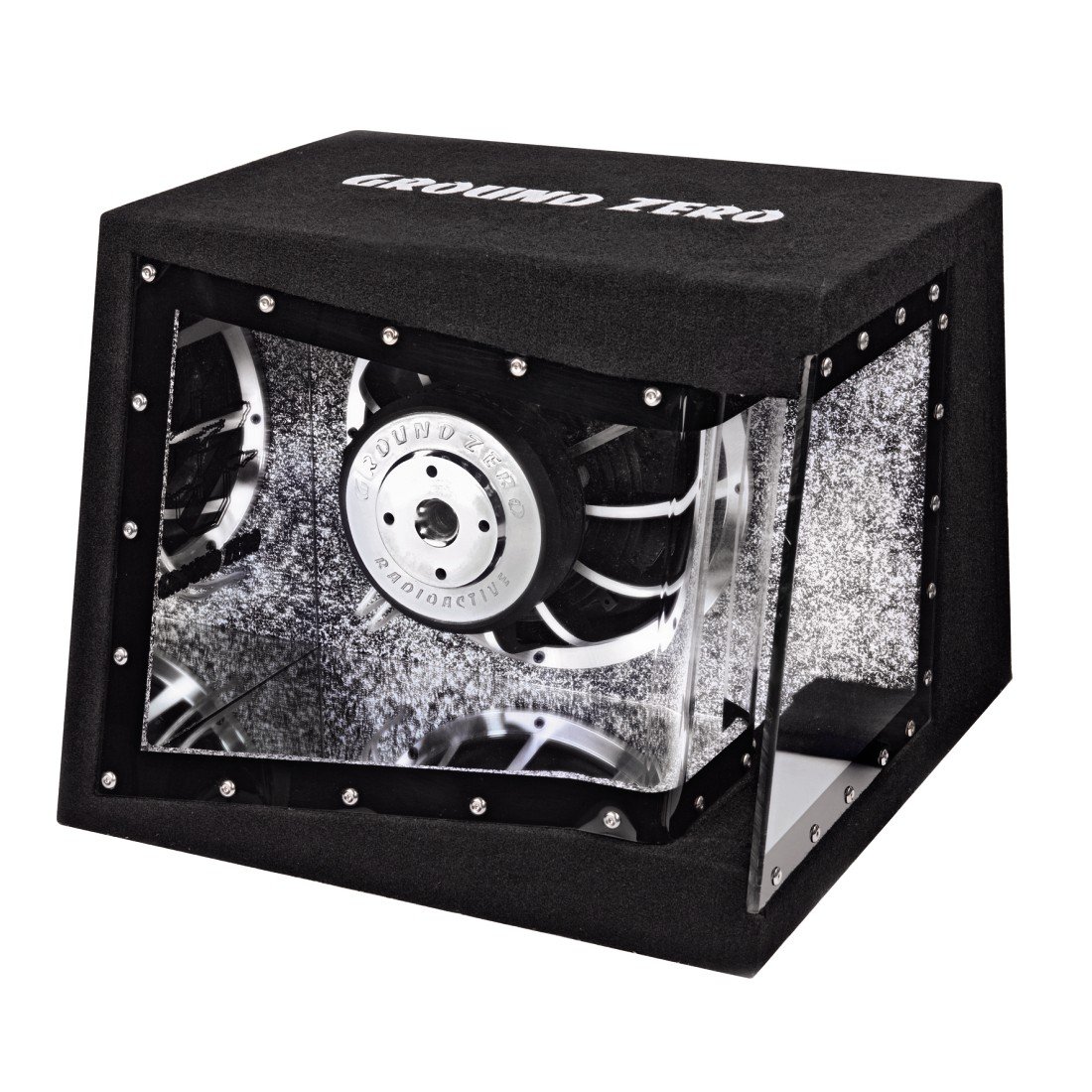
Image: The Ground Zero GZRB 250BPX Bandpass Subwoofer, showcasing its robust enclosure and visible internal components, including the 25 cm subwoofer and clear acrylic panels that allow the LED illumination to be seen.
Operating Instructions
Once the subwoofer is installed and wired correctly, follow these steps for initial operation:
- Initial Power-Up: Reconnect the vehicle's negative battery terminal. Turn on your head unit. The amplifier and subwoofer should power on.
- Gain Setting: Start with the amplifier's gain control at its minimum setting. Play a familiar piece of music with strong bass. Slowly increase the gain until you hear distortion, then back off slightly. This ensures the amplifier is not overdriving the subwoofer.
- Crossover Settings: Use the low-pass filter (LPF) on your amplifier or head unit to send only low frequencies to the subwoofer. A common starting point is 80-100 Hz. Adjust this setting to blend seamlessly with your vehicle's main speakers.
- Phase Control: Some amplifiers have a phase switch (0° or 180°). Experiment with both settings to determine which provides the most impactful and coherent bass response in your listening position.
- Bass Boost: Use bass boost sparingly, if at all. Excessive bass boost can lead to distortion and potential damage to the subwoofer.
Allow the subwoofer to break in for several hours of normal use before playing at maximum volume. This allows the suspension components to loosen up and perform optimally.
Maintenance
The Ground Zero GZRB 250BPX subwoofer requires minimal maintenance. Follow these guidelines to ensure its longevity:
- Cleaning: Use a soft, dry cloth to wipe down the enclosure and visible surfaces. Avoid using harsh chemicals or abrasive cleaners.
- Inspection: Periodically check all wiring connections to ensure they are secure and free from corrosion.
- Environmental Conditions: Protect the subwoofer from direct sunlight, extreme heat, and moisture.
- Secure Mounting: Regularly check that the enclosure remains securely mounted in your vehicle.
Troubleshooting
If you experience issues with your GZRB 250BPX subwoofer, consult the following table before contacting support:
| Problem | Possible Cause | Solution |
|---|---|---|
| No Sound from Subwoofer |
|
|
| Distorted Sound |
|
|
| Weak Bass Output |
|
|
| LED Illumination Not Working |
|
|
Specifications
The following are the technical specifications for the Ground Zero GZRB 250BPX Bandpass Subwoofer:
- Model: GZRB 250BPX
- Subwoofer Type: Bandpass Enclosure
- Chassis Size: 1 x 25 cm (10 inches)
- Power Handling (RMS): 400 Watts
- Voice Coil: 50 mm (2 inches), Dual 2 Ohm
- Net Volume: 12 + 27 Liters / 0.42 + 0.95 cu.ft.
- Dimensions (W x H x D): 45 x 34 x 44 / 28 cm (17.72 x 13.39 x 17.32 / 11.02 inches)
- Weight: Approximately 20.4 Kilograms (44.97 lbs)
- Illumination: Switchable LED (White / Blue)
- Color: Black enclosure with clear acrylic panels, Blue/White LED illumination
Warranty and Support
Ground Zero products are designed and manufactured to the highest quality standards. For warranty information and technical support, please refer to the warranty card included with your product or visit the official Ground Zero website. Keep your proof of purchase for warranty claims.
For further assistance, you may contact your authorized Ground Zero dealer or distributor.
Ground Zero Official Website: www.ground-zero-audio.com