
1. Introduction
Thank you for choosing the Magnum Energy ME-RC50 Remote Panel. This manual provides detailed instructions for the proper installation, operation, and maintenance of your remote panel. Please read this manual thoroughly before attempting to install or operate the device to ensure safe and efficient use.
2. Product Overview
The Magnum Energy ME-RC50 is a remote control panel designed to provide convenient monitoring and control of compatible Magnum Energy inverters or inverter/chargers. It features an intuitive interface for easy system management.
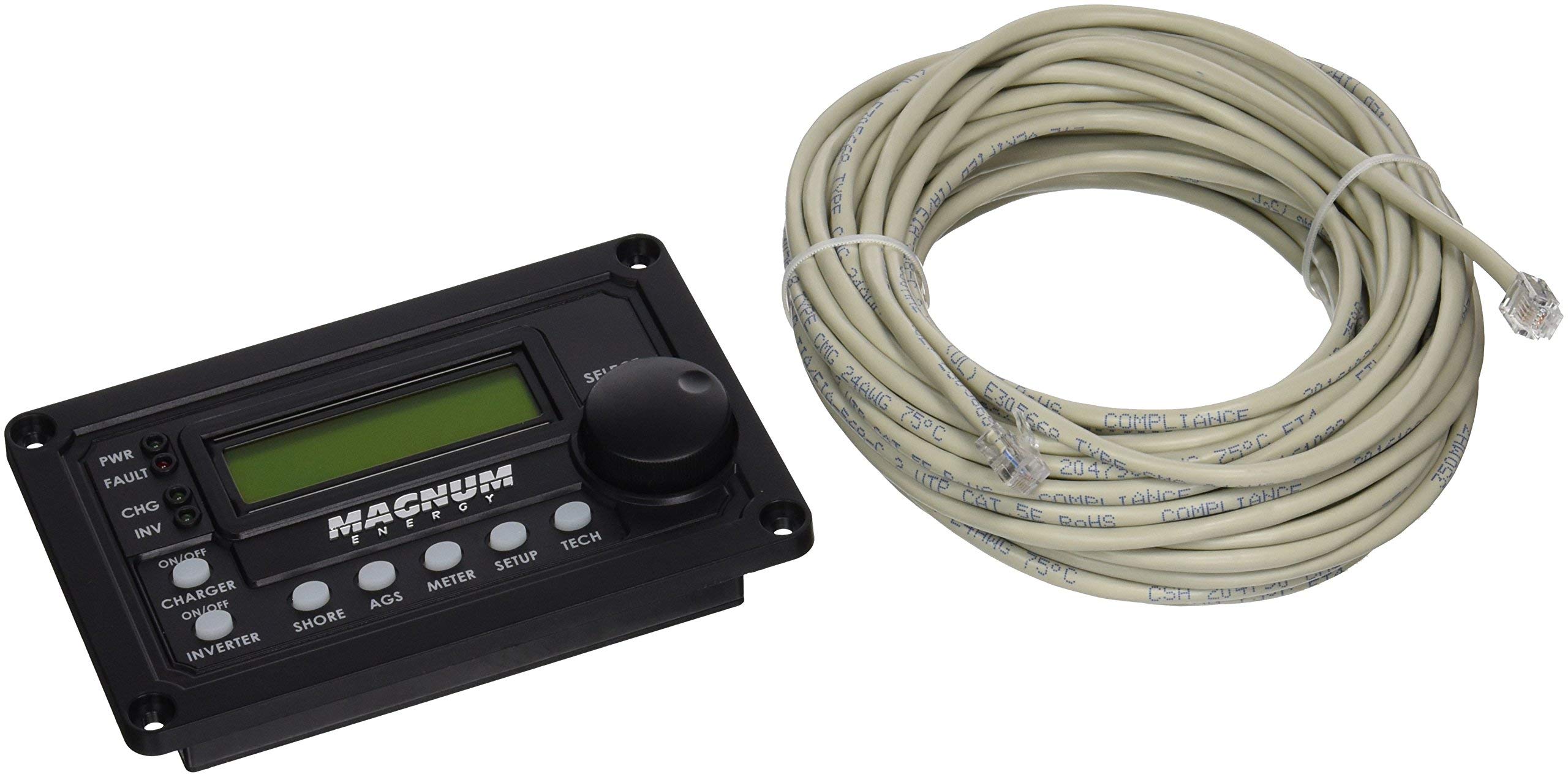
Figure 1: Magnum Energy ME-RC50 Remote Panel with its communication cable.
Key Features:
- LCD Display: A 16 x 2 line (32 characters total) alphanumeric display for clear information readout.
- Menu Push Buttons (x5): Five dedicated buttons for navigating menus and adjusting settings.
- Connectivity: Utilizes a 4-conductor (twisted-pair) telephone cable for reliable communication.
- Ergonomic Design: Engineered for user comfort and ease of use.

Figure 2: Close-up of the ME-RC50 Remote Panel's display and control buttons.
3. Setup
Follow these steps to properly set up your ME-RC50 Remote Panel:
- Mounting: Choose a suitable location for the remote panel. Ensure it is easily accessible and visible. The panel can be flush-mounted or surface-mounted depending on your preference and installation kit (sold separately).
- Cable Connection: Connect one end of the provided 4-conductor (twisted-pair) telephone cable to the RJ11 port on the back of the ME-RC50 remote panel.
- System Connection: Connect the other end of the telephone cable to the designated remote port on your compatible Magnum Energy inverter or inverter/charger. Ensure the connection is secure.
- Power On: Once the cable is securely connected, power on your Magnum Energy inverter/charger system. The remote panel should automatically power on and display system information.
Note: The ME-RC50 is compatible with various Magnum Energy inverters and inverter/chargers, often used in conjunction with generators for power management.
4. Operating Instructions
The ME-RC50 Remote Panel provides a user-friendly interface for monitoring and controlling your power system.
Navigating the Menus:
- Use the Menu Push Buttons (X5) located below the LCD display to navigate through various screens and settings.
- Typically, there are buttons for 'Menu', 'Select', 'Up', 'Down', and 'Escape' or similar functions. Refer to your inverter/charger's specific manual for detailed button assignments and menu structures.
- The LCD Display will show system status, battery voltage, charge current, inverter status, and other critical information.
Basic Operations:
- Viewing Status: Press the 'Menu' button to cycle through different status screens.
- Adjusting Settings: Enter the 'Settings' menu (if available) and use the 'Up'/'Down' buttons to select parameters, then 'Select' to confirm changes.
- Inverter On/Off: Some systems allow you to turn the inverter on or off directly from the remote panel. Consult your system's manual for this functionality.
5. Maintenance
The ME-RC50 Remote Panel requires minimal maintenance to ensure long-term performance.
- Cleaning: Wipe the panel surface and LCD display with a soft, dry cloth. Avoid using abrasive cleaners or solvents, which can damage the plastic and screen.
- Cable Inspection: Periodically check the communication cable for any signs of wear, damage, or loose connections. Replace damaged cables immediately.
- Environmental Conditions: Ensure the panel is not exposed to extreme temperatures, direct sunlight for prolonged periods, or excessive moisture.
6. Troubleshooting
If you encounter issues with your ME-RC50 Remote Panel, try the following steps:
| Problem | Possible Cause | Solution |
|---|---|---|
| Panel does not power on | Loose cable connection; Inverter/charger not powered; Damaged cable | Check cable connections at both ends; Ensure inverter/charger is powered; Replace cable if damaged. |
| Display is blank or unreadable | Poor connection; Extreme temperature; Internal fault | Reseat cable; Move panel to a moderate temperature environment; Contact support if problem persists. |
| Buttons are unresponsive | Stuck button; Internal fault | Gently press buttons to ensure they are not stuck; If unresponsive, contact support. |
| Incorrect readings | Communication error; Inverter/charger fault | Check cable connections; Refer to your inverter/charger manual for troubleshooting its readings. |
7. Specifications
| Feature | Specification |
|---|---|
| Brand | Magnum Energy |
| Model Number | ME-RC50 |
| Item Weight | 1.4 Pounds |
| Connectivity Technology | Infrared (for communication with inverter/charger) |
| Button Quantity | 5 |
| Controller Type | Button Control |
| Maximum Range | 50 Feet (cable length dependent) |
| Compatible Devices | Magnum Energy Inverters/Inverter/Chargers (e.g., Generator systems) |
| Display Type | 16 x 2 line Alphanumeric LCD |
| Cable Type | 4-conductor (twisted-pair) telephone cable |
8. Warranty and Support
Magnum Energy, INC. provides a warranty for the ME-RC50 Remote Panel. For any issues experienced within 30 days of receipt, please contact your retailer or Magnum Energy customer support directly. For warranty claims or technical assistance beyond this period, please refer to the official Magnum Energy website or contact their customer service department.
Proposition 65 Warning: This product may contain materials cautioned by California Proposition 65.


