
Introduction
The MOBICOOL Drink Cooler D03AC/DC is a versatile portable device designed to keep your beverages either cool or warm. It operates using both AC (alternating current) for home or office use and DC (direct current) for vehicle use, offering convenience wherever you go. This manual provides essential information for the safe and efficient operation of your device.
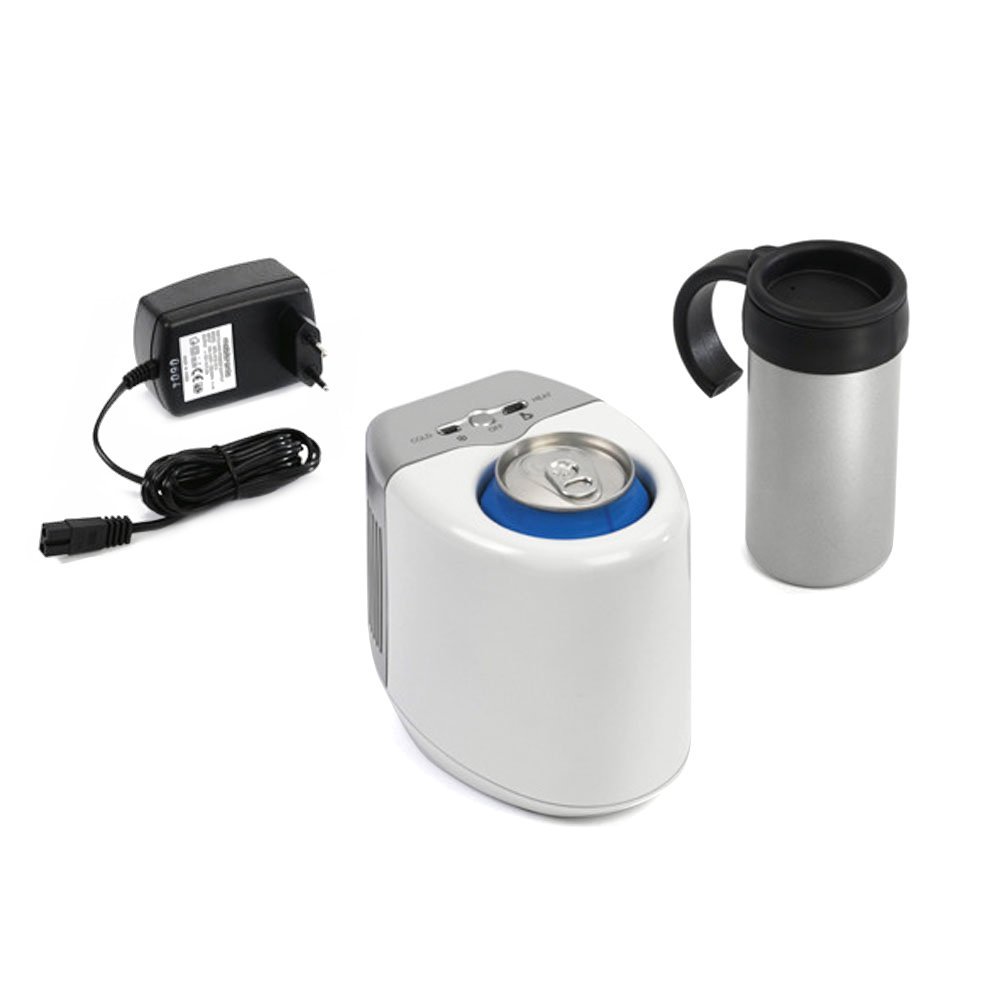
Image: The MOBICOOL Drink Cooler D03AC/DC, illustrating its dual functionality for keeping drinks cold or hot.
Safety Instructions
- Read all instructions before using the appliance.
- Do not immerse the unit in water or other liquids.
- Ensure proper ventilation around the unit. Do not block air vents.
- Use only the provided power adapters (AC and DC).
- Keep out of reach of children.
- Unplug the unit from the power source before cleaning or if not in use for an extended period.
- Do not attempt to repair or modify the unit yourself. Contact qualified service personnel.
Package Contents
Please check that all items are present in the package:
- MOBICOOL Drink Cooler D03AC/DC Unit
- AC Power Adapter (for home/office use)
- DC Power Adapter (for car use)
- Instruction Manual (this document)
- Included Beverage Cup (if applicable)
Product Overview
Familiarize yourself with the main components of your MOBICOOL Drink Cooler.

Image: A diagram highlighting key features such as the LED indicator light, cooling fan, and non-slip mat on the base of the unit.
- Control Panel: Located on the top surface, featuring a switch for COLD, OFF, and HEAT modes, along with indicator lights.
- Beverage Compartment: The central recess designed to hold cans, bottles, or the included cup.
- Cooling/Heating Plate: Located at the bottom of the beverage compartment, responsible for temperature transfer.
- Air Vents: Located on the sides and/or rear for heat dissipation. Ensure these are not obstructed.
- Power Input Port: Located on the rear or side for connecting the AC or DC power adapter.
- Non-slip Mat: On the base of the unit for stability.
Setup
- Placement: Place the drink cooler on a stable, flat, and dry surface. Ensure there is adequate space around the unit for proper air circulation, especially around the air vents.
- Power Connection:
- For Home/Office (AC): Connect the AC power adapter to the unit's power input port, then plug the adapter into a standard wall outlet.
- For Car (DC): Connect the DC power adapter to the unit's power input port, then plug the adapter into your vehicle's 12V cigarette lighter socket.
- Ensure the power switch on the unit is in the "OFF" position before connecting to a power source.

Image: The drink cooler connected to a power source, ready for use with a beverage bottle.
Operating Instructions
The MOBICOOL Drink Cooler D03AC/DC offers both cooling and heating functions.

Image: A detailed view of the control panel, showing the switch for selecting COLD, OFF, or HEAT modes.
- Insert Beverage: Place your can, bottle, or the included cup into the beverage compartment. For optimal performance, ensure the beverage container makes good contact with the cooling/heating plate at the bottom.
- Select Mode:
- To Cool beverages, slide the switch to the "COLD" position. A green indicator light will illuminate.
- To Heat beverages, slide the switch to the "HEAT" position. A red indicator light will illuminate.
- To turn the unit Off, slide the switch to the "OFF" position.
- Operation: The unit will begin to cool or heat your beverage. The time required to reach the desired temperature will vary depending on the initial temperature of the beverage and the ambient temperature.
- Removal: Carefully remove your beverage once it has reached the desired temperature.
Note: For best cooling results, pre-chilled beverages are recommended. For heating, avoid placing extremely cold or frozen items directly into the unit as it may take longer to heat.
Maintenance
- Cleaning: Disconnect the unit from the power source before cleaning. Wipe the exterior and interior of the beverage compartment with a soft, damp cloth. Do not use abrasive cleaners or immerse the unit in water.
- Air Vents: Regularly check and clean the air vents to ensure they are free from dust and debris. Blocked vents can reduce efficiency and potentially damage the unit.
- Storage: When not in use, store the unit in a dry, cool place, away from direct sunlight and extreme temperatures.
Troubleshooting
| Problem | Possible Cause | Solution |
|---|---|---|
| Unit does not turn on. | No power supply; loose connection; faulty adapter. | Check if the power adapter is securely plugged into both the unit and the power source. Try a different outlet or power source. Ensure the switch is not in the "OFF" position. |
| Beverage is not cooling/heating effectively. | Poor contact with cooling/heating plate; obstructed air vents; ambient temperature too high/low. | Ensure the beverage container is making full contact with the bottom plate. Clear any obstructions from the air vents. Allow more time for temperature change, especially in extreme ambient conditions. |
| Unusual noise from the unit. | Fan obstruction; unit placed on an uneven surface. | Check if the fan vents are clear. Ensure the unit is placed on a flat, stable surface. If the noise persists and is excessive, discontinue use and contact customer support. |
Specifications
- Model: D03AC/DC
- Brand: MOBICOOL
- Function: Cooling and Heating
- Power Input:
- AC (Alternating Current) for home/office use
- DC (Direct Current) 12V for car use
- Mounting Type: Freestanding
- Dimensions: (Specific dimensions not provided in source data, refer to product packaging)
- Weight: (Specific weight not provided in source data, refer to product packaging)
Warranty and Support
For warranty information, please refer to the documentation included with your purchase or contact your retailer. For technical support or service inquiries, please reach out to MOBICOOL customer service through their official website or the contact information provided on the product packaging.