
Introduction
This manual provides detailed instructions for the proper setup, operation, and maintenance of your Michael Kors MK8165 Men's Quartz Chronograph Watch. Please read this manual thoroughly to ensure optimal performance and longevity of your timepiece.
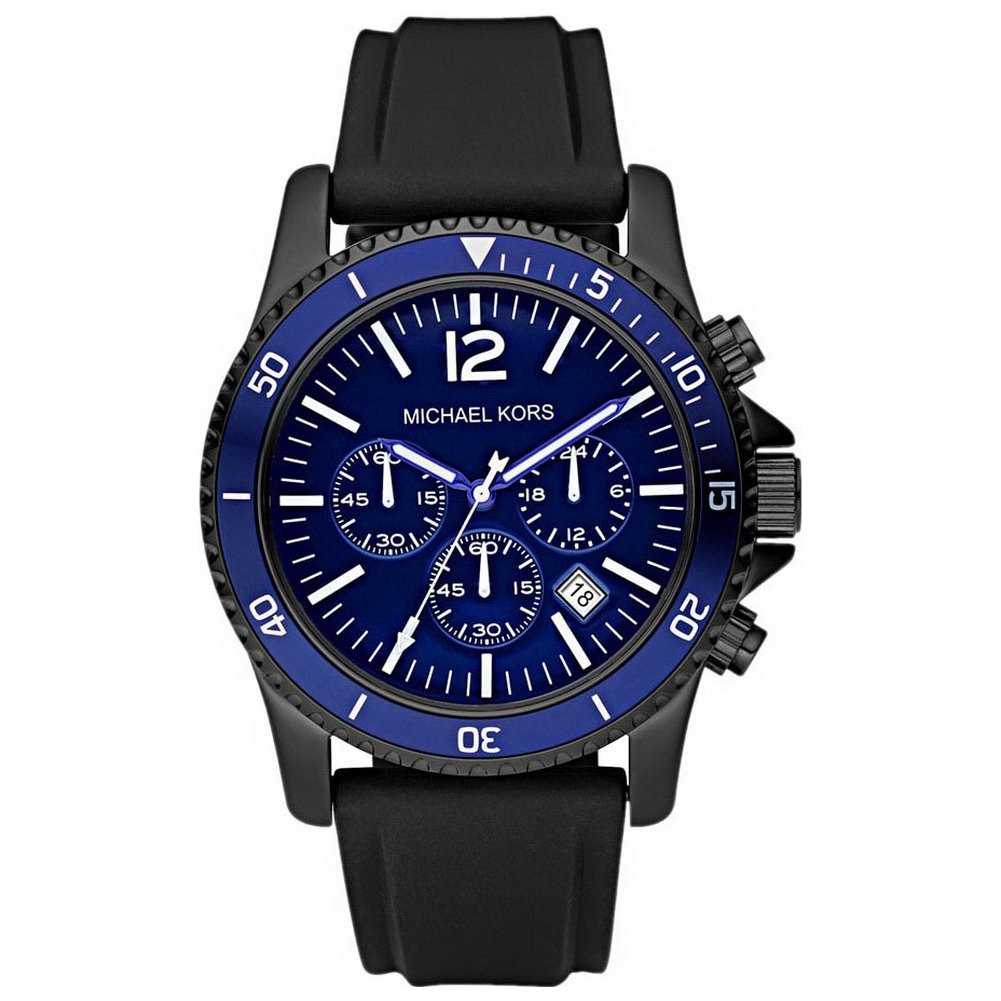
Figure 1: Michael Kors MK8165 Men's Quartz Chronograph Watch. This image displays the watch with its black rubber strap, stainless steel case, and blue dial featuring chronograph subdials and a date window.
1. Setup
1.1 Watch Components
Familiarize yourself with the main components of your watch:
- Crown: Located on the right side of the watch case, used for setting time and date.
- Pushers (A & B): Located above and below the crown, used for operating the chronograph function.
- Hour, Minute, Second Hands: Indicate the current time.
- Chronograph Hands: Small hands within the subdials for stopwatch functions.
- Date Window: Displays the current date.
1.2 Setting the Time
- Pull the crown out to position 2 (the outermost position). The second hand will stop.
- Turn the crown clockwise or counter-clockwise to set the hour and minute hands to the desired time. To ensure correct AM/PM setting, advance the hands past 12 o'clock until the date changes. This indicates midnight.
- Push the crown back into position 0 (normal operating position). The second hand will resume movement.
1.3 Setting the Date
- Pull the crown out to position 1 (the middle position).
- Turn the crown clockwise to set the date. Do not set the date between 9:00 PM and 3:00 AM, as this may interfere with the automatic date change mechanism.
- Once the correct date is displayed, push the crown back into position 0.
Note: The date mechanism is designed for a 31-day month. At the end of months with fewer than 31 days, manually adjust the date.
2. Operating the Chronograph
Your Michael Kors MK8165 watch features a chronograph (stopwatch) function.
2.1 Basic Chronograph Operation
- Start: Press pusher A (top pusher) to start the chronograph. The chronograph second hand will begin to move.
- Stop: Press pusher A again to stop the chronograph. The elapsed time will be indicated by the chronograph hands.
- Reset: Press pusher B (bottom pusher) to reset the chronograph hands to their zero positions.
2.2 Water Resistance
This watch is water resistant up to 100 meters (10 ATM). This rating makes it suitable for swimming and snorkeling. However, it is not suitable for diving. Ensure the crown is fully pushed in before any contact with water. Do not operate the crown or pushers while the watch is wet or submerged, as this can compromise the water resistance.
3. Maintenance
3.1 Cleaning Your Watch
To maintain the appearance of your watch:
- Wipe the case and crystal with a soft, dry cloth.
- For the rubber strap, use a mild soap solution and a soft brush, then rinse thoroughly with fresh water and dry completely. Avoid harsh chemicals.
- After exposure to saltwater, rinse the watch with fresh water and dry it completely.
3.2 Battery Replacement
The watch is powered by a quartz movement and requires a battery. When the battery is low, the second hand may jump in 2-second intervals. Battery life typically ranges from 2 to 3 years. It is recommended to have the battery replaced by an authorized Michael Kors service center to ensure proper sealing and maintain water resistance.
3.3 Water Resistance Checks
Gaskets that ensure water resistance can deteriorate over time. It is advisable to have your watch's water resistance checked annually by an authorized service center, especially if it is frequently exposed to water.
4. Troubleshooting
| Problem | Possible Cause | Solution |
|---|---|---|
| Watch not running | Depleted battery | Replace battery at an authorized service center. |
| Date not changing at midnight | Time set incorrectly (AM/PM) | Reset the time, ensuring the date changes at 12 AM. |
| Chronograph hands not resetting to zero | Requires calibration | Consult an authorized service center for adjustment. |
| Water inside the watch | Crown not fully pushed in, or gaskets compromised | Immediately take the watch to an authorized service center. Do not attempt to dry it yourself. |
5. Specifications
| Model Number | MK8165 |
| Movement Type | Quartz |
| Display Type | Chronograph |
| Case Material | Stainless Steel |
| Case Diameter | 45 mm |
| Case Thickness | 12 mm |
| Dial Window Material | Mineral Glass |
| Strap Material | Rubber |
| Strap Color | Black |
| Strap Width | 20 mm |
| Clasp Type | Buckle (Ardillon) |
| Water Resistance Depth | 100 Meters (10 ATM) |
| Special Features | Chronograph, Date Function |
| Power Source | Battery Powered |
| Product Dimensions (L x W x H) | 13 x 13 x 13 cm |
| Item Weight | 249.48 grams |
| UPC | 691464657956, 722631298341 |
6. Warranty Information
Michael Kors watches typically come with a limited warranty covering manufacturing defects. The specific terms and duration of the warranty may vary by region and purchase date. Please refer to the warranty card included with your watch at the time of purchase or visit the official Michael Kors website for detailed warranty information.
The warranty generally does not cover:
- Battery life.
- Normal wear and tear (e.g., scratches on case or crystal, alteration of strap/bracelet).
- Damage resulting from improper handling, lack of care, accidents, or unauthorized repairs.
- Water damage if the watch was not used according to its water resistance guidelines.
7. Customer Support
For further assistance, service, or inquiries regarding your Michael Kors MK8165 watch, please contact Michael Kors customer service or visit their official website:
- Official Website: www.michaelkors.com
- Service Center Locator: Check the official website for authorized service centers in your region.
When contacting support, please have your watch model number (MK8165) and purchase information readily available.
