1. Introduction
The Technivorm Moccamaster 59691 KB Coffee Brewer is designed to deliver exceptional coffee quality. This manual provides essential information for the safe and efficient operation, maintenance, and care of your coffee brewer.
Key Features:
- Optimal Brewing Temperature: Brews coffee at 196°F - 205°F for ideal extraction.
- Glass Carafe: Maintains coffee quality and taste.
- Independent Hot-Plate Element: Keeps coffee at 175°F - 185°F for up to 100 minutes, then automatically shuts off.
- Manual Drip-Stop Brew Basket: Allows adjustment of coffee flow or complete stop.
- Copper Heating Element: Rapidly heats water and automatically shuts off when the reservoir is empty.
- Durable Construction: Features metal housing for longevity.
2. Important Safety Instructions
Please read all instructions carefully before using the appliance. Failure to follow these instructions may result in injury or damage.
- Do not immerse the appliance, cord, or plug in water or other liquids.
- Ensure the voltage indicated on the appliance corresponds to your local mains voltage before connecting.
- Always unplug the appliance from the outlet when not in use and before cleaning.
- Do not operate any appliance with a damaged cord or plug, or after the appliance malfunctions or has been damaged in any manner.
- Keep the appliance and its cord out of reach of children.
- Use the appliance only for its intended household purpose.
- Avoid contact with hot surfaces. Use handles or knobs.
- Do not place on or near a hot gas or electric burner, or in a heated oven.
- Always ensure the carafe lid is securely in place during brewing to prevent spills.
3. Package Contents
Verify that all components are present upon unpacking:
- Technivorm Moccamaster 59691 KB Coffee Brewer Unit
- Glass Carafe
- Brew Basket
- Brew Basket Lid
- Water Reservoir Lid
- Descaling Agent (starter pack, if included)
4. Setup
Follow these steps to set up your coffee brewer for first-time use:
- Unpack: Carefully remove all components from the packaging.
- Clean Components: Wash the glass carafe, brew basket, and lids with warm, soapy water. Rinse thoroughly and dry.
- Position the Brewer: Place the coffee brewer on a flat, stable, heat-resistant surface near an electrical outlet.
- Assemble: Place the brew basket onto its support, ensuring it is correctly seated. Insert a paper filter (size #4 cone filter recommended) into the brew basket. Place the glass carafe on the hot plate.
- Initial Rinse Cycle: Fill the water reservoir with fresh, cold water up to the '10 Cups' mark. Do not add coffee grounds. Close the water reservoir lid. Turn on the brewer using the On/Off switch. Allow the full cycle to complete, discarding the water from the carafe. This cleans the internal components and prepares the brewer for use.

Figure 1: Diagram illustrating the various components of the Technivorm Moccamaster 59691 KB Coffee Brewer, including the water reservoir, brew basket, glass carafe, and control switches.
5. Operating Instructions
5.1 Brewing Coffee
- Prepare Brew Basket: Ensure the brew basket is clean and a fresh #4 cone paper filter is inserted.
- Add Coffee Grounds: Add your desired amount of medium-coarse ground coffee to the filter. A general guideline is 55-60 grams of coffee per liter of water (approximately 2 tablespoons per 6 ounces of water).
- Fill Water Reservoir: Open the water reservoir lid and fill the reservoir with fresh, cold water to the desired level, indicated by the cup markings. Close the lid.
- Position Carafe: Place the glass carafe with its lid securely on the hot plate beneath the brew basket.
- Set Drip-Stop: Adjust the manual drip-stop switch on the brew basket to the desired flow rate (full flow for standard brewing, half flow for smaller batches, or closed to stop flow temporarily).
- Start Brewing: Press the On/Off switch. The indicator light will illuminate, and brewing will begin. Water will be heated to 196°F - 205°F and dispensed over the coffee grounds.
- Hot Plate Setting: Once brewing is complete, the hot plate will keep the coffee warm at 175°F - 185°F for 100 minutes before automatically shutting off. You can adjust the hot plate temperature using the Hi/Lo switch if available on your model.

Figure 2: Filling the water reservoir with fresh, cold water.
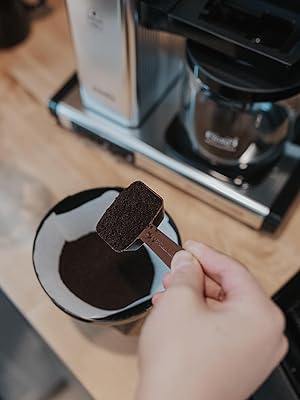
Figure 3: Adding coffee grounds to the filter in the brew basket.

Figure 4: Adjusting the manual drip-stop on the brew basket.
5.2 Product Overview Video
Video 1: A brief product overview video demonstrating the Technivorm Moccamaster coffee brewer's features and operation.
6. Maintenance
6.1 Daily Cleaning
- After each use, discard the used coffee grounds and paper filter.
- Wash the brew basket, glass carafe, and all lids with warm, soapy water. Rinse thoroughly.
- Wipe the exterior of the brewer with a damp cloth. Do not use abrasive cleaners or scouring pads.
6.2 Descaling
Regular descaling is crucial to maintain optimal performance and coffee quality. Technivorm Moccamaster recommends descaling every 100 filter packs, or approximately every 3 months with regular use.
- Prepare Descaling Solution: Use a descaling agent specifically designed for coffee makers, following the manufacturer's instructions. Alternatively, a solution of white vinegar and water (1 part vinegar to 1 part water) can be used.
- Run Descaling Cycle: Fill the water reservoir with the descaling solution. Place the empty carafe on the hot plate. Turn on the brewer and allow the full cycle to complete.
- Rinse Cycles: After the descaling cycle, run 2-3 full cycles with fresh, cold water only to thoroughly rinse the system and remove any residual descaling agent.
7. Troubleshooting
If you encounter issues with your coffee brewer, refer to the following common problems and solutions:
| Problem | Possible Cause | Solution |
|---|---|---|
| Coffee not brewing or slow brewing | Clogged water lines due to mineral buildup; brew basket drip-stop closed. | Perform a descaling cycle; ensure drip-stop is open. |
| Coffee tastes weak or watery | Too coarse a grind; insufficient coffee grounds; incorrect water-to-coffee ratio. | Use a finer grind; increase coffee grounds; adjust ratio according to preference. |
| Coffee tastes bitter or burnt | Too fine a grind; coffee sitting on hot plate too long (glass carafe models). | Use a coarser grind; consume coffee promptly or transfer to an insulated server. |
| Carafe drips when pouring | Carafe lid not properly seated. | Ensure the carafe lid is securely attached and aligned for pouring. |
8. Specifications
- Brand: Technivorm Moccamaster
- Model Name: 59691 KB
- Color: Brushed Silver
- Product Dimensions: 6.5"D x 12.75"W x 14"H
- Capacity: 10 Cups (40 oz / 1.25 Liters)
- Coffee Maker Type: Drip Coffee Machine
- Operation Mode: Manual
- Voltage: 120 Volts
- Item Weight: 6.26 pounds
- Material Type: Aluminum (housing), Glass (carafe), Copper (heating element)
- Filter Type: Reusable (requires #4 cone paper filters)
- Special Feature: Manual Drip-Stop, Auto Shut-off (after 100 minutes)
9. Warranty and Support
The Technivorm Moccamaster 59691 KB Coffee Brewer comes with a 5-year warranty. For warranty claims, technical support, or replacement parts, please contact Technivorm Moccamaster customer service directly. Refer to the official Technivorm Moccamaster website for the most up-to-date contact information and detailed warranty terms.


