
Introduction
This manual provides detailed instructions for the safe and proper installation and use of the OSD Audio FM-01 Fixed Flat Wall Mount. This mount is designed for LED TVs ranging from 32-inches to 55-inches, offering an ultra-slim profile for a clean, flush appearance.
Safety Warnings
Warning: The installer of this product must verify that the mounting surface, whether ceiling or wall, will safely support the combined weight of all attached equipment and hardware. OSD Audio will not be held liable for the improper use or installation of this product. Always consult a professional if unsure about your mounting surface's capacity.
Package Contents
Please verify that all components listed below are present before beginning installation. All necessary mounting hardware is included with your FM-01 wall mount.
- Wall Plate Assembly
- TV Bracket Rails (2x)
- Mounting Hardware Kit (screws, anchors, washers, spacers)
- Instruction Manual
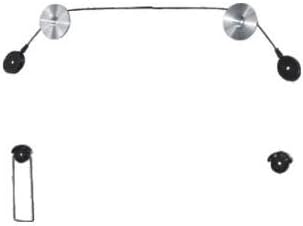
Specifications
| Model Number | FM-01 |
| Compatible TV/Monitor Size | 32" - 55" |
| Maximum Supported Weight | 110 lbs (50 kg) |
| Profile (Distance from Wall) | 0.57" (14.5 mm) |
| VESA Compatibility | Universal, up to 400x400 mm |
| Mounting Type | Fixed Wall Mount |
| Product Dimensions | 9.25 x 2 x 8.5 inches (approximate, assembled) |
| Item Weight | 1.05 pounds (0.48 kg) |
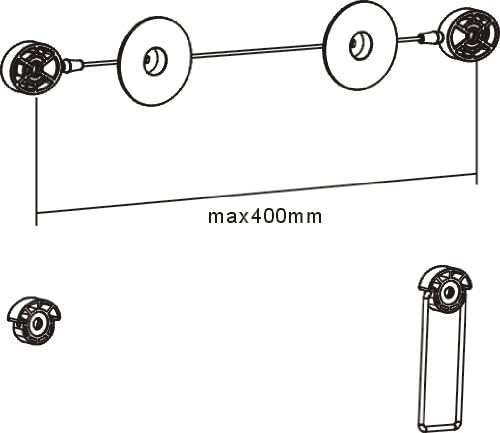

Setup and Installation
Pre-Installation Checklist
- Verify Wall Type: Ensure your wall can support the weight of your TV plus the mount. Common wall types include wood stud, concrete, or brick. Drywall alone is not sufficient.
- Locate Studs: For wood stud walls, use a stud finder to locate and mark the center of two adjacent studs.
- Check VESA Pattern: Confirm your TV's VESA mounting pattern (the distance between the four mounting holes on the back of your TV) is within the mount's supported range (up to 400x400 mm).
- Gather Tools: You will need a drill, level, tape measure, pencil, and a Phillips head screwdriver.
Installation Steps
- Mark Drilling Locations: Hold the wall plate assembly against the wall at your desired TV height. Use a level to ensure it is straight. Mark the drilling points through the holes on the wall plate.
- Drill Pilot Holes: Drill pilot holes at the marked locations. The size of the drill bit will depend on your wall type and the anchors/lag bolts provided.
- Attach Wall Plate: Secure the wall plate assembly to the wall using the appropriate lag bolts and washers. Ensure it is firmly attached and level.
- Attach TV Brackets: Identify the correct size screws for your TV's VESA mounting holes. Attach the two TV bracket rails to the back of your TV. Ensure they are securely fastened and oriented correctly to hook onto the wall plate.
- Hang the TV: With assistance, carefully lift the TV and hook the TV bracket rails onto the wall plate assembly. Ensure both sides are securely engaged.
- Secure TV (if applicable): Some mounts include security screws or pull-straps to prevent accidental dislodging. If provided, engage these features.
Note: Due to the ultra-slim profile, access to rear TV ports may be limited once mounted. Connect all necessary cables before hanging the TV.
Operation
Using the Fixed Mount
The OSD Audio FM-01 is a fixed wall mount, meaning it holds your TV in a stationary position close to the wall. It does not offer tilt, swivel, or extension capabilities. Once installed, your TV will remain in the position it was mounted.
- Viewing Angle: Position your TV at an optimal viewing height and angle during installation, as this cannot be adjusted afterward.
- Cable Management: Plan for cable routing before mounting to maintain a tidy appearance.
Maintenance
Regular maintenance ensures the longevity and safety of your TV wall mount.
- Periodic Inspection: Annually, inspect all screws and bolts to ensure they remain tight. Over time, vibrations or environmental changes can cause fasteners to loosen.
- Cleaning: Dust the mount periodically with a soft, dry cloth. Avoid abrasive cleaners or solvents that could damage the finish.
- Weight Limit: Do not exceed the maximum supported weight of 110 lbs.
Troubleshooting
If you encounter issues during or after installation, refer to the following common problems and solutions.
- TV Not Level:
- Ensure the wall plate was installed perfectly level. If not, minor adjustments may be possible by slightly loosening and re-tightening mounting screws, or re-drilling if necessary.
- Verify TV brackets are evenly attached to the TV.
- Mount Feels Loose:
- Re-tighten all wall mounting bolts and TV bracket screws.
- Ensure the wall material is appropriate and the anchors/lag bolts are correctly installed. If mounting into drywall without studs, the mount will not be secure.
- TV Does Not Hook Onto Wall Plate:
- Check the orientation of the TV bracket rails.
- Ensure there are no obstructions preventing the brackets from engaging with the wall plate.
Warranty and Support
For warranty information or technical support regarding your OSD Audio FM-01 Fixed Flat Wall Mount, please refer to the official OSD Audio website or contact their customer service department directly. Keep your purchase receipt as proof of purchase for any warranty claims.
Manufacturer: OSD Audio
Website: www.osdaudio.com