
PAC SWI-RC
PAC SWI-RC Steering Wheel Control Interface User Manual
Model: SWI-RC
1. Introduction
The PAC SWI-RC Steering Wheel Control Interface is designed to retain the factory steering wheel controls when installing an aftermarket radio in a wide range of vehicles. This universal interface provides seamless integration, allowing you to maintain convenience and safety features.

Image 1.1: The PAC SWI-RC-1 product packaging, showcasing the main module and its features.
2. Features
- Fast and easy steering wheel control retention for over 3000 vehicles.
- Quick and easy pre-programmed button function by DIP switch selection.
- Works on Analog (resistive) and Data SWC systems.
- Compatible with vehicles featuring CAN-Bus, GMLAN, CLASS II, LIN-Bus, I-BUS, or analog SWC.
- Supports classic, SWI-RC style button programming.
- Customizable button functions, including short press, long press, and button reassignment.
- Provides a 2 amp, 12-volt accessory output (for CAN-Bus, LAN, and Class II applications).
- Compatible with all late model brands of radios with 3.5mm or two-wire connections.
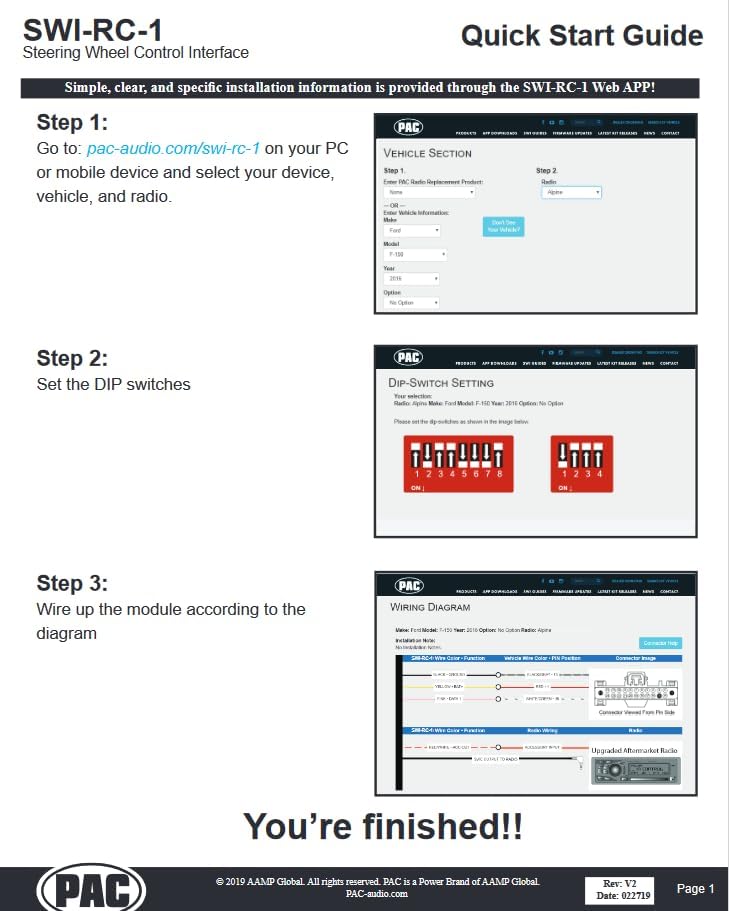
Image 2.1: The PAC SWI-RC-1 module with its associated wiring harness, showing the various connections.
3. Compatibility Notes
The PAC SWI-RC requires the aftermarket radio to be equipped with a wired remote input (typically a 3.5mm headphone style jack or a Blue/Yellow wire). This input may be labeled W/R, REM, Wired Remote, Remote, or Rem Cont on the back of the radio.
Important Incompatibilities:
- Kenwood Models: Not compatible with KDC-X598, KDC-BT318U, KDCBT-758-HD, KDCBT-558U, and KDC-X798. These models require the SWI-CP5.
- Clarion CZ500: Does not support remote Bluetooth controls.
- JVC Models KW-NT1 and KW-NT3HDT: Do not support Presets Up and Down from steering wheel controls.
- Pioneer AVIC-Fxxx Radios: Do not interpret radio preset seeking commands. This is a limitation of the radio, not the SWI-RC.
- Pioneer Radios with Bluetooth: Steering wheel controls will not adjust phone call volume. Volume must be adjusted on the radio face. This is a radio limitation, not the SWI-RC.
- Voice Recognition: Only AVIC-Z110BT, Z120BT, Z130BT, Z140BH, AVIC-X920BT, X930BT, and X940BT models support Voice Recognition via wired remote input.

Image 3.1: The PAC SWI-RC-1 module, its wiring harness, and the 3.5mm jack for wired remote input, essential for compatibility.
4. Setup and Installation
Installation of the SWI-RC-1 involves a few key steps, primarily guided by the PAC web application for specific vehicle and radio configurations. For detailed instructions, refer to the official Installation Manual (PDF) and User Guide (PDF) available on the product page or PAC's website.
Quick Start Overview:
- Step 1: Access the Web App
Go to pac-audio.com/swi-rc-1 on your PC or mobile device. Select your device, vehicle, and radio information. - Step 2: Set DIP Switches
Set the DIP switches on the SWI-RC-1 module according to the configuration provided by the web application. - Step 3: Wire the Module
Wire the module according to the specific wiring diagram generated by the web application for your vehicle and radio.

Image 4.1: A visual representation of the Quick Start Guide, illustrating the three main steps for installation: using the web app, setting DIP switches, and following the wiring diagram.
What's New: SWI-RC-1 vs. SWI-RC
The SWI-RC-1 offers several improvements over the classic SWI-RC, enhancing vehicle coverage and features.
| Feature/Benefit | SWI-RC-1 | SWI-RC |
|---|---|---|
| Works with CAN-Bus and other data SWC systems for more vehicle coverage | ✓ | X |
| Works with analog/resistive SWC systems | ✓ | ✓ |
| 12 Volt Accessory Output (CAN-Bus, LAN, Class II Applications) saves time looking for accessory wire | ✓ | X |
| Pre-programmed button functions, selectable by DIP switches, reduces installation time | ✓ | X |
| Programs by Classic SWI-RC Button Learning Mode | ✓ | ✓ |
| Radio selection by DIP Switch setting offers improved radio selection precision | ✓ | X |
| 2 Wire Resistive SWC Outputs for Power Acoustik, Soundstream, Pumpkin, Fahrenheit etc... | ✓ | X |
| Compatible with late model Alpine/Kenwood/JVC/Sony radios | ✓ | X |
| Quick on-line programming instructions eliminates cumbersome paper instructions | ✓ | X |
Table 4.2: Comparison of features and benefits between the SWI-RC-1 and the original SWI-RC, highlighting the advancements of the newer model.
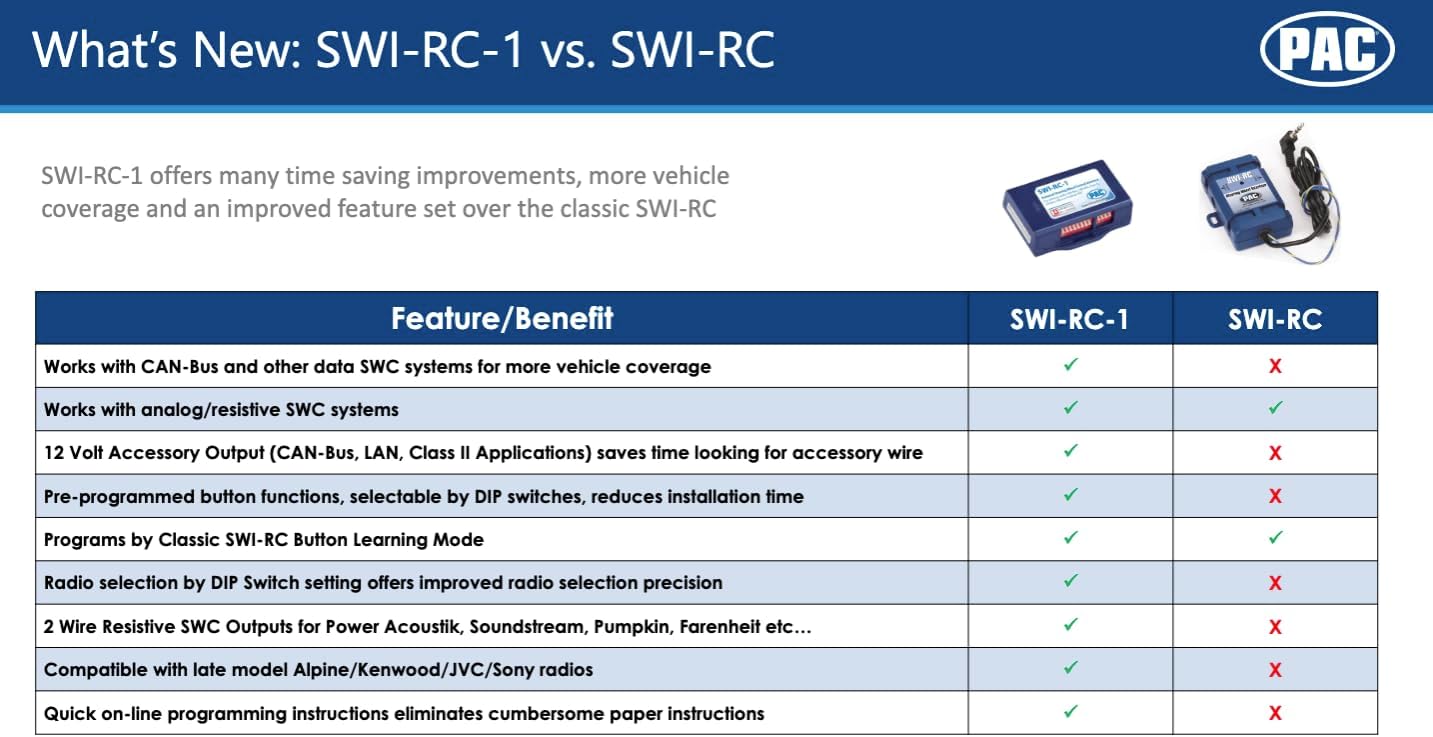
Image 4.3: Visual representation of the feature comparison table, detailing the improvements of the SWI-RC-1 over its predecessor.
Wiring Similarities (SWI-RC-1 vs. SWI-RC):
The table below highlights the wiring connections and their similarities or differences between the SWI-RC-1 and the older SWI-RC model.
| Function | SWI-RC-1 | SWI-RC | Notes |
|---|---|---|---|
| Constant 12v | Yellow | NA | Only required for CAN-Bus applications |
| Ground | Black | Black | Same |
| Accessory 12v | Red | Red | Same |
| Accessory 12v Output | Red/White | NA | Provides 12v acc. output for CAN-Bus, LAN, and Class II applications |
| Analog 1 | White | White | Same |
| Analog 2 | White/Black | White/Black | Same |
| Analog 3 | White/Red | White/Red | Same |
| Analog 4 | Green | Green | Same |
| Data 1 (LAN, MSCAN, SWCAN, LSFT) | Pink | NA | SWI-RC does not support CAN-Bus vehicles |
| Data 2 (LIN, IBUS, CLASS II, Serial) | Purple | NA | SWI-RC does not support CAN-Bus vehicles |
| Serial Data 1 | NA | Orange | Serial input deleted due to obsolete vehicle applications (GM HVAC) |
| Serial Data 2 | Purple | Yellow | SWI-RC-1 supports pre-programmed button functions in BMW |
| SWC Output-Kenwood/Newer JVC | Blue/Yellow | Blue/Yellow | Same |
| 2-Wire Resistive Radio Output 1 | Blue/Yellow | NA | SWI-RC does not support 2-wire resistive radios |
| 2-Wire Resistive Radio Output 2 | Brown | NA | SWI-RC does not support 2-wire resistive radios |
Table 4.4: Comparison of wiring functions between the SWI-RC-1 and the original SWI-RC, highlighting new features and shared connections.
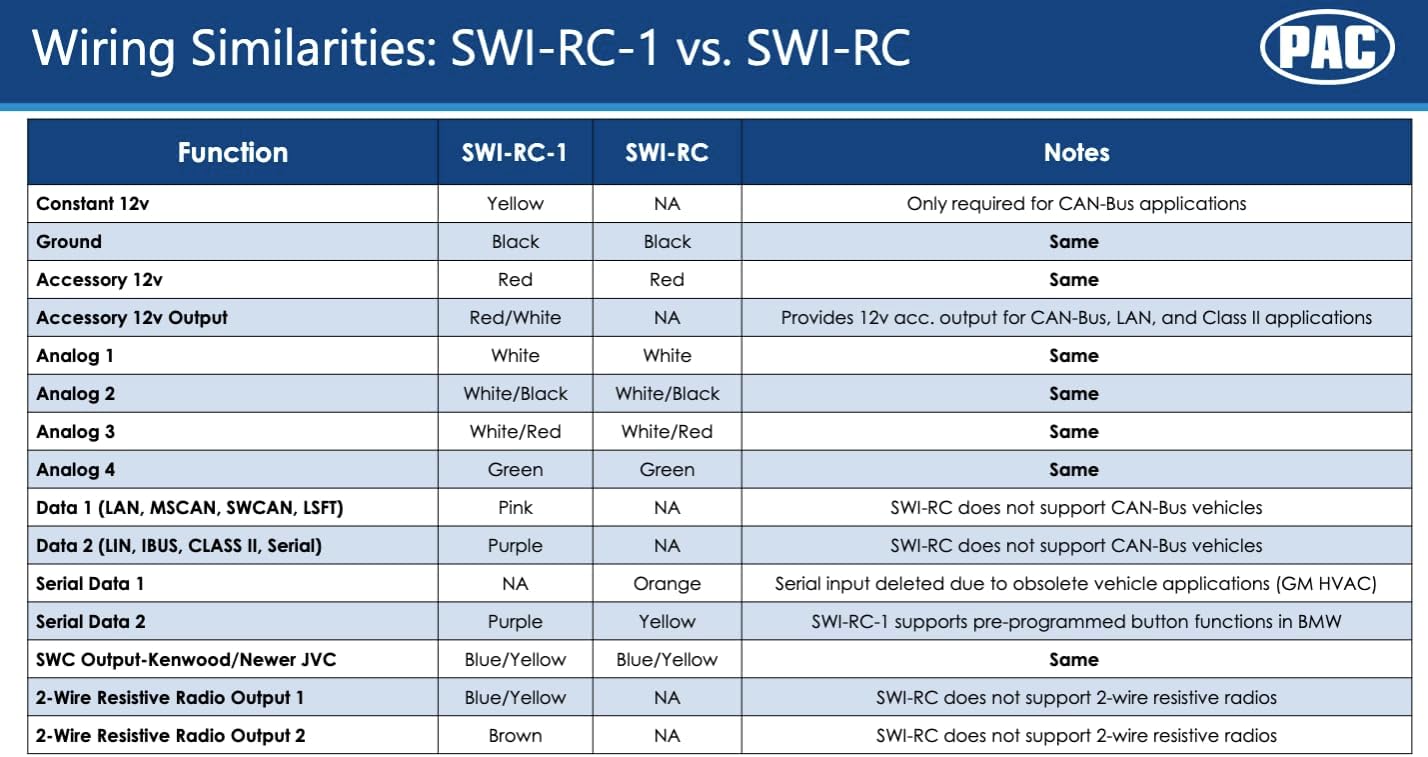
Image 4.5: Visual representation of the wiring similarities table, detailing the differences and commonalities in wiring between the SWI-RC-1 and SWI-RC models.
5. Operating Instructions
Once installed and configured, the PAC SWI-RC-1 allows you to control your aftermarket radio using your vehicle's existing steering wheel controls. The specific functions available will depend on your vehicle, radio, and the programming chosen during setup.
Button Programming:
The SWI-RC-1 supports both pre-programmed button functions via DIP switch selection and classic SWI-RC style button learning mode for custom assignments. You can customize functions for short presses, long presses, and reassign buttons as needed through the PAC web application or manual programming steps.
Accessory Output:
For vehicles with CAN-Bus, LAN, and Class II applications, the SWI-RC-1 provides a 2 amp, 12-volt accessory output. This can simplify wiring by providing a switched 12V source for your aftermarket radio.
6. Maintenance
The PAC SWI-RC Steering Wheel Control Interface is designed to be a maintenance-free device. Once properly installed and configured, no regular maintenance is required. Ensure all connections remain secure and free from moisture or physical damage.
7. Troubleshooting
If you encounter issues with your SWI-RC-1, review the following common problems and their potential solutions:
- Steering Wheel Controls Not Responding:
- Verify that your aftermarket radio has a wired remote input and that the SWI-RC-1 is correctly connected to it.
- Double-check the DIP switch settings against the PAC web application's recommendations for your specific vehicle and radio.
- Ensure all wiring connections are secure and correct according to the wiring diagram.
- Confirm your radio model is not listed as incompatible (e.g., certain Kenwood, Clarion, JVC models).
- Pioneer AVIC-Fxxx Radios - Preset Seeking Issues:
This is a known limitation of these specific Pioneer radio models, not the SWI-RC-1. The interface accurately sends the command, but the radio does not interpret it for preset seeking. There is no correction unless provided by Pioneer.
- Pioneer Radios with Bluetooth - Phone Call Volume:
Steering wheel controls will not adjust phone call volume on these radios. This is a limitation of the radio itself. Adjust phone call volume directly on the radio's face.
- JVC KW-NT1 and KW-NT3HDT - Presets Up/Down:
These JVC models do not support the Presets Up and Down function from steering wheel controls.
- Clarion CZ500 - Remote Bluetooth Controls:
This Clarion model does not support remote Bluetooth controls via the SWI-RC-1.
8. Specifications
- Model: SWI-RC
- Item Weight: 3.52 ounces
- Product Dimensions: 8.46 x 4.06 x 1.02 inches
- Manufacturer Part Number: SWIRC
- Special Features: Wireless (refers to wireless control capability, not wireless connection to radio)
- Compatible Devices: Radios from Pioneer, Sony, JVC, Alpine, Clarion, Kenwood, Blaupunkt, Jensen, Dual, Advent, OEM, Valor, and Visteon, provided they have a wired remote input. (See Compatibility Notes for specific incompatibilities).
- Controller Type: Steering Wheel
- Connectivity Technology: Bluetooth (refers to radio's Bluetooth features, not SWI-RC's connection method)
9. Warranty and Support
Warranty: This product includes a 3-year warranty. For warranty claims or service, please contact PAC customer support.
Support: For further assistance, detailed installation guides, or troubleshooting not covered in this manual, please visit the official PAC website or contact their customer support. You can also refer to the Installation Manual (PDF) and User Guide (PDF) linked on the product's Amazon page.
Online Resources:
Related documentsSWI-RC


Ask a question about this manual
Ask about setup, troubleshooting, compatibility, parts, safety, or missing instructions. Manuals+ will review the question and use this page’s manual context to help answer it.