
1. Overview
The Nikon N2000, also known as the F-301, is a 35mm Single-Lens Reflex (SLR) film camera designed for both student and professional photographers. It offers multiple shooting options and settings, including a built-in light meter, ISO control, and various exposure modes. This camera body is designed to be used with compatible Nikon F-mount lenses (not included).

Figure 1: Front view of the Nikon N2000 F-301 camera body.
Key Features:
- 35mm SLR film camera body.
- Built-in light meter for accurate exposure readings.
- Multiple shooting modes: Program, Aperture Priority, and Manual.
- Manual focus system with split circle and microprisms for precise focusing.
- Integrated motor drive for film advance at 2.5 frames per second.
- Compatible with a wide range of Nikon F-mount lenses (AI, AIS, AF-AFD, AFS, AF-I).
- Uses 4 AAA batteries for operation.
2. Setup
2.1. Battery Installation
The Nikon N2000 requires four AAA batteries for operation. Ensure the camera is powered off before installing or replacing batteries.
- Locate the battery compartment, typically on the bottom of the camera body.
- Open the battery compartment cover.
- Insert four AAA batteries, ensuring correct polarity (+/-) as indicated inside the compartment.
- Close the battery compartment cover securely.

Figure 2: Example of a battery compartment, similar to the Nikon N2000. Ensure correct battery orientation.
Note: Batteries are not included with the camera body.
2.2. Lens Attachment
The N2000 uses the Nikon F-mount system. To attach a lens:
- Remove the body cap from the camera and the rear cap from the lens.
- Align the mounting index (usually a white dot) on the lens with the corresponding index on the camera body.
- Insert the lens into the camera mount and rotate it clockwise until it clicks into place.
Caution: Non-AI lenses made before 1977 may damage the metering tab if mounted. G and DX lenses will mount but may not function properly in all modes. AI, AIS, and early autofocus lenses with an aperture ring are generally compatible.
2.3. Film Loading
Loading 35mm film into the N2000 is simplified by its built-in motor drive.
- Open the camera back by pulling up the film rewind knob.
- Place a 35mm film cassette into the film chamber on the left side.
- Pull the film leader across to the take-up spool on the right, ensuring it engages with the sprocket teeth.
- Close the camera back. The camera will automatically advance the film to the first frame.
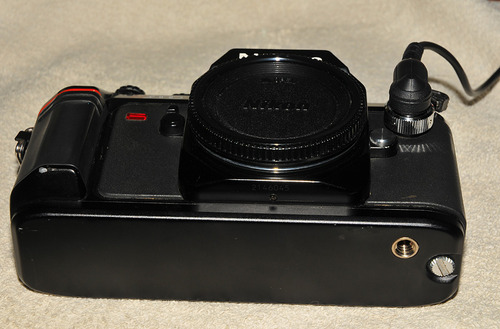
Figure 3: Nikon N2000 with a lens, ready for film loading.
Note: Film is not included with the camera body. The camera features a window on the back to confirm the type of film loaded.
3. Operation
3.1. Power On/Off
Locate the main power switch, usually around the shutter release button. Turn it to the 'ON' position to activate the camera. Turn it 'OFF' when not in use to conserve battery life.
3.2. Focusing
The Nikon N2000 is a manual focus camera. To achieve sharp focus:
- Look through the viewfinder.
- Rotate the focusing ring on your lens until the image in the split circle and microprism collar in the center of the viewfinder appears sharp and aligned.
The split circle and microprisms provide visual aids for precise manual focusing.
3.3. Exposure Modes
The N2000 offers several exposure modes:
- Program (P) Mode: The camera automatically sets both aperture and shutter speed for optimal exposure.
- Aperture Priority (A) Mode: You select the aperture, and the camera automatically sets the appropriate shutter speed.
- Manual (M) Mode: You manually set both the aperture and shutter speed. The built-in light meter will indicate if your settings result in over, under, or correct exposure.
To select an exposure mode, rotate the mode dial on the camera body.
3.4. Setting ISO
The ISO setting on the N2000 is typically set manually to match the film speed (e.g., ISO 100, 200, 400). Locate the ISO dial or button and adjust it according to the film loaded in the camera.
3.5. Shutter Speed and Aperture
In Manual mode, you control both shutter speed and aperture. Shutter speeds range from 1 second to 1/2000th of a second, plus a Bulb (B) setting for long exposures. Aperture is controlled via the lens's aperture ring.
Shutter speeds are displayed in the viewfinder, which is helpful in low-light conditions.
3.6. Light Metering
The N2000 features center-weighted metering. This system measures the light predominantly from the center of the frame, providing a balanced exposure reading for most situations.
3.7. Self-Timer
To use the self-timer, activate the self-timer lever or button. The N2000 typically has a 10-second delay before the shutter fires, allowing the photographer to be included in the shot or to minimize camera shake.
3.8. Exposure Lock
The exposure lock feature allows you to meter a specific part of your scene, lock that exposure, and then recompose your shot before taking the picture. Consult your camera's specific controls for activating the exposure lock.
3.9. Film Rewind
After exposing all frames on a roll of film, the N2000 requires manual film rewind. It does not automatically rewind the film. To rewind:
- Press the film rewind release button on the bottom of the camera.
- Rotate the film rewind crank (usually integrated with the film rewind knob) in the direction indicated until you feel the tension release, indicating the film is fully rewound into its cassette.
- Open the camera back and remove the film cassette.
4. Maintenance
Proper care and maintenance will ensure the longevity and optimal performance of your Nikon N2000 camera.
4.1. Cleaning the Camera Body
- Use a soft, lint-free cloth to wipe down the camera body.
- For stubborn dirt, slightly dampen the cloth with water or a mild camera cleaning solution. Avoid excessive moisture.
- Do not use harsh chemicals or abrasive materials.
4.2. Cleaning the Lens
- Use a blower brush to remove dust from the lens surface.
- For smudges or fingerprints, use a specialized lens cleaning solution and a clean microfiber lens cloth.
- Clean in a circular motion from the center outwards.
4.3. Storage
- Store the camera in a cool, dry place, away from direct sunlight and extreme temperatures.
- If storing for an extended period, remove the batteries to prevent leakage.
- Keep the camera in a protective bag or case to prevent dust accumulation and physical damage.
5. Troubleshooting
5.1. Camera Does Not Power On
- Check Batteries: Ensure four fresh AAA batteries are correctly installed with the proper polarity.
- Battery Compartment: Verify the battery compartment cover is securely closed.
- Power Switch: Confirm the power switch is in the 'ON' position.
5.2. Film Does Not Advance
- Film Leader: Ensure the film leader is properly engaged with the take-up spool and sprocket teeth when loading.
- Camera Back: Make sure the camera back is fully closed.
- Batteries: Low batteries can affect motor drive function. Replace if necessary.
5.3. Images Are Underexposed or Overexposed
- ISO Setting: Verify the ISO setting on the camera matches the film speed.
- Metering: Ensure you are metering correctly for your scene, especially in challenging lighting conditions. Use exposure lock if needed.
- Manual Mode: In Manual mode, adjust aperture and shutter speed according to the light meter's indication.
- Lens Aperture: Check that the lens aperture ring is not accidentally set to a very small (high f-number) or very large (low f-number) opening for the lighting conditions.
5.4. Blurry Images
- Focus: Re-check your manual focus using the split circle and microprisms in the viewfinder.
- Shutter Speed: Use a faster shutter speed, especially when shooting handheld or subjects in motion, to prevent camera shake.
- Tripod: For very slow shutter speeds or precise shots, use a tripod.
6. Specifications
| Feature | Specification |
|---|---|
| Brand | Nikon |
| Model Name | N2000 (F-301) |
| Camera Type | 35mm SLR Film Camera |
| Compatible Mountings | Nikon F |
| Focus Type | Manual Focus (MF) |
| Metering Description | Center Weighted |
| Exposure Control | Manual, Aperture Priority, Program |
| Shutter Speed Range | 1 sec to 1/2000 seconds, Bulb (B) |
| Min Shutter Speed | 1/125 seconds (flash sync) |
| ISO Range | Manual setting, typically 25-6400 (camera reads DX code or manual set) |
| Self Timer | 10 seconds |
| Flash Modes | Automatic (with external flash), TTL capability |
| Built-In Flash | No |
| Battery Type | 4 AAA batteries |
| Film Advance | Built-in Motor Drive (2.5 fps) |
| Film Rewind | Manual |
| Viewfinder | Optical |
| Dimensions (Approx.) | Not available |
| Weight (Approx.) | Not available |
Note: Specifications are subject to change without notice.
7. Warranty & Support
Specific warranty information for the Nikon N2000 F-301 camera body is not provided in this manual. For details regarding warranty coverage, service, or technical support, please refer to the documentation included with your purchase or contact Nikon customer service directly.
You can typically find support information on the official Nikon website or through authorized Nikon service centers.
Please retain your proof of purchase for any warranty claims.


