
1. Introduction
This manual provides detailed instructions for the Mobo Waterproof Bluetooth Speaker, model VARBBWTNEGRA. Please read this manual thoroughly before using the product to ensure proper operation, maximize its features, and extend its lifespan. This speaker is designed for use in environments where it may be exposed to water splashes, such as bathrooms or outdoor settings, offering convenient wireless audio.
2. Safety Information
- Do not immerse the speaker in water. While it is waterproof against splashes and jets, it is not designed for submersion.
- Ensure the charging port cover is securely closed before exposing the speaker to water to maintain its waterproof integrity.
- Keep the speaker away from extreme temperatures, direct sunlight, and open flames.
- Do not attempt to disassemble, repair, or modify the speaker. This will void the warranty and may cause damage or injury.
- Use only the provided charging cable or a certified compatible cable.
- Clean the speaker with a soft, damp cloth. Do not use abrasive cleaners or solvents.
3. Package Contents
Please check the package for the following items:
- 1x Mobo Waterproof Bluetooth Speaker (Model VARBBWTNEGRA)
- 1x USB Charging Cable
4. Product Overview
Familiarize yourself with the speaker's components and controls.
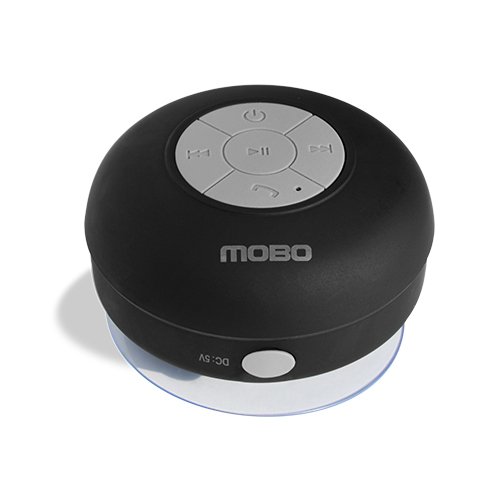
Figure 4.1: Front view of the Mobo Waterproof Bluetooth Speaker, showing the control panel.
Control Panel

Figure 4.2: Detailed view of the speaker's control buttons.
- Power Button (⏻): Press and hold to turn the speaker On or Off.
- Play/Pause Button (⏸): Press to play or pause audio.
- Previous Track / Volume Down Button (⏮): Short press for previous track. Long press to decrease volume.
- Next Track / Volume Up Button (⏭): Short press for next track. Long press to increase volume.
- Call Button (☎): Press to answer or end a phone call.
- Microphone: For hands-free calling.
Charging Port and Suction Cup

Figure 4.3: Back view of the speaker, showing the suction cup and the charging port with its protective cover.
- Charging Port: Located on the side, protected by a waterproof cover. Used for charging the speaker's internal battery.
- Waterproof Cover: Must be securely sealed to maintain water resistance.
- Suction Cup: Located on the back, allows for mounting on smooth, flat surfaces.
5. Setup
5.1 Charging the Speaker
- Carefully open the waterproof cover on the side of the speaker to expose the charging port.
- Connect the small end of the provided USB charging cable to the speaker's charging port.
- Connect the larger end of the USB cable to a USB power source (e.g., computer USB port, USB wall adapter).
- The LED indicator light will illuminate during charging. It will typically change color or turn off once fully charged.
- Once charging is complete, disconnect the cable and firmly close the waterproof cover to ensure water resistance.
5.2 Pairing via Bluetooth
- Ensure the speaker is fully charged.
- Press and hold the Power button (⏻) for a few seconds until you hear an audible prompt or see the LED indicator light flashing, indicating it is in pairing mode.
- On your Bluetooth-enabled device (smartphone, tablet, laptop), go to the Bluetooth settings.
- Search for available devices. You should see "Mobo Speaker" or a similar name appear in the list.
- Select "Mobo Speaker" to connect. Once successfully paired, you will hear a confirmation sound, and the LED indicator light may change its state (e.g., solid blue).
- The speaker will automatically attempt to reconnect to the last paired device when powered on, if that device's Bluetooth is active and within range.
6. Operating Instructions
6.1 Power On/Off
- To Power On: Press and hold the Power button (⏻) until the LED indicator lights up and you hear a power-on sound.
- To Power Off: Press and hold the Power button (⏻) until the LED indicator turns off and you hear a power-off sound.
6.2 Music Playback
- Play/Pause: Press the Play/Pause button (⏸) to start or pause music playback.
- Next Track: Short press the Next Track button (⏭) to skip to the next song.
- Previous Track: Short press the Previous Track button (⏮) to go back to the beginning of the current song or to the previous song.
- Volume Up: Long press the Volume Up button (⏭) to increase the volume.
- Volume Down: Long press the Volume Down button (⏮) to decrease the volume.
6.3 Call Handling
- Answer Call: When a call comes in, press the Call button (☎) to answer.
- End Call: During a call, press the Call button (☎) to end the conversation.
- Reject Call: When a call comes in, press and hold the Call button (☎) to reject the call.
6.4 Using the Suction Cup
To attach the speaker to a smooth, flat surface (like a shower wall or tile):
- Ensure the surface is clean, dry, and smooth.
- Lightly moisten the suction cup for better adhesion.
- Press the speaker firmly against the desired surface, ensuring the suction cup creates a seal.
- To remove, gently pull on the edge of the suction cup to break the seal.
7. Maintenance
- Cleaning: Wipe the speaker with a soft, slightly damp cloth. Do not use harsh chemicals, cleaning sprays, or abrasive materials.
- Water Resistance: Always ensure the charging port cover is fully and securely closed when not charging, especially before exposing the speaker to water.
- Storage: Store the speaker in a cool, dry place when not in use. Avoid prolonged exposure to direct sunlight or high temperatures.
- Battery Care: To prolong battery life, avoid fully discharging the speaker frequently. Charge it regularly, even if not used for extended periods.
8. Troubleshooting
| Problem | Possible Cause | Solution |
|---|---|---|
| Speaker does not turn on. | Battery is depleted. | Charge the speaker fully using the provided USB cable. |
| Cannot pair with Bluetooth device. | Speaker not in pairing mode; Bluetooth off on device; device too far. | Ensure speaker is powered on and in pairing mode (flashing LED). Turn on Bluetooth on your device. Move device closer to the speaker. |
| No sound or low volume. | Volume too low on speaker or device; speaker not connected. | Increase volume on both the speaker and your connected device. Verify Bluetooth connection. |
| Suction cup does not stick. | Surface is dirty, uneven, or porous; suction cup is dry. | Clean the surface thoroughly. Ensure it is smooth and non-porous. Lightly moisten the suction cup before pressing firmly. |
| Water enters the speaker. | Charging port cover not sealed; speaker immersed. | Ensure the charging port cover is always securely closed when not charging. Do not immerse the speaker in water. |
| Short battery life. | Battery not fully charged; battery degradation over time. | Ensure the speaker is fully charged before use. Battery performance may decrease over time with regular use. |
9. Specifications
| Feature | Description |
|---|---|
| Brand | Mobo |
| Model Name | VARBBWTNEGRA |
| Connectivity Technology | Bluetooth |
| Speaker Type | Outdoor |
| Mounting Type | Tabletop (with suction cup for wall mounting) |
| Color | Black |
| Waterproof | Yes (splash-proof, not submersible) |
| Power Source | Battery |
| Item Weight | 50 Grams |
| Recommended Uses | Music, movies, games, calls |
| Compatible Devices | Laptop, Smartphone, Tablet, Television |
| UPC / GTIN | 842797038749 |
10. Warranty and Support
For warranty information or technical support, please refer to the documentation provided at the time of purchase or contact Mobo customer service through their official website or contact channels. Keep your proof of purchase for warranty claims.