
Introduction
The Sunpak DigiFlash 2800 is an electronic flash unit designed to provide enhanced lighting for your Canon EOS Digital SLR camera. This compact and lightweight flash offers E-TTL compatibility, ensuring seamless integration with your camera's exposure system. It features a versatile bounce head and an auto-focus assist light to improve photographic results in various lighting conditions.
Key features include:
- Small and lightweight design, powered by 2 AA batteries.
- Guide Number (ISO 100): 100' (30m) for powerful illumination.
- Automatic recognition of TTL signals upon mounting.
- TTL automatic check function and EV adjustment buttons for precise control.
- 90-degree bounce head for indirect, softer lighting.
- Auto Focus Assist Light to aid focusing in low-light environments.

Figure 1: Front view of the Sunpak DigiFlash 2800 E-TTL Flash unit.
Setup
1. Battery Installation
- Locate the battery compartment on the back of the flash unit.
- Open the battery compartment cover.
- Insert two (2) AA batteries, ensuring correct polarity (+ and -) as indicated inside the compartment.
- Close the battery compartment cover securely.
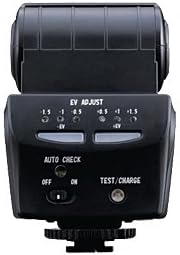
Figure 2: Back view of the flash unit with the battery compartment open, showing battery insertion points.
2. Mounting to Camera
- Ensure both the camera and the flash unit are powered off.
- Slide the flash unit's mounting foot into your Canon EOS camera's hot shoe.
- Tighten the locking wheel on the flash unit's mounting foot to secure it firmly to the camera.
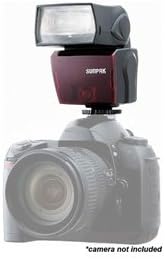
Figure 3: The Sunpak DigiFlash 2800 flash unit securely mounted on a Canon EOS DSLR camera.
Setup and Overview Video
Video 1: An unboxing and setup guide for the Sunpak DigiFlash 2800, demonstrating battery installation and mounting the flash to a Canon camera.
Operating Instructions
1. Power On/Off
To power on the flash unit, slide the ON/OFF switch to the 'ON' position. To power off, slide the switch to 'OFF'. Allow a few seconds for the flash to charge after powering on.
2. EV Adjustment
The EV ADJUST buttons allow you to fine-tune the flash output. Use the '-EV' button to decrease flash power and the '+EV' button to increase it. Indicator lights will show the current exposure compensation setting.

Figure 4: The back panel of the flash unit, highlighting the EV adjustment controls and power switch.
3. Test/Charge Button
Press the TEST/CHARGE button to manually fire a test flash. This button also indicates the flash's charge status. A red light typically indicates charging, while a green light signifies it's ready to fire.
4. 90-Degree Bounce Head
The flash head can be tilted upwards by 90 degrees. This feature allows you to bounce the flash off a ceiling or wall, creating softer, more natural-looking light and reducing harsh shadows. Simply tilt the flash head to the desired angle.
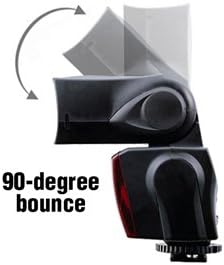
Figure 5: The flash unit with its head tilted to demonstrate the 90-degree bounce feature.
5. Auto Focus Assist Light
The integrated Auto Focus Assist Light helps your camera achieve focus in dimly lit conditions, ensuring sharper images even when ambient light is scarce.
Maintenance
To ensure the longevity and optimal performance of your Sunpak DigiFlash 2800, follow these maintenance guidelines:
- Cleaning: Use a soft, dry cloth to clean the exterior of the flash unit. For the flash tube and sensor, use a lens cleaning cloth and solution if necessary, being careful not to scratch the surfaces.
- Storage: When not in use for extended periods, remove the AA batteries to prevent leakage and store the flash in a cool, dry place away from direct sunlight and extreme temperatures.
- Battery Replacement: Replace batteries promptly when the charge indicator shows low power or when the flash recycle time becomes excessively long. Always use fresh, high-quality AA batteries.
Troubleshooting
If you encounter issues with your Sunpak DigiFlash 2800, refer to the following common troubleshooting steps:
- Flash Not Firing:
- Ensure the flash unit is powered 'ON'.
- Check that the batteries are correctly installed and have sufficient charge.
- Verify the flash is securely mounted to the camera's hot shoe.
- Confirm that the camera's flash settings are enabled and compatible with an external flash.
- Inconsistent Flash Output:
- Review the EV adjustment settings on the flash unit.
- Ensure batteries are fully charged, as low power can affect consistency.
- Check for any obstructions between the flash and the subject.
- Slow Recycle Time:
- This flash typically has an initial charge time of approximately 40 seconds and subsequent charges of 4-5 seconds. If it's significantly slower, replace the batteries.
Specifications
| Feature | Specification |
|---|---|
| Brand | SUNPAK |
| Model | DigiFlash 2800 |
| Compatible Mountings | Canon EOS |
| Camera Flash Type | Electronic Flash |
| Flash Sync Speed | 1/200 |
| Guide Number (ISO 100) | 100' (30m) |
| Power Source | 2 AA batteries |
| Bounce Head | 90 Degree |
| Included Components | 2 AA batteries |
Warranty and Support
For specific warranty information regarding your Sunpak DigiFlash 2800, please refer to the documentation included with your purchase or visit the official SUNPAK website. Warranty terms and conditions may vary by region and retailer.
Should you require technical assistance or have questions not covered in this manual, please contact SUNPAK customer support through their official channels. Ensure you have your product model number and purchase details available when seeking support.