1. Introduction and Overview
The Polk Audio DSW PRO 440 WI is an 8-inch high-performance subwoofer designed to deliver smooth, powerful bass. Its compact design allows for flexible placement within a room, making it an ideal addition to compact speaker systems or soundbars. This manual provides essential information for the proper setup, operation, and maintenance of your subwoofer.

Figure 1.1: Front view of the Polk Audio DSW PRO 440 WI Subwoofer.
Key features include Dynamic Balance technology for deep bass, Klippel Distortion Analyzer for optimized performance, and exclusive PRO Technology for room optimization. It also features intelligent amplifiers for efficiency and a convenient Night Mode accessible via remote control.
2. What's in the Box
Upon unpacking your Polk Audio DSW PRO 440 WI Subwoofer, please ensure all the following components are present:
- Woofer Unit
- Power Cable
- Remote Control
- Warranty Information
3. Features
The DSW PRO 440 WI Subwoofer incorporates several advanced technologies for superior audio performance:
- Dynamic Balance: Patented Polk Audio technology and construction techniques produce powerful, deep bass performance.
- Klippel Distortion Analyzer: State-of-the-art optimizations to the motor structure, voice coil alignment, and suspension ensure efficient performance at all volumes.
- Exclusive PRO Technology: Polk Room Optimizer (PRO) features four-way phase selection, four presets, and an easy-to-read blue status LED for optimal performance adjustment from your listening position.
- Maximum Efficiency: Proprietary intelligent amplifiers generate minimal heat and require less power, even at extreme listening levels.
- Night Mode: Quickly and easily lower the subwoofer’s intensity directly from the remote control.
4. Setup
Proper setup is crucial for optimal performance of your subwoofer. Follow these steps for connection and initial configuration:
4.1 Placement
The DSW PRO 440 WI's compact design allows for versatile placement. While it can be placed in a corner or tucked away, experiment with different locations in your room to find the spot that yields the best bass response for your listening area. Avoid placing it directly against a wall if possible, as this can sometimes lead to boomy bass.

Figure 4.1: Example placement of the subwoofer in a home audio setup.
4.2 Connections
Before making any connections, ensure your subwoofer and all connected audio components are powered off.

Figure 4.2: Rear panel connections and controls.
- Power Connection: Connect the provided power cable to the AC IN port on the rear panel of the subwoofer and then to a suitable wall outlet (220V/240V - 50Hz for India).
- Audio Connection (LFE/Subwoofer Output): If your AV receiver or processor has a dedicated LFE or subwoofer output, connect a single RCA cable from this output to the LFE IN port on the subwoofer. This is the recommended connection method for home theater systems.
- Audio Connection (Line In): If your receiver does not have a dedicated LFE output, connect RCA cables from the receiver's pre-out (front left/right) to the LINE IN (Left/Right) ports on the subwoofer.
- Speaker Level Connection (Optional): For receivers without pre-out or LFE outputs, you can connect speaker wires from your receiver's main speaker outputs to the SPEAKER IN terminals on the subwoofer. Then, connect speaker wires from the SPEAKER OUT terminals on the subwoofer to your main front speakers. Ensure correct polarity (+ to + and - to -).
4.3 Initial Settings
After connecting, power on your subwoofer and receiver. Use the controls on the rear panel or the remote control to adjust the following:
- Volume: Start with the volume at a low level and gradually increase it until the bass blends seamlessly with your main speakers.
- Low Pass Filter (Crossover): This control determines the highest frequency the subwoofer will reproduce. If using an LFE connection, set your receiver's subwoofer crossover. If using Line In or Speaker Level connections, adjust the Low Pass filter on the subwoofer to blend with your main speakers (typically between 80Hz and 120Hz).
- Phase: Adjust the phase (0° or 180°) to ensure the subwoofer's output is in phase with your main speakers. Listen for the strongest and most coherent bass response.
- PRO Technology: Utilize the Polk Room Optimizer (PRO) presets and phase selection to fine-tune the subwoofer's performance to your room acoustics. Refer to the detailed PRO Technology section in the full manual for advanced calibration.
5. Operation
Operating your Polk Audio DSW PRO 440 WI Subwoofer is straightforward once properly set up.
5.1 Power On/Off
The subwoofer has a power switch on the rear panel. For daily use, it is recommended to leave the subwoofer in 'Auto' mode (if available) or 'On' mode, allowing it to power on automatically when an audio signal is detected and enter standby when no signal is present.
5.2 Volume Control
Adjust the subwoofer's volume using the dedicated knob on the rear panel or the remote control. The goal is to achieve a balanced sound where the bass complements, rather than overwhelms, the rest of your audio system.
5.3 Night Mode
For late-night listening or when you need to reduce bass intensity without disturbing others, activate 'Night Mode' using the remote control. This feature quickly lowers the subwoofer's output.
6. Maintenance
To ensure the longevity and optimal performance of your Polk Audio DSW PRO 440 WI Subwoofer, follow these simple maintenance guidelines:
- Cleaning: Dust the cabinet regularly with a soft, dry cloth. For stubborn marks, use a slightly damp cloth, but avoid excessive moisture. Do not use harsh chemicals or abrasive cleaners.
- Ventilation: Ensure the subwoofer has adequate ventilation. Do not block any vents or place it in an enclosed space without proper airflow, as this can lead to overheating.
- Environment: Keep the subwoofer away from direct sunlight, heat sources, and excessive humidity. Avoid placing it in areas prone to vibrations or extreme temperatures.
- Power Cable: Periodically check the power cable for any signs of damage. If damaged, replace it immediately with an approved cable.
7. Troubleshooting
If you encounter issues with your subwoofer, refer to the following common problems and solutions:
| Problem | Possible Cause | Solution |
|---|---|---|
| No Sound from Subwoofer |
|
|
| Distorted or Boomy Bass |
|
|
| Subwoofer Not Powering On |
|
|
If the problem persists after attempting these solutions, please contact Polk Audio customer support or an authorized service center.
8. Specifications
Detailed technical specifications for the Polk Audio DSW PRO 440 WI Subwoofer:
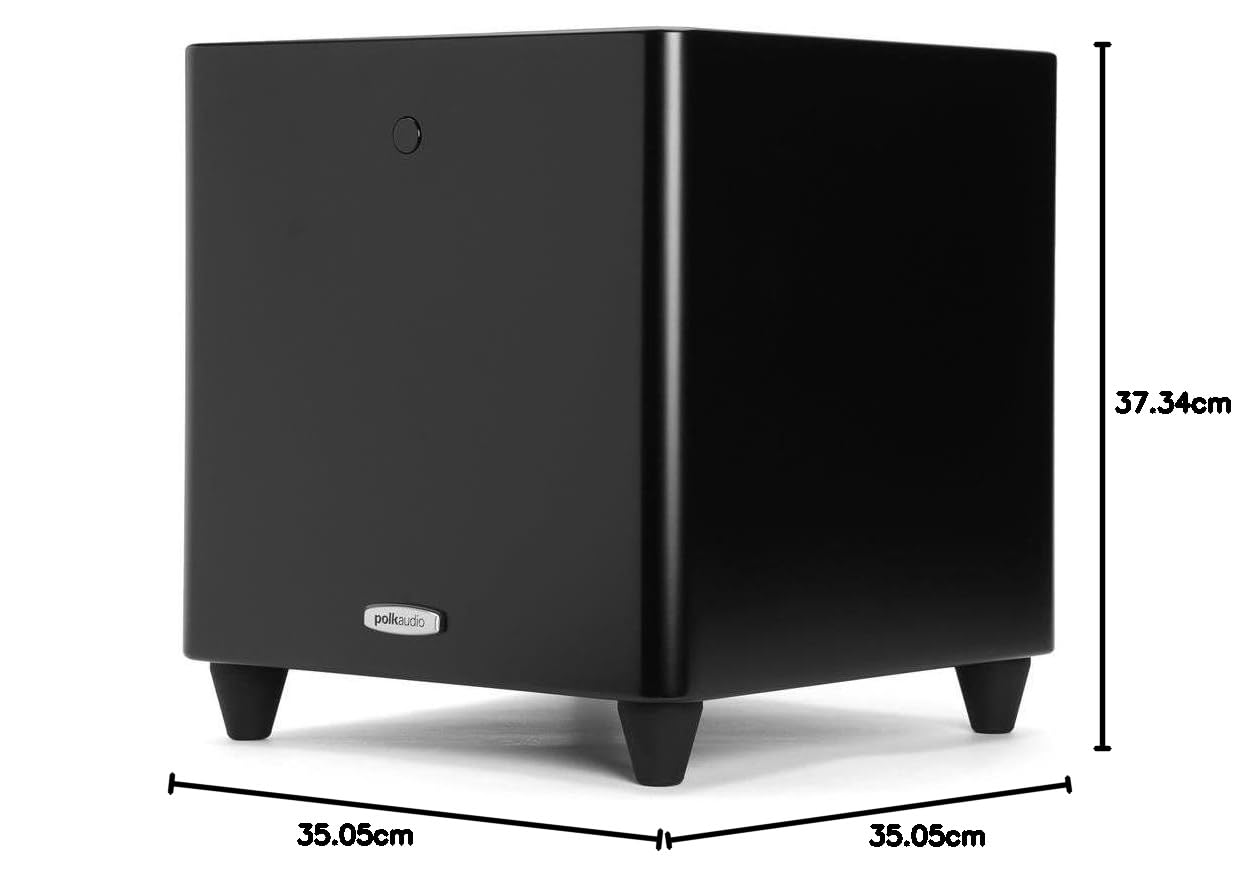
Figure 8.1: Dimensions of the Polk Audio DSW PRO 440 WI Subwoofer.
| Specification | Value |
|---|---|
| Model Name | DSW PRO 440 WI |
| Speaker Type | 8" Single Woofer Speaker |
| Material | MDF |
| Colour | Black |
| Subwoofer Diameter | 8 Inches |
| RMS Power Range - Amplifiers | 150 Watts |
| Speaker Maximum Output Power | 600 Watts |
| Surround Sound Channel Configuration | 1 |
| Connectivity Technology | Auxiliary, Wi-Fi |
| Control Method | Remote |
| Power Source | AC |
| Item Weight | 13.61 kg (13 kg 600 g) |
| Product Dimensions (LxWxH) | 35.05 x 35.05 x 37.34 cm |
| Manufacturer | Polk Audio |
| First Available | 6 August 2012 |
9. Warranty and Support
The Polk Audio DSW PRO 440 WI Subwoofer comes with a 1-year manufacturer's warranty. All gadgets, home theater systems, speakers, amplifiers, and subwoofers sold by authorized channels carry respective brand/manufacturer's warranty, which is valid Pan-India. During the warranty period, all service and warranty claims are provided directly by the manufacturer/brand and not by the dealer/re-seller.
For product quality concerns, technical issues, or to claim warranty service, kindly contact Polk Audio directly. Your purchase includes a GST/TAX invoice with contact details for support.
Legal Disclaimer: Products are new, original, sealed pack, official, genuine, legal, duties, taxes, and GST paid. All electronics are made to work with Indian electrical/voltage system (220V/240V - 50Hz). Products listed are non-returnable/non-refundable. Read product info carefully before purchasing. If ordered product arrives damaged/opened, you may deny acceptance and return. Notify us within 24 hours of receiving damaged goods. All disputes are subject to Mumbai Jurisdiction only.


