Introduction
This manual provides essential information for the safe and efficient operation of your ONKYO AERO Sound System iPod Dock CD Tuner Amplifier System CBX-500. Please read it thoroughly before using the unit and keep it for future reference.
The CBX-500 is a compact audio system that integrates a CD player, amplifier, tuner, and speakers, along with a dedicated iPod/iPhone dock. It is designed to deliver high-quality audio by transmitting music data from iPods and iPhones digitally, minimizing sound degradation. Key features include Onkyo's proprietary 'AERO ACOUSTIC DRIVE' bass reflex technology for enhanced low frequencies, a robust power transformer, and a digital amplifier built with carefully selected components. The system also offers convenient features such as a remote control for intuitive iPod/iPhone music library operation, a snooze function with a repeat alarm, and a program timer with up to four modes. The unique slide-out dock port protects the connector when not in use by retracting into the main unit.
Product Overview

Figure 1: Front view of the CBX-500 with an iPhone docked. This image shows the sleek black design of the unit, with the central speaker grille and the retractable dock at the bottom, holding an iPhone.
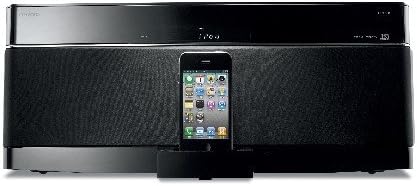
Figure 2: Angled view of the CBX-500, highlighting its compact form factor and the integrated iPhone dock. The image provides a perspective of the unit's depth and the placement of the docked device.
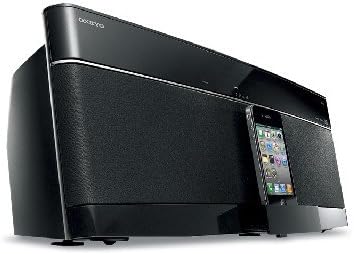
Figure 3: Top-down view of the CBX-500 with the top panel removed, revealing the internal speaker drivers. This view illustrates the integrated speaker design and the compact arrangement of components within the system.
Setup
1. Unpacking and Placement
- Carefully remove the unit and all accessories from the packaging.
- Place the CBX-500 on a stable, flat surface, ensuring adequate ventilation around the unit. Avoid placing it near heat sources or in direct sunlight.
2. Power Connection
- Connect the power cord securely to the AC inlet on the rear of the unit, then plug the other end into a wall outlet.
3. Antenna Connection
- For FM/AM radio reception, connect the supplied FM antenna (if included) to the FM antenna terminal on the rear panel. Extend the antenna for optimal reception. Note: An external antenna may be required for improved reception in some areas.
4. iPod/iPhone Dock Setup
- Press the 'OPEN' button (or slide the dock tray manually) to extend the iPod/iPhone dock.
- Insert the appropriate Universal Dock Adapter for your specific iPod or iPhone model into the dock.
- Carefully place your iPod or iPhone onto the dock connector. Ensure it is seated firmly.
- To protect the connector when not in use, gently push the dock tray back into the unit until it clicks into place.
Operating Instructions
1. Power On/Off
- Press the POWER button on the unit or remote control to turn the system on or off.
2. Source Selection
- Press the FUNCTION button on the unit or the dedicated source buttons (e.g., CD, iPod/iPhone, TUNER) on the remote control to select your desired audio source.
3. CD Playback
- Select the CD function.
- Insert a CD into the slot-in CD tray. The unit will automatically load the CD and begin playback.
- Use the PLAY/PAUSE, STOP, SKIP (►►| / |◄◄) buttons on the unit or remote control to manage playback.
4. iPod/iPhone Playback
- Ensure your iPod/iPhone is correctly docked.
- Select the iPod/iPhone function.
- Use the remote control to navigate your iPod/iPhone's music library and control playback (e.g., PLAY/PAUSE, SKIP).
5. Tuner Operation
- Select the TUNER function.
- Use the TUNING buttons on the unit or remote control to scan for radio stations.
- Refer to the full manual for instructions on presetting stations.
6. Volume Control
- Adjust the volume using the VOLUME +/- buttons on the unit or remote control.
- The 'Active BASS Control' circuit automatically optimizes bass output based on the current volume level.
7. Timer and Alarm Functions
- The system includes a snooze function with a repeat alarm and a program timer with up to 4 modes. Consult the detailed instruction manual for setting these features.
Maintenance
1. Cleaning the Unit
- Before cleaning, ensure the unit is powered off and unplugged from the wall outlet.
- Wipe the exterior surfaces with a soft, dry cloth. For stubborn dirt, use a cloth lightly dampened with water or a mild, non-abrasive cleaner.
- Avoid using harsh chemicals, solvents, or abrasive materials, as these can damage the finish.
2. CD Slot Care
- Periodically use a CD lens cleaner disc to maintain optimal CD playback performance.
- Do not insert foreign objects into the CD slot.
3. iPod/iPhone Dock Care
- Keep the dock connector free from dust and debris. Use a soft, dry brush or compressed air to clean it if necessary.
- Ensure the dock tray slides smoothly. Do not force it if it encounters resistance.
Troubleshooting
If you experience issues with your CBX-500, please refer to the following common solutions before contacting customer support.
No Power
- Check if the power cord is securely plugged into both the unit and the wall outlet.
- Ensure the wall outlet is functional by plugging in another device.
No Sound
- Verify that the correct audio source is selected.
- Increase the volume level.
- Check if the MUTE function is activated.
CD Not Playing or Reading
- Ensure the CD is inserted correctly with the label side facing up.
- Clean the CD with a soft, lint-free cloth, wiping from the center outwards.
- Try a different CD to determine if the issue is with the disc itself.
- The slot-in mechanism can sometimes be sensitive; ensure the CD is inserted smoothly without force.
iPod/iPhone Not Recognized or Playing
- Ensure your iPod/iPhone is properly seated on the dock connector and that the correct Universal Dock Adapter is used.
- Check if the iPod/iPhone is powered on and not in sleep mode.
- Restart your iPod/iPhone and try docking it again.
- Ensure the iPod/iPhone function is selected on the CBX-500.
Poor Radio Reception
- Adjust the position and orientation of the FM antenna.
- Move the unit away from other electronic devices that may cause interference.
- Consider connecting an external antenna for stronger reception.
Remote Control Not Working
- Check and replace the batteries in the remote control if necessary.
- Ensure there are no obstructions between the remote control and the unit's remote sensor.
- Point the remote control directly at the unit.
Specifications
| Model Number | CBX-500 |
| Brand | Onkyo |
| Manufacturer | Onkyo |
| Color | Black |
| Compatible Devices | iPod, iPhone |
| First Available Date | 2010/11/30 |
Note: Specifications are subject to change without notice for product improvement.
Warranty and Support
For warranty information and customer support, please refer to the warranty card included with your product or visit the official Onkyo website. Keep your purchase receipt as proof of purchase for any warranty claims.
For further assistance, you may contact Onkyo customer service through their official channels. Contact details are typically available on the manufacturer's website or in the product packaging.


