
Gold Hunter GH-B004DO04FA
Gold Hunter 9-Function Metal Detector User Manual
Model: GH-B004DO04FA
Introduction
Thank you for choosing the Gold Hunter 9-Function Metal Detector. This device is designed for easy operation and effective detection of various metals, including ferrous and non-ferrous targets. Its lightweight design and sensitivity control make it suitable for both beginners and experienced users in various treasure hunting environments. Please read this manual thoroughly before operating your metal detector to ensure proper use and optimal performance.
Safety Information
- Always obtain permission before searching on private property.
- Avoid searching in areas where underground utilities (cables, pipes) may be present. Contact local authorities if unsure.
- Exercise caution when digging to avoid injury or damage to property.
- Do not operate the detector near live electrical wires or equipment.
- Keep the detector away from extreme temperatures and moisture.
- Dispose of batteries responsibly according to local regulations.
Package Contents
Please check the package contents to ensure all items are present:
- Gold Hunter Metal Detector Main Unit
- Adjustable Stem
- Search Coil with Cable
- Armrest
- User Manual (this document)
Setup and Assembly
Follow these steps to assemble your Gold Hunter Metal Detector:
- Attach the Search Coil: Connect the search coil to the lower stem using the provided bolt and knob. Ensure it is securely fastened but not overtightened.
- Connect the Stems: Insert the lower stem into the middle stem, and then the middle stem into the upper stem. Adjust the length to a comfortable height using the locking collars.
- Mount the Control Box: Slide the control box onto the upper stem. Secure it in place.
- Wrap the Cable: Carefully wrap the search coil cable around the stem, ensuring it is snug but not stretched. Plug the cable connector into the corresponding port on the control box.
- Install Batteries: Open the battery compartment (usually located on the control box or under the armrest) and insert the required batteries, observing correct polarity. This model operates on a rechargeable battery.
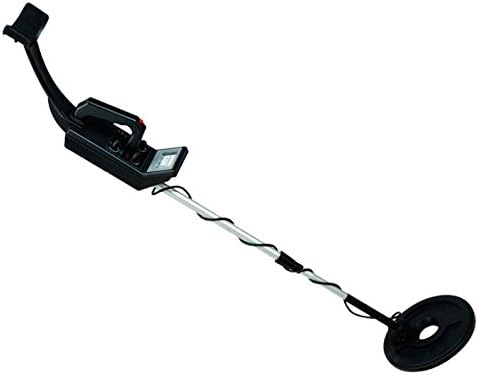
Image: Fully assembled Gold Hunter 9-Function Metal Detector, showing the control box, adjustable stem, and search coil.
Operating Instructions
Powering On and Off
- To turn on the detector, locate the power button/knob on the control box and switch it to the 'ON' position.
- To turn off the detector, switch the power button/knob to the 'OFF' position.
Adjusting Sensitivity
The Sensitivity Control allows you to adjust the detector's responsiveness to targets. Higher sensitivity settings can detect smaller or deeper objects but may also pick up more ground noise or interference.
- Increase Sensitivity: Turn the sensitivity knob clockwise (or press the '+' button) to increase detection depth.
- Decrease Sensitivity: Turn the sensitivity knob counter-clockwise (or press the '-' button) to reduce false signals, especially in highly mineralized ground or areas with electrical interference.
Discrimination Mode
The discrimination feature allows the detector to ignore certain types of metal, typically iron (ferrous metals), while still detecting more valuable non-ferrous metals like gold, silver, and copper.
- Setting Discrimination: Use the discrimination control (knob or buttons) to set the level at which unwanted metals are rejected. A higher discrimination setting will filter out more types of junk metal.
- All-Metal Mode: For maximum depth and to detect all types of metal, set the discrimination to its lowest level or select the 'All-Metal' mode if available.
Sweeping Technique
Proper sweeping technique is crucial for effective detection:
- Hold the search coil parallel to the ground, about 1-2 inches above the surface.
- Sweep the coil from side to side in a slow, overlapping motion.
- Maintain a consistent speed and height for best results.
- When a target is detected, the detector will emit an audible tone, and the display (if present) may indicate the type of metal.
Maintenance
- Cleaning: Wipe down the detector with a damp cloth after each use. Do not use abrasive cleaners or solvents. The search coil can be rinsed with water, but ensure the control box remains dry.
- Storage: Store the detector in a cool, dry place when not in use. If storing for an extended period, remove the rechargeable battery to prevent leakage.
- Battery Care: Recharge the battery fully before storage and periodically during long storage periods to maintain battery health.
- Cable Inspection: Regularly check the search coil cable for any signs of wear or damage.
Troubleshooting
| Problem | Possible Cause | Solution |
|---|---|---|
| No power | Battery not charged or incorrectly installed. | Ensure rechargeable battery is fully charged and correctly inserted. |
| Constant false signals (chattering) | High sensitivity setting, electrical interference, or highly mineralized ground. | Reduce sensitivity. Move away from power lines or other electronic devices. Adjust discrimination. |
| Poor detection depth | Low sensitivity setting, incorrect sweeping technique, or deeply buried target. | Increase sensitivity. Ensure search coil is parallel to the ground and swept slowly. |
| Detector beeps on non-metal objects | Discrimination set too low. | Increase discrimination level to filter out unwanted targets. |
Specifications
| Feature | Detail |
|---|---|
| Brand | Gold Hunter |
| Model | GH-B004DO04FA |
| Power Source | Rechargeable Battery |
| Material | Metal components |
| Color | Black |
| Dimensions (Package) | 73.9 x 18.8 x 12.5 cm |
| Weight (Package) | 1.54 kg |
| Key Features | Sensitivity Control, Ferrous Metal Discriminator, Lightweight, Easy to Use |
Warranty and Support
For warranty information or technical support, please refer to the contact details provided with your purchase or visit the official Gold Hunter website. Keep your proof of purchase for warranty claims.
For further assistance, you may contact the seller, Master Detector, through the Amazon platform where the product was purchased.
Related documentsGH-B004DO04FA


Ask a question about this manual
Ask about setup, troubleshooting, compatibility, parts, safety, or missing instructions. Manuals+ will review the question and use this page’s manual context to help answer it.