
Introduction
The Digipower TC-55F is a compact and versatile travel charger designed for various Fuji digital camera Li-Ion batteries. It features Intellicharge Technology for efficient charging, a built-in USB port for simultaneous device charging, and a flip-close plug for portability. This charger supports 100V-240V auto voltage switching and includes an EU adapter plug, making it suitable for international travel.
Safety Information
- Do not expose the charger to moisture or extreme temperatures.
- Avoid disassembling the charger. Refer servicing to qualified personnel.
- Ensure the battery is inserted correctly according to polarity markings.
- Unplug the charger from the power outlet when not in use.
- Keep out of reach of children.
Package Contents
Verify that your package contains the following items:
- Digipower TC-55F Travel Charger
- EU Adapter Plug
Product Features
- Intellicharge Technology: Optimizes charging for various battery types.
- USB Port: Allows charging of a second device (e.g., smartphone) simultaneously.
- LCD Display: Provides charging status indication.
- Compact Design: Features a flip-close plug for easy storage and travel.
- Universal Voltage: Supports 100V-240V AC input for worldwide use.
- EU Adapter: Includes an adapter for use in over 40 European countries.
- Compatibility: Designed for Fuji NP40, NP45, NP50, NP60, NP70, NP95, and NP120 Li-Ion batteries.
Setup
- Unfold the AC Prongs: Gently flip out the AC prongs from the back of the charger until they lock into place.
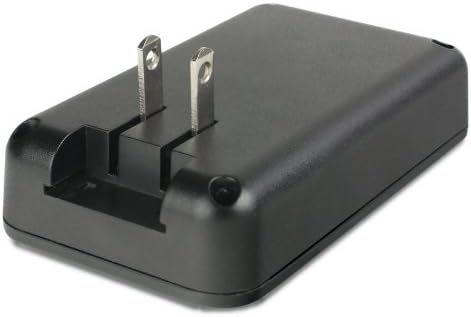
Image: The back of the charger showing the extended foldable AC prongs ready for connection to a power outlet.
- Insert the Battery: Align your Fuji Li-Ion battery with the charging contacts in the charger's slot. Ensure the battery is inserted with the correct polarity. The charger is designed to accommodate various Fuji battery models.

Image: A top-down view of the charger, highlighting the slot where the camera battery is inserted for charging.
- Connect to Power: Plug the charger into a standard AC wall outlet. If traveling in Europe, attach the included EU adapter plug to the charger's prongs before plugging it into the wall outlet.
Operating Instructions
- Charging Process: Once connected to power with a battery inserted, the LCD display on the charger will illuminate, indicating the charging status. The Intellicharge Technology will automatically detect the battery type and begin charging. The display will show the progress of the charge.
- Charging Completion: The LCD display will indicate when the battery is fully charged. Once charging is complete, remove the battery from the charger and unplug the charger from the power outlet.
- Using the USB Port: The charger includes a USB port on its side, allowing you to charge another USB-powered device (e.g., a smartphone or tablet) simultaneously with your camera battery. Connect your device's USB charging cable to this port.

Image: A side view of the charger, clearly showing the USB output port for charging additional devices.
Maintenance
- Cleaning: Use a soft, dry cloth to clean the exterior of the charger. Do not use liquid cleaners or solvents.
- Storage: When not in use, store the charger in a cool, dry place. Fold the AC prongs back into the charger for compact storage.
- Battery Contacts: Periodically check the charging contacts on the charger and battery for any debris and clean if necessary.
Troubleshooting
| Problem | Possible Cause | Solution |
|---|---|---|
| Battery not charging / LCD flashing error | Incorrect battery insertion, incompatible battery, faulty battery, or charger malfunction. | Ensure battery is inserted with correct polarity. Verify battery compatibility (Fuji NP40, NP45, NP50, NP60, NP70, NP95, NP120). Try a different battery if available. If the issue persists, contact customer support. |
| USB device not charging | USB cable issue, device not compatible with charger's USB output, or charger not powered. | Ensure the charger is plugged into a live power outlet. Try a different USB cable. Verify your device can charge via a standard USB port. |
| Charger not powering on | No power from outlet, prongs not fully extended, or internal fault. | Check the power outlet with another device. Ensure AC prongs are fully extended and securely plugged in. If using the EU adapter, ensure it is correctly attached. |
Specifications
- Model Number: TC-55F
- Input Voltage: 100V-240V AC
- Output Voltage (Battery): Varies by battery type (Intellicharge)
- Output Voltage (USB): 5V DC
- Item Weight: Approximately 0.41 Pounds (0.19 kg)
- Compatible Batteries: Fuji NP40, NP45, NP50, NP60, NP70, NP95, NP120
Warranty Information
This Digipower TC-55F Travel Charger is covered by a One Year Limited Warranty from the date of purchase. This warranty covers defects in materials and workmanship under normal use. It does not cover damage caused by misuse, accident, unauthorized modification, or external causes.
For warranty service, please retain your proof of purchase and contact customer support.
Support
If you encounter any issues or have questions regarding your Digipower TC-55F Travel Charger that are not addressed in this manual, please visit the official DigiPower website or contact their customer support for assistance. Please have your product model number (TC-55F) and proof of purchase ready when contacting support.


