
Introduction
The DigiPower TC-55P is a compact travel battery charger designed for various Panasonic camera batteries. This manual provides essential information for the safe and efficient use of your charger, including setup, operation, maintenance, and troubleshooting.
Compatible Panasonic Battery Models:
- CGA-S004
- CGA-S005
- CGA-S008
- DMW-BCF10
- DMW-BCG10
- DMW-BCE10
Setup
Follow these steps to prepare your TC-55P charger for use:
- Unfold the AC Prongs: Locate the foldable AC prongs on the back of the charger. Gently pull them out until they lock into position, ready to be plugged into a wall outlet.
- Insert Battery: Align your compatible Panasonic camera battery with the charging contacts on the charger. Carefully insert the battery into the designated slot until it is securely seated. Ensure the battery is inserted with the correct polarity.
- Connect to Power: Plug the charger directly into a standard AC wall outlet (100-240V). The charger's display should illuminate, indicating it is receiving power and beginning the charging process.
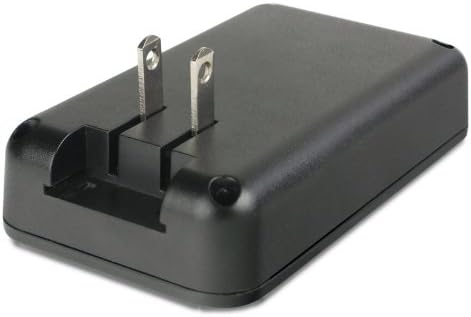
Image: Rear view of the DigiPower TC-55P charger with its foldable AC prongs extended, ready for connection to a power outlet.
Operating Instructions
Once the battery is inserted and the charger is connected to power, the charging process will begin automatically.
- Charging Indicator: The charger features a clear display that indicates the charging status. It typically cycles from 0 to 4 bars, with solid bars representing the charged portion of the battery. For example, if two bars are solid, the battery is approximately halfway charged.
- Charging Completion: The display will show a full charge (e.g., 4 solid bars) when the battery is fully charged. The charger is designed to stop charging automatically once the battery reaches full capacity to prevent overcharging.
- Removing the Battery: Once charging is complete, unplug the charger from the wall outlet. Then, carefully remove the charged battery from the charging slot.
- USB Charging Function: The TC-55P also includes a USB charging port. You can use this port to charge other USB-powered devices simultaneously with or independently of battery charging. Connect your USB device using its compatible USB cable to the port on the side of the charger.

Image: Side view of the DigiPower TC-55P charger, highlighting the digital display and the integrated USB charging port.
Maintenance
Proper care ensures the longevity and optimal performance of your charger.
- Cleaning: Disconnect the charger from the power outlet before cleaning. Use a soft, dry cloth to wipe the exterior of the charger. Do not use liquid cleaners or solvents.
- Storage: When not in use, store the charger in a cool, dry place, away from direct sunlight and extreme temperatures. Ensure the AC prongs are folded back into the charger body to prevent damage.
- Handling: Avoid dropping the charger or subjecting it to strong impacts. Do not attempt to disassemble or modify the charger.
Troubleshooting
If you encounter issues with your TC-55P charger, refer to the following common problems and solutions:
| Problem | Possible Cause / Solution |
|---|---|
| Charger display does not light up. |
|
| Battery is not charging. |
|
| USB device is not charging. |
|
Specifications
| Brand | DigiPower |
| Model Number | TC-55P |
| Compatible Batteries | Panasonic CGA-S004, CGA-S005, CGA-S008, DMW-BCF10, DMW-BCG10, DMW-BCE10 |
| Input Voltage | 100-240 Volts AC |
| Item Weight | Approximately 6.56 ounces (186 grams) |
| Connector Type | Integrated AC Power Plug, USB Type-A Output Port |
Warranty Information
The DigiPower TC-55P Travel Charger is covered by a One Year limited warranty from the date of purchase. This warranty covers defects in materials and workmanship under normal use. It does not cover damage caused by misuse, accident, unauthorized modification, or external causes.
Please retain your proof of purchase for warranty claims. For detailed warranty terms and conditions, refer to the official DigiPower website or contact customer support.
Support
For further assistance, technical support, or inquiries regarding your DigiPower TC-55P charger, please visit the official DigiPower website or contact their customer service department. Contact information can typically be found on the product packaging or the manufacturer's website.
When contacting support, please have your product model number (TC-55P) and proof of purchase readily available.