
Product Overview
The Pico 7146QT Nylon Cable Clamps are designed for efficiently channeling and securing cables and wires. These durable clamps provide a reliable solution for organizing electrical wiring in various applications. Each package contains 3 clamps, offering convenience for multiple installations.
Key Features:
- Inside Diameter: 5/8" (when closed)
- Clamp Width: 1/2"
- Screw Hole Diameter: 0.203"
- Color: Black
- Quantity: 3 clamps per package
These clamps are engineered to withstand a wide range of temperatures, with a maximum operating temperature from -60°F to 275°F, ensuring performance in diverse environments.
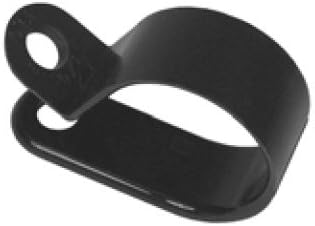
Image: A single black nylon cable clamp, showing its circular shape when closed and the screw hole for mounting. This clamp is designed for securing cables with a 5/8 inch diameter.
Setup and Installation
Before installation, ensure the cable or wire bundle to be secured has an outside diameter of approximately 5/8 inches or less to fit properly within the clamp's closed diameter.
- Identify Mounting Location: Choose a suitable surface for mounting the cable clamp. The surface should be clean, dry, and capable of securely holding a screw.
- Position the Clamp: Place the cable clamp in the desired position. The clamp has a pre-drilled screw hole with a 0.203" diameter.
- Mark and Drill (if necessary): Use the clamp's screw hole as a guide to mark the drilling point on the mounting surface. If the surface requires it, pre-drill a pilot hole appropriate for your chosen mounting screw.
- Insert Cables: Open the clamp slightly and insert the cable(s) or wire bundle into the clamp's interior. Ensure the cables are neatly routed and not under excessive tension.
- Secure the Clamp: Insert a suitable screw (not included) through the clamp's screw hole and fasten it securely to the mounting surface. Do not overtighten, as this may damage the clamp or the mounting surface.
- Verify Security: Gently tug on the secured cables to ensure the clamp is firmly attached and the cables are held in place without excessive movement.
Note: Always use appropriate safety measures when working with tools and electrical components.
Operating Guidelines
These cable clamps are passive components designed to provide a fixed routing and securing point for cables and wires. Once installed, they require no active operation.
Best Practices:
- Ensure the cables are not pinched or excessively compressed by the clamp.
- Distribute cable weight evenly across multiple clamps if securing long or heavy runs.
- Avoid installing clamps in areas subject to extreme abrasion or chemical exposure that could degrade nylon.
Maintenance
Pico nylon cable clamps are designed for long-term durability and require minimal maintenance.
- Periodic Inspection: Periodically inspect installed clamps for any signs of wear, cracking, or loosening, especially in high-vibration environments or areas with significant temperature fluctuations.
- Cleaning: If necessary, clean the clamps with a damp cloth. Avoid harsh chemical cleaners that may degrade the nylon material.
- Replacement: If a clamp shows signs of damage or degradation, replace it immediately to maintain the integrity of your cable management system.
Troubleshooting
Most issues related to cable clamps are due to improper installation or selection.
| Problem | Possible Cause | Solution |
|---|---|---|
| Cables are loose within the clamp. | Clamp ID is too large for the cable bundle. | Use a clamp with a smaller inside diameter. Ensure the cable bundle fills the clamp adequately. |
| Clamp breaks during installation. | Overtightening of the mounting screw. | Do not overtighten. Fasten until snug, then a quarter turn more. |
| Clamp becomes brittle or cracks over time. | Exposure to extreme temperatures outside specified range or harsh chemicals. | Ensure operating environment is within -60°F to 275°F. Avoid chemical exposure. Replace damaged clamps. |
| Clamp detaches from mounting surface. | Improper screw size or type; insufficient mounting surface. | Use a screw appropriate for the 0.203" hole and the mounting material. Ensure the surface is strong enough. |
Specifications
| Attribute | Detail |
|---|---|
| Part Number | 7146QT |
| Model Number | 7146 |
| Brand | Pico |
| Manufacturer | Pacific Industrial Components |
| Material | Nylon |
| Inside Diameter (Closed) | 5/8 inches |
| Clamp Width | 1/2 inches |
| Screw Hole Diameter | 0.203 inches |
| Color | Black |
| Item Package Quantity | 3 |
| Item Weight | 0.32 ounces (9.07 grams) |
| Maximum Operating Temperature | 275°F |
| Minimum Operating Temperature | -60°F |
| ASIN | B004C07XW2 |
| UPC | 035704971462 |
| Date First Available | June 3, 2007 |
Warranty and Support
For specific warranty information regarding the Pico 7146QT Nylon Cable Clamps, please refer to the packaging or contact Pacific Industrial Components directly. General product support and inquiries can also be directed to the manufacturer.
Manufacturer: Pacific Industrial Components
For the most up-to-date contact information, please visit the official Pico or Pacific Industrial Components website or consult your purchase documentation.