
VideoSecu ML531B
VideoSecu Articulating TV Wall Mount User Manual
Model: ML531B
Brand: VideoSecu
1. Introduction
This user manual provides detailed instructions for the installation, operation, and maintenance of your VideoSecu Articulating TV Wall Mount, model ML531B. This mount is designed to securely hold most 22-inch to 37-inch flat panel displays, and some models up to 42 inches, with VESA 200x200mm, 200x100mm, or 100x100mm mounting patterns. Its robust steel construction ensures a safe loading capacity of up to 66 lbs. The mount offers extensive adjustability, including 15 degrees of tilt, 180 degrees of swivel, and an extension range of up to 20 inches from the wall, allowing for optimal viewing angles and flexible TV placement.
2. Safety Information
Please read all instructions carefully before installation and assembly. If you do not understand these instructions or have doubts about the safety of the installation, please contact a qualified installer. Improper installation may cause serious injury or damage.
- Do not exceed the maximum weight capacity of 66 lbs (30 kg).
- Ensure the wall structure can safely support the combined weight of the mount and the display.
- Use only the provided mounting hardware. If you are unsure about the type of wall, consult a professional.
- Avoid installing the mount in areas with excessive vibration, direct sunlight, or high humidity.
- Keep children and pets away during installation.
- Periodically check all screws and connections to ensure they remain secure.
3. Package Contents
Verify that all components are present and undamaged before beginning installation.

Image: The complete package contents, including the articulating wall mount, a 10-foot HDMI cable, and a 3-axis magnetic bubble level.
- Articulating TV Wall Mount (Main Unit)
- VESA Plate (Pre-attached to main unit, removable for installation)
- Common Wall and TV Attachment Hardware Kit
- 6-inch 3-Axis Magnetic Bubble Level
- 10-foot HDMI Cable
- Installation Manual (This document)
4. Setup and Installation
4.1. Pre-Installation Checks
- Check VESA Compatibility: Ensure your TV's mounting hole pattern (VESA) matches the mount's supported patterns: 200x200mm, 200x100mm, or 100x100mm.
- Check TV Inputs: Verify that the area inside your TV's four mounting holes does not contain any plugs or inputs that could be blocked by the mount's VESA plate.

Image: Illustration of a TV's rear panel, highlighting the mounting holes and a caution regarding potential input blockage if they are located within the mounting area. Some LG and Sony TVs may require an open plate mount.
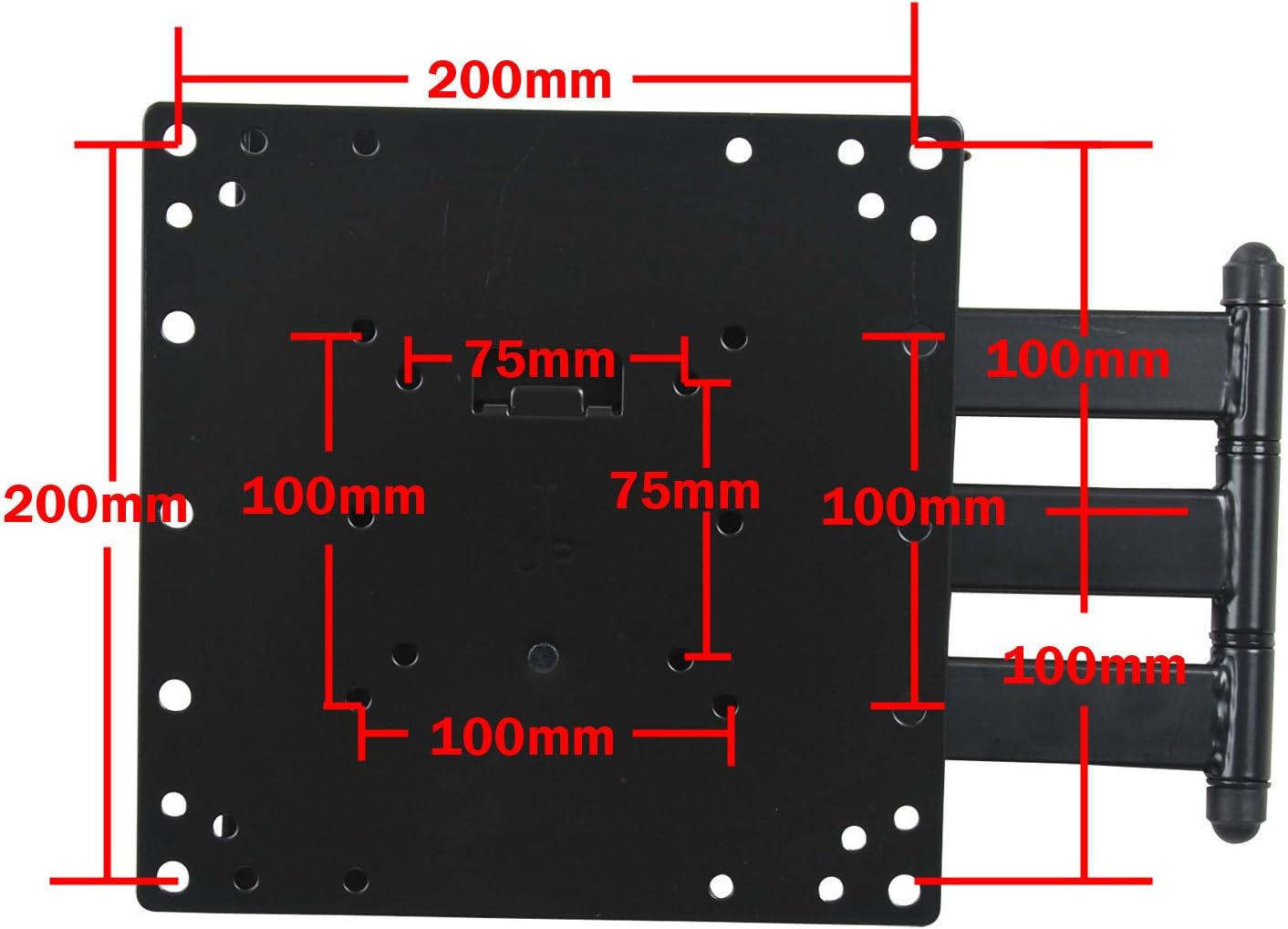
Image: A top-down view of the mount's VESA plate, showing the various mounting hole dimensions (200mm, 100mm, 75mm) to ensure compatibility with different TV VESA patterns.
4.2. Mounting the Wall Plate
- Determine the desired height and location for your TV.
- Use the included bubble level to mark the drilling points for the wall plate.
- Drill pilot holes into the wall at the marked locations. Ensure you are drilling into studs for wood walls or using appropriate anchors for concrete/brick walls.
- Securely attach the wall plate to the wall using the provided lag bolts and washers. Do not overtighten.
4.3. Attaching the VESA Plate to the TV
- Carefully place your TV face down on a soft, clean surface to prevent screen damage.
- Remove the VESA plate from the articulating arm by unlocking the screw (if pre-attached).
- Align the VESA plate with the mounting holes on the back of your TV.
- Attach the VESA plate to the TV using the appropriate screws and spacers from the hardware kit. Ensure a snug fit without overtightening.
4.4. Hanging the TV on the Mount

Image: A visual guide demonstrating the three key steps for attaching the TV to the wall mount: 1. Tilt and detach the VESA plate from the arm, then attach it to the TV. 2. Carefully hang the TV (with attached VESA plate) onto the articulating arm. 3. Securely lock the VESA plate to the arm with the screw.
- With assistance, carefully lift the TV (with the VESA plate attached) and align the VESA plate with the articulating arm on the wall mount.
- Gently lower the TV, ensuring the VESA plate hooks securely onto the arm.
- Once the TV is securely seated, lock the VESA plate to the arm using the designated locking screw. This prevents accidental dislodgement.
5. Operating and Adjustments
Your VideoSecu articulating mount offers multiple adjustment options for optimal viewing.

Image: A visual representation of the mount's full range of motion, including its ability to extend up to 20 inches from the wall, swivel 180 degrees at the wall plate, swivel 360 degrees at the arm joint, and tilt +/-15 degrees at the TV plate.
- Extension: The mount can extend up to 20 inches (50.8 cm) from the wall, allowing you to pull your TV forward for better viewing or access to rear ports.
- Swivel: The articulating arm allows for 180 degrees of swivel at the wall connection and 360 degrees of swivel at the arm joint, providing wide viewing angles.
- Tilt: The TV plate can be tilted up to 15 degrees upwards or downwards to reduce glare and optimize viewing comfort.

Image: A detailed view highlighting the tilt adjustment point on the mount's VESA plate, indicating where adjustments can be made to change the vertical angle of the TV.
5.1. Post-Installation Level Adjustment
After installation, you can make minor level adjustments to ensure your TV is perfectly horizontal. This feature allows for fine-tuning without re-drilling.
6. Maintenance
- Cleaning: Use a soft, dry cloth to clean the mount. Do not use abrasive cleaners or solvents.
- Periodic Checks: Regularly inspect all screws and connections to ensure they are tight and secure. Over time, vibrations or movement may cause fasteners to loosen.
- Lubrication: The articulating joints are designed for smooth movement. If movement becomes stiff, a small amount of silicone-based lubricant can be applied to the pivot points.
7. Troubleshooting
7.1. TV is not level after installation.
Utilize the post-installation level adjustment feature. Refer to section 5.1 for details on how to fine-tune the level without removing the TV.
7.2. Mount feels loose or unstable.
Immediately remove the TV from the mount. Re-check all wall mounting screws and TV attachment screws to ensure they are securely tightened. Verify that the wall structure is adequate for the weight. If issues persist, consult a professional installer.
7.3. Movement is stiff.
Apply a small amount of silicone-based lubricant to the articulating joints. Ensure no debris is obstructing the movement.
8. Specifications
| Feature | Detail |
|---|---|
| Model Number | ML531B |
| Compatible TV Sizes | 22" - 37" (some models up to 42") |
| Weight Capacity | Up to 66 lbs (30 kg) |
| VESA Compatibility | 200x200mm, 200x100mm, 100x100mm |
| Tilt Angle | +/- 15 degrees |
| Swivel Angle | 180 degrees (at wall), 360 degrees (at arm joint) |
| Extension from Wall | 1.9" (retracted) to 20" (extended) |
| Material | Heavy Gauge Steel Alloy |
| Product Dimensions | 10.5 x 8.8 x 2.4 inches |
| Item Weight | 5.4 pounds |
9. Warranty Information
VideoSecu products typically come with a limited manufacturer's warranty. For specific warranty terms and conditions, please refer to the documentation included with your purchase or visit the official VideoSecu website. Keep your proof of purchase for warranty claims.
10. Customer Support
If you have any questions, require technical assistance, or need to report a missing or damaged part, please contact VideoSecu customer support. Contact information can typically be found on the manufacturer's website or on the product packaging.
For the most up-to-date support information, please visit the official VideoSecu website.
Ask a question about this manual
Ask about setup, troubleshooting, compatibility, parts, safety, or missing instructions. Manuals+ will review the question and use this page’s manual context to help answer it.