
Introduction
The Sharper Image Portable Travel Sound Soother 20 (Model SI601) is designed to provide a relaxing audio environment, assist with sleep, and function as a portable alarm clock. It features 20 digitally-recorded sound environments, an LCD display with time, date, year, and temperature, and a dual-time alarm with snooze. Its compact size and lightweight design make it ideal for travel.

Front view of the Sharper Image Travel Sound Soother 20 packaging, highlighting key features.
Package Contents
Please check the package for the following items:
- Sharper Image Portable Travel Sound Soother 20 unit
- Earbuds
- Handstrap
- Soft Travel Pouch

The Sharper Image Travel Sound Soother 20 unit and accessories as packaged.
Product Overview
The device features a backlit LCD display and front-mounted controls for easy access.

Close-up of the product display and controls, as shown on the packaging.
Controls and Display:
- DISPLAY Button: Toggles backlight, changes temperature unit (°F/°C).
- MODE Button: Used to set time, date, and alarm.
- TIMER Button: Sets the auto-shutoff timer.
- VOL- / VOL+ Buttons: Adjusts volume.
- Soother Buttons (Up/Down Arrows): Selects sound environments.
- LCD Screen: Displays time, date, year, temperature, and selected sound.
Setup
Battery Installation:
- Locate the battery compartment on the back of the unit.
- Open the battery compartment cover.
- Insert 3 AA batteries (not included), ensuring correct polarity (+/-).
- Close the battery compartment cover securely.
Note: For optimal performance, use fresh alkaline batteries. Remove batteries if the unit will not be used for an extended period.
Operating Instructions
Setting Time and Date:
- Press and hold the MODE button until the time display flashes.
- Use the VOL- and VOL+ buttons to adjust the hour. Press MODE to confirm.
- Repeat the process to set minutes, year, month, and day.
- Press MODE again to exit the setting mode.
Setting the Alarm:
- Press the MODE button repeatedly until the alarm time is displayed.
- Press and hold the MODE button until the alarm time flashes.
- Use the VOL- and VOL+ buttons to adjust the alarm hour. Press MODE to confirm.
- Repeat to set alarm minutes.
- Press MODE to select alarm type (buzzer or sound soother).
- Press MODE again to exit alarm setting mode.
- To activate/deactivate the alarm, press the MODE button until the alarm icon appears/disappears.
Note: The alarm features a ramp-up volume and a snooze function. When the alarm sounds, press any button to activate snooze for a short period, or press the MODE button to turn off the alarm.
Using the Sound Soother:
- Press the Soother Up or Soother Down arrow buttons to cycle through the 20 available sound environments.
- Use the VOL- and VOL+ buttons to adjust the playback volume.
Available Sound Environments:
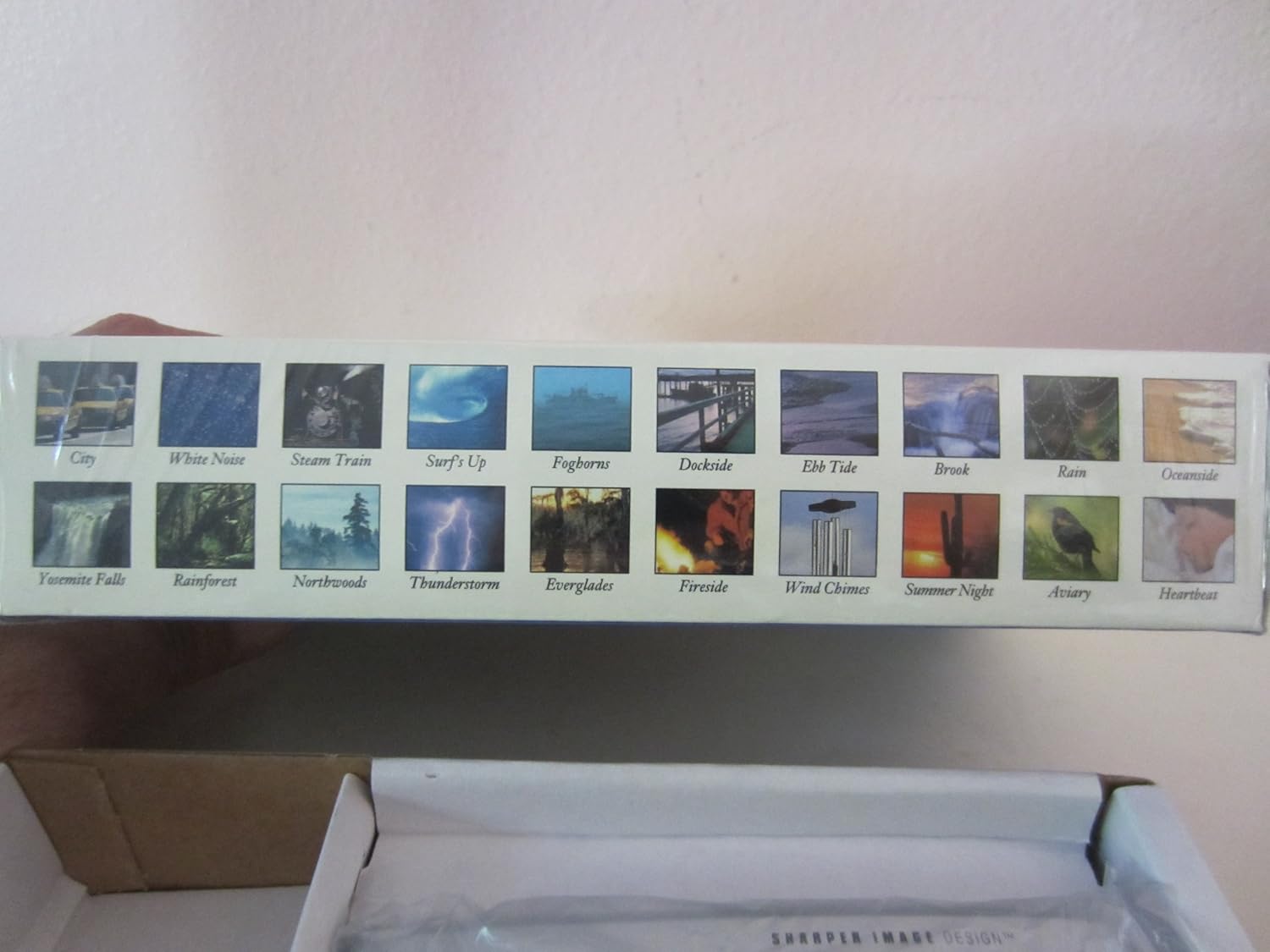
Visual representation of the 20 sound environments available on the device.
- City
- White Noise
- Steam Train
- Surf's Up
- Foghorns
- Dockside
- Ebb Tide
- Brook
- Rain
- Oceanside
- Yosemite Falls
- Rainforest
- Northwoods
- Thunderstorm
- Everglades
- Fireside
- Wind Chimes
- Summer Night
- Aviary
- Heartbeat
Using the Timer:
The unit features an auto-shutoff timer with settings from 15 to 120 minutes.
- While a sound environment is playing, press the TIMER button repeatedly.
- The display will show the selected timer duration (e.g., 15, 30, 60, 90, 120 minutes).
- The unit will automatically turn off after the selected time.
Temperature Display:
The LCD displays the ambient temperature.
- To switch between Fahrenheit (°F) and Celsius (°C), press the DISPLAY button.
Maintenance
Cleaning:
- Wipe the unit with a soft, dry cloth.
- Do not use abrasive cleaners or solvents.
- Avoid exposing the unit to excessive moisture.
Battery Replacement:
When the display dims or the unit functions erratically, it is time to replace the batteries. Follow the battery installation steps outlined in the Setup section.
Troubleshooting
| Problem | Solution |
|---|---|
| Unit does not power on. | Check battery polarity. Replace with fresh AA batteries. |
| Display is dim or blank. | Replace batteries. Ensure batteries are correctly inserted. |
| Sound is distorted or too low/high. | Adjust volume using VOL- and VOL+ buttons. Ensure earbuds are properly connected if used. |
| Alarm does not sound. | Ensure the alarm is activated (alarm icon visible on display). Check alarm time settings. |
Specifications
- Model: SI601
- Power Source: 3 x AA batteries (not included)
- Dimensions: Approximately 4 7/8" (W) x 2 3/4" (H) x 1 1/3" (D)
- Weight: Approximately 6 oz (without batteries)
- Display: Backlit LCD
- Sound Environments: 20 digitally-recorded sounds
- Timer: 15, 30, 60, 90, 120 minutes auto-shutoff
- Features: Dual-time alarm clock, thermometer (°F/°C), date, year display
Warranty and Support
For warranty information or technical support, please refer to the warranty card included with your product or contact Sharper Image customer service directly. Keep your purchase receipt as proof of purchase.
For further assistance, please visit the official Sharper Image website or contact their customer support line.


