
Classic Cantabile DP-400F
Classic Cantabile dP-400F Digital Piano User Manual
Model: dP-400F
1. Introduction
Welcome to the Classic Cantabile dP-400F Digital Piano. This manual provides essential information for the safe and effective use of your instrument. Please read it thoroughly before operating the piano and keep it for future reference.
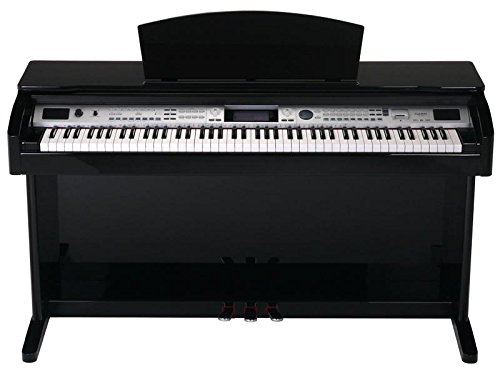
Figure 1: Classic Cantabile dP-400F Digital Piano
The dP-400F features an 88-key Fatar hammer-action keyboard, 559 high-quality sounds, 203 accompaniment styles, and a clear LCD display. It is designed to provide an authentic piano playing experience with versatile digital functionalities.
2. Safety Instructions
To prevent electric shock, short circuit, damage, fire, or other hazards, always observe the following basic precautions:
- Power Supply: Use only the specified power adapter. Do not place the power cord near heat sources or heavy objects.
- Location: Do not expose the instrument to rain, use it near water, or in damp or wet conditions. Avoid direct sunlight, extreme temperatures, or excessive dust.
- Do Not Open: Do not attempt to open or disassemble the instrument. There are no user-serviceable parts inside. Refer all servicing to qualified service personnel.
- Handling: Do not drop the instrument or subject it to strong impacts. Always handle with care.
- Cleaning: Use a soft, dry cloth for cleaning. Do not use paint thinners, solvents, cleaning fluids, or chemical-impregnated wiping cloths.
3. Package Contents
Please check that your package contains all the following items:
- Classic Cantabile dP-400F Digital Piano Unit
- 3-Pedal Unit
- Power Adapter
- Music Rest
- User Manual (this document)
If any items are missing or damaged, please contact your dealer immediately.
4. Setup
4.1 Assembly
The dP-400F typically comes with the main piano unit and a separate stand/pedal unit. Follow these general steps for assembly:
- Carefully unpack all components from the box.
- Assemble the stand according to the included diagram, ensuring all screws are securely tightened.
- Place the main piano unit onto the assembled stand, aligning it with the mounting points. Secure the piano unit to the stand using the provided screws.
- Connect the pedal unit cable to the corresponding port on the underside of the piano unit.
4.2 Power Connection
Connect the supplied power adapter to the DC IN jack on the rear of the piano. Plug the other end of the adapter into a suitable AC power outlet.
4.3 Pedal Connection
The dP-400F includes a 3-pedal unit. Ensure the cable from this unit is securely connected to the designated pedal input on the piano. The pedals provide Sustain, Sostenuto, and Soft functions, mimicking an acoustic piano.
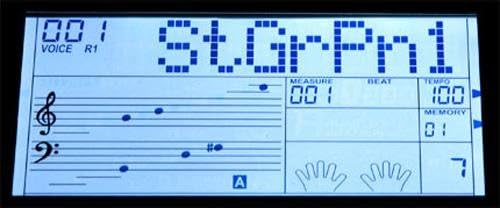
Figure 2: Three-pedal unit
5. Operating Instructions
5.1 Power On/Off
Press the POWER button located on the control panel to turn the instrument on or off. The LCD display will illuminate upon power-on.
5.2 Volume Control
Adjust the overall volume using the VOLUME knob on the control panel. Turn clockwise to increase volume, counter-clockwise to decrease.

Figure 3: Volume and Brilliance controls
5.3 Sound Selection (Voices)
The dP-400F offers 559 different sounds (voices). Use the VOICE buttons and the data entry dial to browse and select sounds. The selected voice number and name will appear on the LCD display.

Figure 4: LCD display showing selected voice and notation
5.4 Accompaniment Styles
The piano features 203 accompaniment styles. Press the STYLE button and use the data entry dial to select a desired style. Press START/STOP to begin or end the accompaniment.
5.5 Dual Voice and Split Voice Functions
- Dual Voice: Press the DUAL button to layer two different voices simultaneously. You can adjust the volume balance between the two voices.
- Split Voice: Press the SPLIT button to divide the keyboard into two sections, allowing you to play different voices with your left and right hands. The split point can be adjusted.

Figure 5: Control panel with Dual and Split buttons
5.6 Learning Function
The dP-400F includes a learning mode with 100 built-in songs and 3 different learning levels. Access this function via the SONG button and follow the instructions on the LCD display to practice specific parts of a song.
5.7 Recording
The instrument allows for song recording. Press the RECORD button to enter recording mode. Play your performance, then press STOP to end recording. Your performance can be played back using the PLAY button.
5.8 USB Connectivity
The USB port allows connection to a computer for MIDI data transfer. This enables the piano to be used as a MIDI controller or to receive MIDI data from music software.
6. Maintenance
6.1 Cleaning
Wipe the instrument with a soft, dry cloth. Do not use liquid cleaners, waxes, or solvents, as these can damage the finish and internal components.
6.2 Storage
When not in use for extended periods, cover the piano with a dust cover to protect it. Store in a location free from extreme temperatures, humidity, and direct sunlight.
7. Troubleshooting
| Problem | Possible Cause | Solution |
|---|---|---|
| No sound | Volume is too low or muted. Headphones are connected. | Increase the VOLUME knob. Disconnect headphones. |
| Keys not responding | Instrument is off. Specific voice selected has no sound. | Ensure power is on. Select a different voice. |
| Pedals not working | Pedal cable is disconnected or loose. | Check and securely connect the pedal cable. |
| LCD display is blank | Power is off. Brightness setting is too low. | Turn on the power. Adjust display brightness if available in settings. |
If the problem persists after trying these solutions, please contact your dealer or authorized service center.
8. Specifications
- Keyboard: 88 Fatar Hammer-Action Keys
- Polyphony: 64 Notes (maximum)
- Voices: 559
- Styles: 203 (including 3 user styles)
- Learning Songs: 100
- Display: Large LCD with notation display
- Functions: Dual Voice, Split Voice, Metronome, Learning Mode, Record, Playback
- Pedals: 3 (Sustain, Sostenuto, Soft)
- Connectivity: USB (MIDI), Headphone Out, Pedal Input, Power Input
- Dimensions (W x D x H): 1410 x 530 x 840 mm
- Weight: 59 kg
- Power Supply: DC 12V (via included adapter)
9. Warranty and Support
For warranty information, please refer to the warranty card included with your product or contact your point of purchase. Keep your proof of purchase for any warranty claims.
For technical support or service inquiries, please contact Classic Cantabile customer service or visit the official Classic Cantabile website for further assistance and resources.
Online Resources: Classic Cantabile Store
Related documentsDP-400F


Ask a question about this manual
Ask about setup, troubleshooting, compatibility, parts, safety, or missing instructions. Manuals+ will review the question and use this page’s manual context to help answer it.