1. Important Safety Information
Before operating the NordicTrack T12 Si Treadmill, please read all instructions carefully. Keep this manual for future reference. Adhere to all warnings and instructions provided on the treadmill itself.
- Always consult your physician before beginning any exercise program.
- Keep children and pets away from the treadmill when it is in use.
- Place the treadmill on a level surface with at least 2 meters (6.5 feet) of clear space behind it and 0.6 meters (2 feet) on each side.
- Do not operate the treadmill if the power cord or plug is damaged.
- Always wear appropriate athletic footwear while using the treadmill.
- Use the safety key clip at all times.
2. Setup and Assembly
This section guides you through the initial setup and assembly of your NordicTrack T12 Si Treadmill.
2.1 Unpacking
Carefully remove all components from the packaging. Ensure all parts listed in the packing list are present before beginning assembly. Retain packaging materials until assembly is complete in case of missing parts or damage during shipping.
2.2 Assembly Instructions
Assembly typically requires two people. Follow the step-by-step instructions provided in the separate assembly guide (if applicable) or the detailed diagrams. Ensure all bolts and nuts are securely tightened after assembly.
- Attach the uprights to the base frame.
- Secure the console mast to the uprights.
- Connect the console to the console mast, ensuring all cables are properly routed and connected.
- Attach any remaining covers or accessories.
2.3 Placement
Choose a location that is flat, stable, and has sufficient clearance around the treadmill. Avoid placing the treadmill in direct sunlight or near heat sources. Ensure the power outlet is easily accessible.
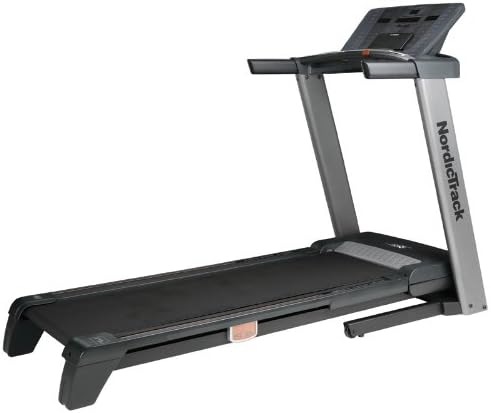
An image showing the complete NordicTrack T12 Si Treadmill from a front-right angle, highlighting its console, handrails, running deck, and base. This illustrates the assembled unit ready for placement.
3. Operating Instructions
This section details how to operate your NordicTrack T12 Si Treadmill, including console functions and workout modes.
3.1 Console Overview
The console features a display screen, speed and incline controls, program selection buttons, and heart rate sensors. Familiarize yourself with the layout before starting your workout.
- Display Screen: Shows time, distance, speed, incline, calories burned, and heart rate.
- Speed Controls: Buttons to increase or decrease running speed. Quick speed buttons for instant adjustments.
- Incline Controls: Buttons to adjust the incline level of the running deck.
- Program Buttons: Select from pre-programmed workouts, custom programs, or heart rate controlled programs.
- Safety Key: Must be inserted for the treadmill to operate. Clip to your clothing.
3.2 Starting a Workout
- Ensure the safety key is inserted into the console and clipped to your clothing.
- Step onto the treadmill deck, placing your feet on the side rails.
- Press the START button. The belt will begin moving at a slow speed.
- Gradually increase speed using the speed controls.
3.3 Adjusting Speed and Incline
- Speed: Use the SPEED + and SPEED - buttons to adjust speed in small increments. Use the quick speed buttons (e.g., 3, 6, 9 MPH) for larger changes.
- Incline: Use the INCLINE + and INCLINE - buttons to adjust the incline.
3.4 Using Programs
The T12 Si Treadmill offers 20 programs:
- 12 Pre-programmed: Speed and incline combined programs designed for various fitness goals.
- 4 Create and Save: Allows you to design and save your own custom workouts.
- 2 Heart Rate Programs: Adjust speed and incline to maintain a target heart rate zone.
To select a program, press the desired program button and follow the on-screen prompts.
3.5 Heart Rate Monitoring
The treadmill is equipped with handgrip pulse sensors. To measure your heart rate, grasp the metal contacts on the handlebars firmly with both hands. Your heart rate will be displayed on the console after a few seconds.
4. Maintenance
Regular maintenance ensures the longevity and optimal performance of your NordicTrack T12 Si Treadmill.
4.1 Cleaning
- Daily: Wipe down the console and handrails with a damp cloth after each use to remove sweat and dust.
- Weekly: Vacuum underneath the treadmill to prevent dust and debris from accumulating.
- Do not use abrasive cleaners or solvents, as they may damage the finish.
4.2 Lubrication
The running belt may require lubrication periodically. Refer to your treadmill's specific lubrication schedule, typically every 3-6 months depending on usage. Use only silicone lubricant approved for treadmills.
4.3 Belt Adjustment
- Belt Tracking: If the running belt drifts to one side, use the provided Allen wrench to adjust the rear roller bolts. Turn the bolt on the side the belt is drifting towards clockwise in small increments (quarter turns) until the belt is centered.
- Belt Tension: If the belt slips during use, it may need tightening. Turn both rear roller bolts clockwise in small, equal increments until the slipping stops. Do not overtighten.
4.4 General Care
- Inspect the power cord regularly for any damage.
- Ensure all bolts and nuts remain tight. Periodically check and tighten as needed.
- Store the treadmill in a dry, climate-controlled environment when not in use for extended periods.
5. Troubleshooting
This section provides solutions to common issues you might encounter with your NordicTrack T12 Si Treadmill.
| Problem | Possible Cause | Solution |
|---|---|---|
| Treadmill does not start. | Power cord not plugged in; Safety key not inserted; Circuit breaker tripped. | Ensure power cord is securely plugged in. Insert safety key fully. Check household circuit breaker. |
| Belt slips during use. | Belt too loose. | Tighten the running belt tension (refer to Section 4.3). |
| Belt drifts to one side. | Belt tracking needs adjustment. | Adjust belt tracking (refer to Section 4.3). |
| Unusual noise from treadmill. | Loose parts; Lack of lubrication; Motor cover rubbing. | Check for loose bolts. Lubricate the belt if needed. Ensure motor cover is secure. If noise persists, contact customer support. |
| Console display is blank or erratic. | Loose console cable; Power issue. | Check all console cable connections. Ensure stable power supply. Try unplugging and replugging the treadmill. |
6. Specifications
Key technical specifications for the NordicTrack T12 Si Treadmill.
- Brand: NordicTrack
- Model: T12 Si
- Programs: 20 (12 Pre-programmed, 4 Create and Save, 2 Heart Rate)
- Heart Rate Monitoring: Handgrip Pulse Sensors
- UPC: 043619149098
- ASIN: B004AFUGSM
- Date First Available: April 9, 2014
- Description: The NordicTrack T12 Si Treadmill has 20 programmes - 12 Pre-programmed, speed and incline combined programmes, 4 Create and Save and 2 Heart Rate programmes to increase calorie burning and improvements in aerobic capacity.
7. Warranty and Support
NordicTrack products are built with quality and durability in mind. For specific warranty details regarding your T12 Si Treadmill, please refer to the warranty card included with your purchase or visit the official NordicTrack website.
For technical assistance, parts replacement, or any other inquiries, please contact NordicTrack Customer Support. Have your model number and serial number ready when contacting support.
NordicTrack Official Website: www.nordictrack.com
Note: Warranty terms and support contact information may vary by region.


