
1. Introduction
This manual provides essential information for the proper setup, operation, and maintenance of your Shure SV100-W Multipurpose Cardioid Dynamic Vocal Microphone. Please read these instructions carefully to ensure optimal performance and longevity of your device.
2. Product Overview
The Shure SV100-W is a versatile dynamic microphone designed for various audio applications. Its cardioid pickup pattern effectively reduces feedback, while its wide frequency response and high output contribute to clear sound reproduction. This microphone is suitable for spoken word presentations, karaoke performances, multimedia use, and instrument amplification.

Figure 1: Shure SV100-W Multipurpose Cardioid Dynamic Vocal Microphone. This image displays the microphone's overall design, featuring a black body, a silver mesh grille, and an on/off switch.
Key Features:
- Cardioid Pickup Pattern: Designed to minimize feedback and isolate the main sound source.
- Wide Frequency Response: Delivers clear and natural audio across a broad range.
- High Output: Ensures a strong signal for excellent sound quality.
- Versatile Applications: Ideal for spoken word, karaoke, multimedia, and instrument use.
- Durable Cable: Includes a 15-foot XLR-to-1/4" (6.3mm) cable for connection to various audio systems.
3. Setup
Follow these steps to set up your Shure SV100-W microphone:
- Connect the Cable: Ensure the microphone's On/Off switch is in the "OFF" position. Connect the XLR end of the provided cable to the microphone's output port.
- Connect to Audio Device: Connect the 1/4" (6.3mm) end of the cable to the microphone input of your karaoke machine, mixer, audio interface, or other compatible device.
- Secure Connection: Verify that both connections are firm and secure to prevent signal loss or interference.
4. Operating Instructions
4.1. Using the On/Off Switch
The microphone features a convenient On/Off switch for quick control over the audio signal.
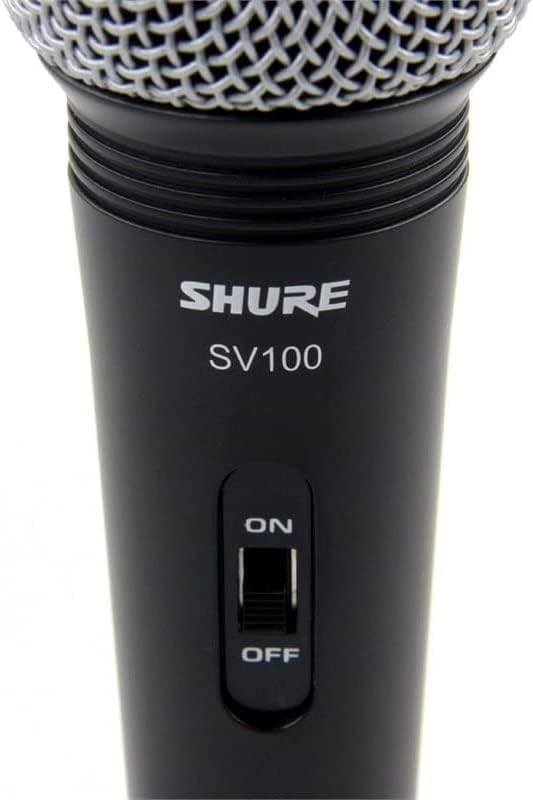
Figure 2: Close-up view of the Shure SV100-W microphone's On/Off switch, clearly labeled for easy operation.
- To turn the microphone ON, slide the switch to the "ON" position.
- To turn the microphone OFF, slide the switch to the "OFF" position.
- Always ensure the switch is in the "OFF" position when connecting or disconnecting the microphone from any audio equipment.
4.2. Microphone Handling and Feedback Prevention
Proper microphone handling is crucial for optimal sound quality and to prevent unwanted audio feedback (howling).
Figure 3: Diagram showing recommended microphone holding techniques and how to position the microphone to prevent feedback from loudspeakers.
- Hold Correctly: Hold the microphone by the body, avoiding covering the grille with your hand. Covering the grille can affect the microphone's directional pattern and sound quality.
- Maintain Distance: Keep a consistent distance from the microphone, typically 2-6 inches (5-15 cm), for balanced sound.
- Avoid Feedback: Position the microphone away from loudspeakers. If feedback occurs, try moving the microphone or reducing the volume of the sound system.
5. Maintenance
Regular maintenance helps preserve the performance and appearance of your microphone.

Figure 4: The Shure SV100-W microphone with its grille detached, showing the internal components. This view is useful for understanding the microphone's construction and for cleaning purposes.
- Cleaning the Grille: The microphone grille can be carefully unscrewed for cleaning. Use a soft, damp cloth to wipe the grille. Ensure it is completely dry before reattaching.
- Cleaning the Body: Wipe the microphone body with a soft, dry cloth. Avoid using harsh chemicals or abrasive cleaners.
- Storage: When not in use, store the microphone in a protective case or bag to prevent dust accumulation and physical damage.
6. Troubleshooting
If you encounter issues with your Shure SV100-W microphone, consider the following common troubleshooting steps:
- No Sound:
- Ensure the microphone's On/Off switch is in the "ON" position.
- Check all cable connections at both the microphone and the audio device.
- Verify that the volume on your audio device (mixer, karaoke machine) is turned up.
- Test with a different cable or audio input if available.
- Distorted Sound:
- Reduce the input gain or volume on your audio device.
- Ensure you are not speaking or singing too close to the microphone.
- Check for damaged cables.
- Feedback (Howling):
- Reposition the microphone further away from loudspeakers.
- Reduce the overall volume of the sound system.
- Avoid pointing the microphone directly at speakers.
7. Specifications
| Feature | Specification |
|---|---|
| Brand | Shure |
| Model Number | SV100-W |
| Microphone Form Factor | Handheld |
| Polar Pattern | Unidirectional (Cardioid) |
| Impedance | 600 Ohm |
| Connectivity Technology | Wired |
| Connector Type | XLR |
| Product Dimensions (L x W x H) | 3.5 x 4.5 x 10.83 inches |
| Item Weight | 7.8 ounces (220 Grams) |
| Power Source | Corded Electric |
| Batteries | 1 A battery required (included) |
| Battery Type | Alkaline |
| Hardware Platform | Karaoke Machine |
| Number of Channels | 1 |
| Color | Black |
| Recommended Uses For Product | Karaoke |
| Special Feature | Mute Function, Voice Activated Recording (Note: Mute function refers to the On/Off switch) |
| Compatible Devices | Karaoke Machine |
| Included Components | Shure SV100-W Multipurpose Cardioid Dynamic Vocal Microphone with On/Off Switch and 15' XLR-to-1/4" Cable |
8. Warranty and Support
For warranty information, product registration, or technical support, please visit the official Shure website or contact Shure customer service. Keep your purchase receipt as proof of purchase for any warranty claims.
Shure Official Website: www.shure.com


