
Introduction
This manual provides comprehensive instructions for the setup, operation, maintenance, and troubleshooting of the Global Water FP111 Digital Water Velocity (Flow Probe) Meter. The FP111 is a highly accurate instrument designed for measuring water flow in open channels and partially filled pipes. Please read this manual thoroughly before using the device to ensure safe and optimal performance.
Safety Information
- Always wear appropriate personal protective equipment (PPE) when working near water bodies.
- Ensure the probe is securely handled to prevent accidental drops or damage.
- Do not attempt to open or modify the sealed components of the probe, as this may compromise its waterproof integrity and void the warranty.
- Keep the device away from extreme temperatures and corrosive substances.
- Dispose of batteries according to local regulations.
Package Contents
Upon unpacking, verify that all components are present and undamaged:
- Global Water FP111 Digital Water Velocity Meter (Probe and Display Unit)
- Extendable Probe Shaft (3.7 to 6 ft / 1.1 to 1.8 m)
- User Manual (This document)
- Carrying Case (Optional, depending on purchase)
Product Overview
The FP111 Digital Water Velocity Meter consists of a propeller-type sensor, an extendable probe shaft, and a digital display unit. The sensor measures water velocity, which is then processed and displayed on the LCD screen.
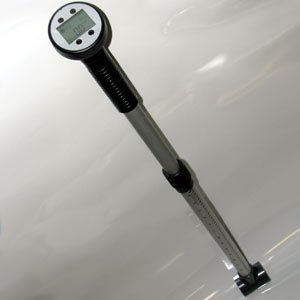
Figure 1: Global Water FP111 Digital Water Velocity Meter. This image displays the Global Water FP111 Digital Water Velocity Meter. It features a digital display unit at the top, an ergonomic handle, and an extendable shaft with measurement markings, leading to the flow sensor at the bottom. The device is designed for measuring water velocity in various aquatic environments.
Key Components:
- Digital Display Unit: Shows real-time water velocity readings.
- Extendable Probe Shaft: Allows for depth adjustment from 3.7 to 6 feet (1.1 to 1.8 meters).
- Propeller Sensor: Rotates with water flow to measure velocity.
- Handle: Provides a secure grip during operation.
Setup
- Battery Installation:
Locate the battery compartment on the digital display unit. Open the compartment and insert the required batteries (typically 9V, refer to the unit's label for specifics), ensuring correct polarity. Close the compartment securely.
- Shaft Assembly/Extension:
If the shaft is not fully assembled, connect the sections as per the markings. To extend the shaft, loosen the locking collar(s), pull the shaft to the desired length (between 3.7 and 6 ft), and tighten the collar(s firmly to secure the extension.
- Sensor Check:
Gently spin the propeller sensor to ensure it rotates freely without obstruction. Any resistance may indicate damage or debris.
Operating Instructions
- Power On:
Press the power button on the digital display unit. The display should illuminate and show a zero reading or the last recorded value.
- Unit Selection (if applicable):
Some models allow selection between feet per second (ft/s) and meters per second (m/s). Refer to the display unit's buttons for unit selection if available.
- Positioning the Probe:
Carefully lower the probe into the water body, ensuring the propeller sensor is fully submerged and oriented directly into the flow. Avoid placing the sensor too close to the bottom or sides of the channel to prevent inaccurate readings due to boundary effects.
- Taking a Measurement:
Hold the probe steady. The digital display will show the real-time water velocity. For accurate readings, it is recommended to average the velocity over a short period (e.g., 10-20 seconds) or take multiple readings at the same point.
- Power Off:
After use, press and hold the power button to turn off the device. Remove the probe from the water and clean it as described in the Maintenance section.
Maintenance
- Cleaning: After each use, rinse the probe and sensor thoroughly with clean fresh water to remove any sediment, algae, or debris. Ensure the propeller spins freely.
- Storage: Store the FP111 in its carrying case (if available) or a clean, dry place away from direct sunlight and extreme temperatures. Ensure the shaft is retracted to its shortest length for compact storage.
- Battery Replacement: Replace batteries when the low battery indicator appears on the display or if the unit fails to power on. Always use fresh, high-quality batteries.
- Sensor Inspection: Periodically inspect the propeller for any signs of wear, damage, or entanglement. Replace the propeller if necessary (contact Global Water support for replacement parts).
Troubleshooting
| Problem | Possible Cause | Solution |
|---|---|---|
| Device does not power on. | Dead or incorrectly installed batteries. | Replace batteries, ensuring correct polarity. |
| Inaccurate or erratic readings. |
|
|
| Display shows "Error" or blank. | Internal malfunction or sensor issue. | Power off and on again. If problem persists, contact Global Water support. |
Specifications
- Model: FP111
- Product Type: Digital Water Velocity (Flow Probe) Meter
- Measurement Range: Designed for various water velocities (specific range not provided in source, refer to product packaging or manufacturer's website).
- Probe Length: Extendable from 3.7 to 6 ft (1.1 to 1.8 m)
- Accuracy: High accuracy (specific percentage not provided in source, refer to product packaging or manufacturer's website).
- Power Source: Battery operated (type typically 9V, refer to device label).
- ASIN: B00478O3RW
- First Available: October 4, 2011
Warranty Information
Global Water products typically come with a manufacturer's warranty covering defects in materials and workmanship. For specific warranty terms, duration, and conditions applicable to your FP111 unit, please refer to the warranty card included with your purchase or visit the official Global Water website. Keep your proof of purchase for warranty claims.
Customer Support
For technical assistance, replacement parts, or service inquiries regarding your Global Water FP111 Digital Water Velocity Meter, please contact Global Water customer support directly. Contact information can usually be found on the manufacturer's website or in the product packaging.
Global Water Official Website: www.globalw.com (Example link, verify actual URL)


