
Introduction
This manual provides comprehensive instructions for the installation, operation, and maintenance of your ALFA NETWORK AOA-2415 15dBi Omni-Directional Outdoor Antenna. Designed for the 2.4GHz ISM band, this antenna supports IEEE 802.11b/g WiFi and Bluetooth applications, offering reliable performance in outdoor environments. Please read this manual thoroughly before installation and use to ensure proper setup and optimal performance.
Safety Information
Observe the following safety precautions during installation and operation:
- Mounting Location: Choose a mounting location that is clear of power lines, trees, and other obstructions. Ensure the mast is securely anchored.
- Weather Conditions: Avoid installing the antenna during lightning storms or strong winds.
- Grounding: Proper grounding of the antenna and mast is recommended to protect against lightning strikes and static discharge. Consult local electrical codes.
- Cable Management: Secure all cables to prevent tripping hazards and damage from environmental factors.
- Connector Protection: Always use weatherproof tape or sealant on exposed coaxial connections to prevent water ingress.
Package Contents
Verify that all items are present in your package:
- ALFA NETWORK AOA-2415 Omni-Directional Outdoor Antenna
- Mounting Bracket
- U-bolts, nuts, and washers for mast mounting
- Weatherproof tape (may be included)

Image: The ALFA NETWORK AOA-2415 Omni-Directional Outdoor Antenna, approximately 4.8 feet long, shown with its base.

Image: Included U-bolts, nuts, and washers for securing the antenna to a mast.
Setup and Installation
1. Choosing a Mounting Location
Select a high, unobstructed location for the antenna to maximize signal range and minimize interference. Ensure the chosen mast or pole is sturdy enough to support the antenna's length and weight, and can withstand local wind conditions. The antenna is designed for outdoor use and is weatherproof.
2. Assembling the Mounting Bracket
Attach the provided mounting bracket to the base of the antenna. The bracket is designed to secure the antenna to a mast up to 2 inches in outer diameter (OD).
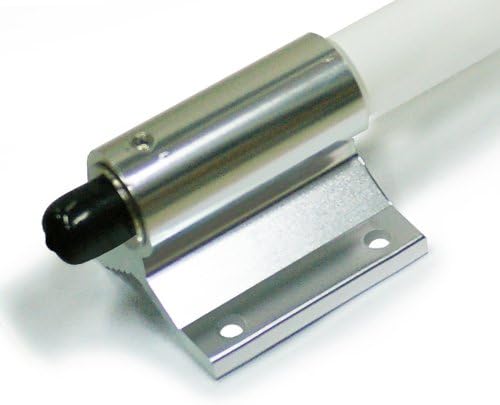
Image: A close-up view of the antenna's base, showing the integrated mounting bracket.
3. Mounting the Antenna to a Mast
- Position the antenna's mounting bracket against the mast.
- Use the U-bolts, nuts, and washers to firmly secure the bracket to the mast. Ensure the antenna is vertical and stable.

Image: The antenna shown mounted vertically on a pole, with the coaxial cable connected to the N-Female connector at the base.
4. Connecting the Coaxial Cable
The AOA-2415 antenna features an N-Female connector at its base. Connect a compatible N-Male coaxial cable (not included) from the antenna to your WiFi access point, router, or adapter.

Image: A detailed view of the N-Female connector located at the bottom of the antenna, ready for coaxial cable attachment.
5. Weatherproofing the Connection
After connecting the coaxial cable, it is crucial to weatherproof the N-Female connector. Use high-quality weatherproof tape (such as self-amalgamating tape) to seal the connection completely, protecting it from moisture and environmental elements. This prevents signal degradation and extends the lifespan of your antenna and cable.
Operation
The ALFA NETWORK AOA-2415 is an omni-directional antenna, meaning it transmits and receives signals in a 360-degree horizontal pattern. It is designed for use with 2.4GHz WiFi (IEEE 802.11b/g) and Bluetooth devices.
Optimal Performance Considerations:
- Line of Sight: For best results, ensure a clear line of sight between the antenna and the devices it is communicating with. Obstructions like buildings, dense foliage, or terrain can significantly reduce signal strength.
- Coaxial Cable Quality and Length: Use the shortest possible length of high-quality, low-loss coaxial cable (e.g., LMR-400 or better for longer runs) to minimize signal attenuation.
- Antenna Height: Mounting the antenna higher can improve range by clearing local obstructions, but consider the vertical beamwidth. For omni-directional antennas, a higher mount might mean a weaker signal for very close, ground-level devices.
- Interference: The 2.4GHz band can be susceptible to interference from other devices (e.g., cordless phones, microwaves, other WiFi networks). If experiencing issues, consider adjusting WiFi channel settings on your access point.
Maintenance
The AOA-2415 antenna is designed for durability and minimal maintenance. However, periodic checks are recommended to ensure continued optimal performance.
- Visual Inspection: Periodically inspect the antenna, mounting hardware, and coaxial cable for any signs of physical damage, corrosion, or wear.
- Connection Integrity: Check the weatherproof seal on the N-Female connector. Reapply weatherproof tape if it shows signs of degradation or cracking.
- Mounting Security: Ensure all mounting bolts and nuts remain tight, especially after severe weather conditions.
- Cleaning: If necessary, gently clean the antenna's fiberglass casing with a soft, damp cloth to remove dirt or debris that might accumulate. Avoid abrasive cleaners.
Troubleshooting
If you experience issues with your antenna, consider the following troubleshooting steps:
- No Signal or Weak Signal:
- Verify all cable connections are secure and properly weatherproofed.
- Check the coaxial cable for damage (kinks, cuts).
- Ensure the antenna is mounted in a location with minimal obstructions.
- Confirm your WiFi access point or adapter is correctly configured and operating on the 2.4GHz band.
- Test with a shorter or different coaxial cable if possible.
- Intermittent Connectivity:
- Check for sources of interference in the 2.4GHz band (e.g., microwaves, cordless phones, neighboring WiFi networks).
- Ensure the antenna is securely mounted and not swaying in the wind, which could cause signal fluctuations.
- Inspect the weatherproof seal for any signs of water ingress into the connector.
- Physical Damage:
- If the antenna or mounting hardware is physically damaged, replace the affected components immediately to prevent further issues or safety hazards.
Specifications
| Model | AOA-2415 |
| Frequency Range | 2.4 - 2.5 GHz |
| Gain | 15 dBi |
| Impedance | 50 Ohm |
| Connector Type | N-Female |
| Applications | IEEE 802.11b/g WiFi, Bluetooth |
| Antenna Length | Approximately 4.8 feet (1.46 meters) |
| Material | Fiberglass (radome) |
| Mounting | Mast mount (up to 2" OD) |
Warranty Information
ALFA NETWORK products are manufactured to high quality standards. For specific warranty terms and conditions, please refer to the warranty card included with your product or visit the official ALFA NETWORK website. Keep your purchase receipt as proof of purchase for any warranty claims.
Customer Support
If you require technical assistance or have questions regarding your ALFA NETWORK AOA-2415 antenna, please contact ALFA NETWORK customer support through their official website or the contact information provided with your product documentation. Please have your model number (AOA-2415) and purchase details ready when contacting support.