1. Product Overview
The Master Lock S430 is a 4mm lockout hasp designed for industrial safety applications. It features a 5/32" (4mm) diameter shackle, making it suitable for smaller lockout points. The hasp is constructed with a steel shackle and a durable plastic body, capable of holding up to two safety padlocks. This device is an integral part of a lockout/tagout program, ensuring equipment remains de-energized during maintenance or service.

Image 1.1: Front view of the Master Lock S430 4mm Lockout Hasp, showcasing its red plastic body and steel shackle.
2. Features
- Compact Design: 4mm (5/32") shackle diameter specifically designed to fit smaller lockout points.
- Durable Construction: Features a robust steel shackle for strength and a plastic body for lightweight durability.
- Multiple Lock Capacity: Designed to hold up to two safety padlocks, allowing multiple authorized employees to secure a single energy source.
- Compatibility: Can be used in conjunction with the Master Lock S100 Lockout Leash Lanyard for added convenience and security.
- Inside Jaw Diameter: 2-1/4" x 3" x 1".

Image 2.1: Diagram highlighting the steel shackle, plastic body, and capacity to hold up to two safety padlocks on the S430 hasp.
3. Specifications
| Attribute | Detail |
|---|---|
| Model Number | S430 |
| Brand | Master Lock |
| Shackle Diameter | 4mm (5/32 inches) |
| Material | Steel shackle, Plastic body |
| Body Dimensions (H x L x D) | 5.7 x 7.6 x 2 cm (approx. 2.24 x 3 x 0.79 inches) |
| Item Weight | 0.704 ounces |
| Color | Red |

Image 3.1: Detailed diagram showing the shackle and body dimensions of the Master Lock S430 hasp.
4. Safety Information and Lockout/Tagout Procedure
The Master Lock S430 lockout hasp is designed to be used as part of a comprehensive Lockout/Tagout (LOTO) program to prevent unexpected startup of machinery or release of hazardous energy during maintenance or servicing activities. Adherence to established LOTO procedures is critical for personnel safety.
General Safety Guidelines:
- Always follow your facility's specific Lockout/Tagout procedures.
- Ensure all energy sources are identified and de-energized before applying lockout devices.
- Verify the isolation of energy by attempting to operate the equipment after lockout devices are applied.
- Each authorized employee involved in the service or maintenance should apply their own personal lockout device.
- Never attempt to remove another employee's lockout device.

Image 4.1: Illustration emphasizing the importance of a Lockout/Tagout program for employee safety, contrasting safe and unsafe practices.
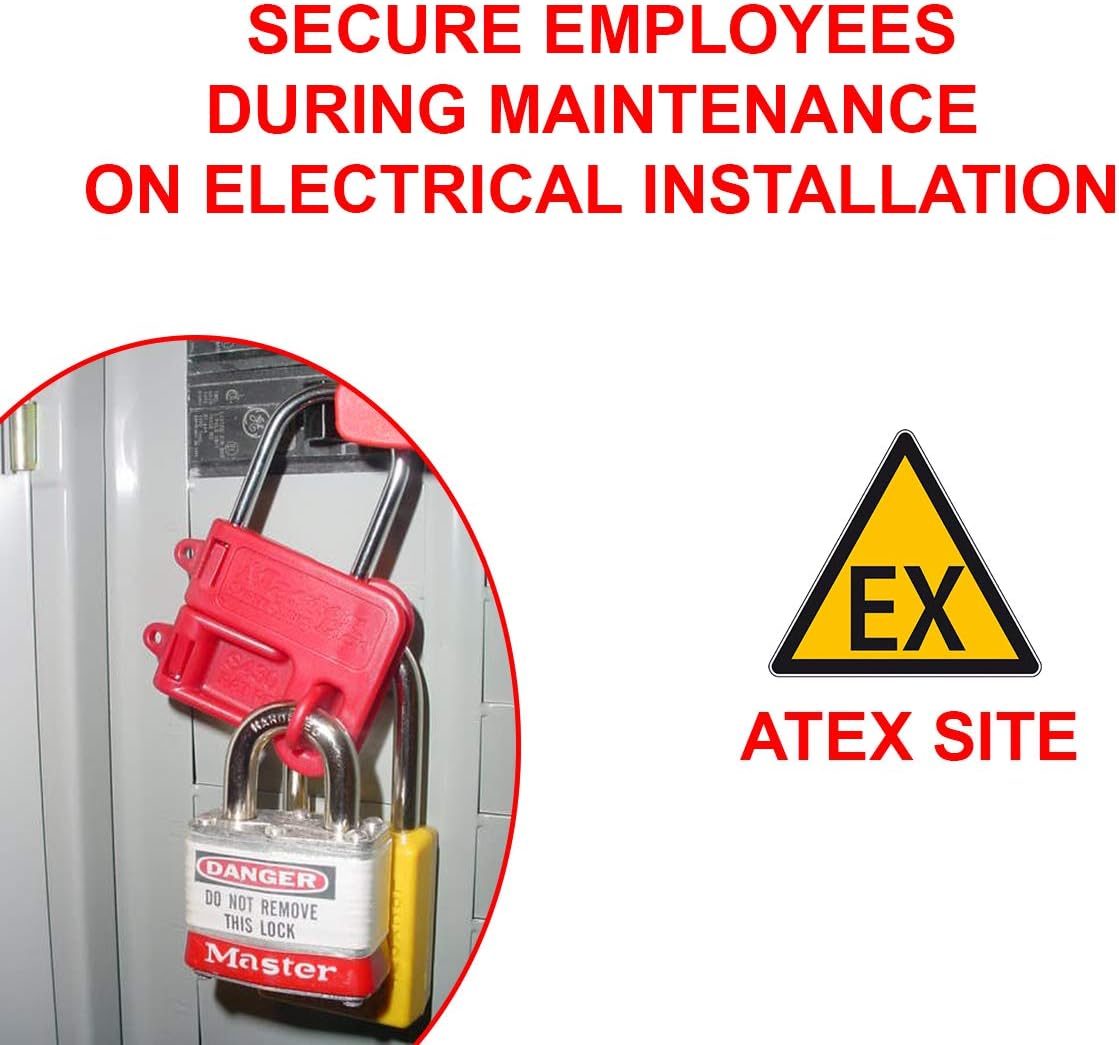
Image 4.2: Example of a lockout hasp securing an electrical installation, preventing accidental re-energization during maintenance.
5. Usage Instructions (Operating)
Follow these general steps for applying the Master Lock S430 lockout hasp as part of a standard Lockout/Tagout procedure. Always refer to your organization's specific LOTO policy.
- Preparation for Shutdown: Identify all energy sources and potential hazards associated with the equipment. Notify all affected personnel.
- Equipment Shutdown: Turn off or shut down the equipment using normal operating procedures.
- Isolation of System from Hazardous Energy: Disconnect or de-energize the equipment from its energy source(s). This may involve turning off circuit breakers, closing valves, or blocking moving parts.
- Application of Lockout/Tagout Devices:
- Place the Master Lock S430 hasp over the energy isolating device (e.g., circuit breaker handle, valve handle).
- Ensure the hasp fully encompasses the device, preventing its operation.
- Each authorized employee involved in the work should then attach their personal safety padlock through one of the holes on the hasp. The S430 can accommodate up to two padlocks.
- Attach a lockout tag to the hasp or padlock, providing information such as the name of the person who applied the lock, the date, and the reason for the lockout.
- Dissipation of Residual or Stored Energy: Safely release or restrain any stored energy (e.g., springs, hydraulic pressure, capacitors).
- Verification of Isolation: Attempt to operate the equipment to confirm that it cannot be started and that all energy sources are effectively isolated. Return controls to the "off" position after verification.
- Performing Service/Maintenance: Proceed with the necessary work.
- Removal of Lockout/Tagout Devices: Once work is complete and the equipment is safe to operate, remove lockout devices in reverse order of application, ensuring all personnel are clear.

Image 5.1: The Master Lock S430 hasp applied to a circuit breaker panel, secured with two safety padlocks, demonstrating its use in an electrical lockout scenario.

Image 5.2: A visual representation of the seven essential steps in a Lockout/Tagout procedure, from preparation to verification of isolation.
6. Maintenance
The Master Lock S430 lockout hasp is designed for durability and requires minimal maintenance.
- Inspection: Regularly inspect the hasp for any signs of damage, wear, or deformation. Check the steel shackle for bends or corrosion and the plastic body for cracks or breaks.
- Cleaning: Clean the hasp with a mild soap and water solution if it becomes dirty. Avoid harsh chemicals that could degrade the plastic material.
- Storage: Store the hasp in a clean, dry environment away from direct sunlight and extreme temperatures when not in use.
- Replacement: If any damage is observed that could compromise the integrity or function of the hasp, replace it immediately to ensure continued safety.
7. Troubleshooting
The Master Lock S430 lockout hasp is a simple mechanical device. Most issues relate to improper application or damage.
- Hasp does not fit the lockout point:
- Ensure the lockout point's dimensions are compatible with the S430's 4mm shackle diameter and jaw dimensions.
- If the lockout point is too large, a different size hasp or lockout device may be required.
- Padlock does not fit through the hasp:
- Verify that the padlock shackle diameter is compatible with the holes on the S430 hasp.
- Use Master Lock safety padlocks designed for lockout/tagout applications, which are typically compatible.
- Hasp appears damaged or compromised:
- Do not use a damaged hasp. Immediately remove it from service and replace it with a new, undamaged unit.
- Damage can compromise the security and effectiveness of the lockout.
8. Warranty and Support
For information regarding product warranty, technical support, or to inquire about other Master Lock safety products, please visit the official Master Lock website or contact their customer service department.
Master Lock Company LLC
www.masterlock.com


