
1. Important Safety Information
Please read all safety warnings and instructions carefully before installing or operating this power supply unit. Retain this manual for future reference.
WARNING: Electrical Shock Hazard
- To prevent electrical shock, do not remove the cover of the power supply unit.
- There are no user-serviceable parts inside. Refer all servicing to qualified service personnel.
- Always turn off the power to your system and wait for at least 5 minutes before removing or installing any peripheral interface cards or components. Failure to do so may result in damage to your system and will void your warranty.
The product label provides critical operational details:
This image displays the product label of the Delta DPS-350FB power supply. It includes critical safety warnings in multiple languages, advising against opening the unit due to electrical shock risk and the presence of user-serviceable parts. It also details the model number (DPS-350FB A), manufacturing origin (Made in Thailand), Apple Part Number (614-0062), and Serial Number (185903). The output specifications are listed for various voltage rails (+5V, +3.3V, +5V TRKL, +12V, +12VD, -12V) with their respective current ratings, culminating in a total output of 390W max. Input specifications are 100-240V ~ 10A, 50-60Hz, and receptacle input is 100-240V ~ 3A, 50-60Hz. Certifications like N, UL, and LR96201C are visible. A barcode and the text 'EH722MLH8MZA' are also present, which can be used as a reference number: EH722MLH8MZA.
2. Product Overview
The Delta DPS-350FB is a 390W ATX power supply unit designed for personal computer systems. It provides stable and reliable power to all your computer components.

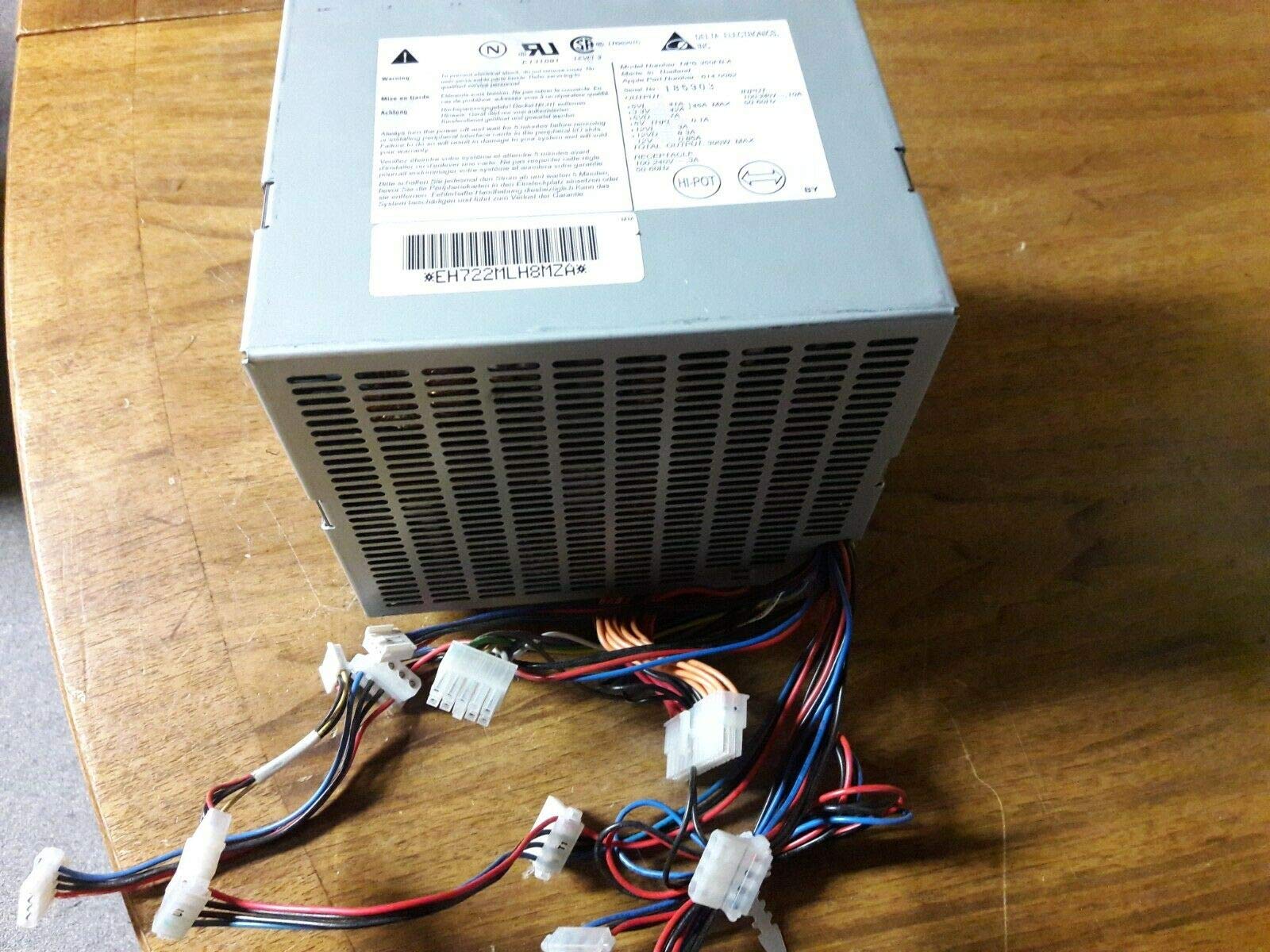
This image shows the Delta DPS-350FB power supply unit from a top-down perspective, highlighting its metal casing with ventilation grilles. A bundle of multi-colored power cables with various connectors (e.g., ATX 20/24-pin, SATA, Molex) extends from the unit, secured by a cable tie. This view illustrates the physical form factor and the types of connectors available for system integration.

This image provides an alternative view of the Delta DPS-350FB power supply unit, similar to the previous one, emphasizing the array of power cables and connectors. The cables are neatly bundled, showcasing the different types of connectors required for various computer components. The metallic casing and ventilation are clearly visible, indicating the unit's design for heat dissipation.
3. Setup and Installation
- Preparation: Ensure your computer system is completely powered off and unplugged from the wall outlet. Open your computer case according to its manufacturer's instructions.
- Remove Old PSU (if applicable): Disconnect all power cables from your motherboard, graphics card, drives, and other components. Unscrew and remove the old power supply unit from the case.
- Install New PSU: Carefully place the Delta DPS-350FB into the power supply bay of your computer case. Secure it with the appropriate screws, typically four, from the rear of the case.
- Connect Main Power: Connect the main 20+4 pin ATX power connector to your motherboard. Ensure it clicks securely into place.
- Connect CPU Power: Connect the 4-pin or 8-pin CPU power connector (EPS12V) to the corresponding port on your motherboard.
- Connect Peripheral Power: Connect SATA power connectors to your hard drives, SSDs, and optical drives. Use Molex connectors for older peripherals or case fans if needed.
- Connect Graphics Card Power (if applicable): If your graphics card requires additional power, connect the appropriate 6-pin or 8-pin PCIe power connectors from the PSU to the graphics card.
- Cable Management: Route cables neatly to improve airflow and aesthetics within your case. Use cable ties if necessary.
- Close Case and Power On: Close your computer case, plug in the power cord, and power on your system. Verify that all components are receiving power and functioning correctly.
4. Operating Instructions
The Delta DPS-350FB power supply operates automatically once installed correctly and connected to a power source. It provides continuous power to your system components.
- Power On/Off: The power supply is controlled by your computer's power button. Ensure the main power switch on the PSU (if present) is in the 'ON' position before powering on your computer.
- Voltage Stability: The unit is designed to provide stable voltage outputs as per ATX specifications.
- Cooling: The integrated fan provides air cooling to maintain optimal operating temperatures. Ensure adequate airflow around the PSU.
5. Maintenance
Proper maintenance ensures the longevity and optimal performance of your power supply unit.
- Dust Removal: Periodically (e.g., every 6-12 months), power off and unplug your computer. Open the case and use compressed air to gently clean dust from the power supply's fan and ventilation grilles. Accumulation of dust can hinder cooling and reduce efficiency.
- Cable Inspection: Occasionally inspect all power cables for any signs of wear, fraying, or damage. Ensure all connections are secure.
- Environment: Operate the power supply in a clean, dry, and well-ventilated environment. Avoid extreme temperatures and humidity.
6. Troubleshooting
If you encounter issues with your power supply, consider the following troubleshooting steps:
- No Power:
- Ensure the power cord is securely plugged into both the PSU and the wall outlet.
- Check if the main power switch on the PSU is in the 'ON' position.
- Verify that the wall outlet is functional by plugging in another device.
- Confirm all internal power connectors (20+4 pin ATX, CPU, GPU, peripherals) are firmly seated.
- System Instability/Random Shutdowns:
- This could indicate an overloaded or failing power supply. Ensure your system's total power consumption does not exceed the PSU's 390W capacity.
- Check for proper ventilation and dust buildup. Overheating can cause instability.
- If possible, test with a known good power supply to rule out other component issues.
- Loud Fan Noise:
- Excessive fan noise can be caused by dust accumulation. Clean the fan as described in the Maintenance section.
- If the noise persists, the fan bearing might be failing, requiring professional service.
If these steps do not resolve the issue, contact Delta customer support or a qualified technician.
7. Specifications
| Feature | Detail |
|---|---|
| Brand | Delta |
| Model Number | DPS-350FBA |
| Output Power | 390 Watts |
| Form Factor | ATX |
| Compatible Devices | Personal Computer |
| Connector Type | ATX |
| Cooling Method | Air |
| Input Voltage Range | 100-240V AC |
| Input Frequency | 50-60Hz |
| ASIN | B00456S19M |
Output Rail Specifications (from product label):
- +5V: 41A
- +3.3V: 42A
- +5V TRKL: 0.1A
- +12V: 3A
- +12VD: 8.3A
- -12V: 0.85A
- Total Output: 390W max.
8. Warranty Information
Delta products are manufactured to high-quality standards. For specific warranty terms and conditions, please refer to the warranty card included with your product or visit the official Delta website. The warranty typically covers defects in materials and workmanship under normal use.
Note: Opening the power supply unit or improper installation will void the product warranty.
9. Customer Support
If you require technical assistance or have questions regarding your Delta DPS-350FB power supply, please contact Delta customer support through their official website or the contact information provided in your product packaging.
When contacting support, please have your product model number (DPS-350FBA) and serial number (found on the product label) ready.


