
1. Introduction
Welcome to the Doro PhoneEasy 105wr user manual. This document provides essential information for setting up, operating, and maintaining your new cordless phone. The Doro PhoneEasy 105wr is designed for ease of use, featuring large, well-separated buttons, a clear backlit display, amplified sound, and an integrated answering machine.
Please read this manual carefully to ensure proper use and to maximize the benefits of your phone's features.
2. Safety Information
- Battery Safety: Use only approved batteries. Do not dispose of batteries in fire. Recycle batteries according to local regulations.
- Water Exposure: Do not expose the phone or base unit to water or moisture.
- Hearing Protection: Avoid prolonged listening at high volume levels to prevent hearing damage. The amplified sound feature should be used responsibly.
- Cleaning: Disconnect the power adapter before cleaning. Use a soft, damp cloth. Do not use liquid or aerosol cleaners.
- Interference: This product operates on radio signals and may cause interference with other electronic devices.
3. Package Contents
The Doro PhoneEasy 105wr package typically includes the following items:
- Doro PhoneEasy 105wr Handset
- Base Unit with Integrated Answering Machine
- Power Adapter
- Telephone Line Cord
- Rechargeable AAA Batteries (2x)
- User Manual (this document)
4. Setup
4.1. Battery Installation
- Open the battery compartment cover on the back of the handset.
- Insert the two supplied AAA rechargeable batteries, observing the correct polarity (+ and -).
- Close the battery compartment cover securely.
4.2. Connecting the Base Unit
Connect the base unit to the power outlet and the telephone line.
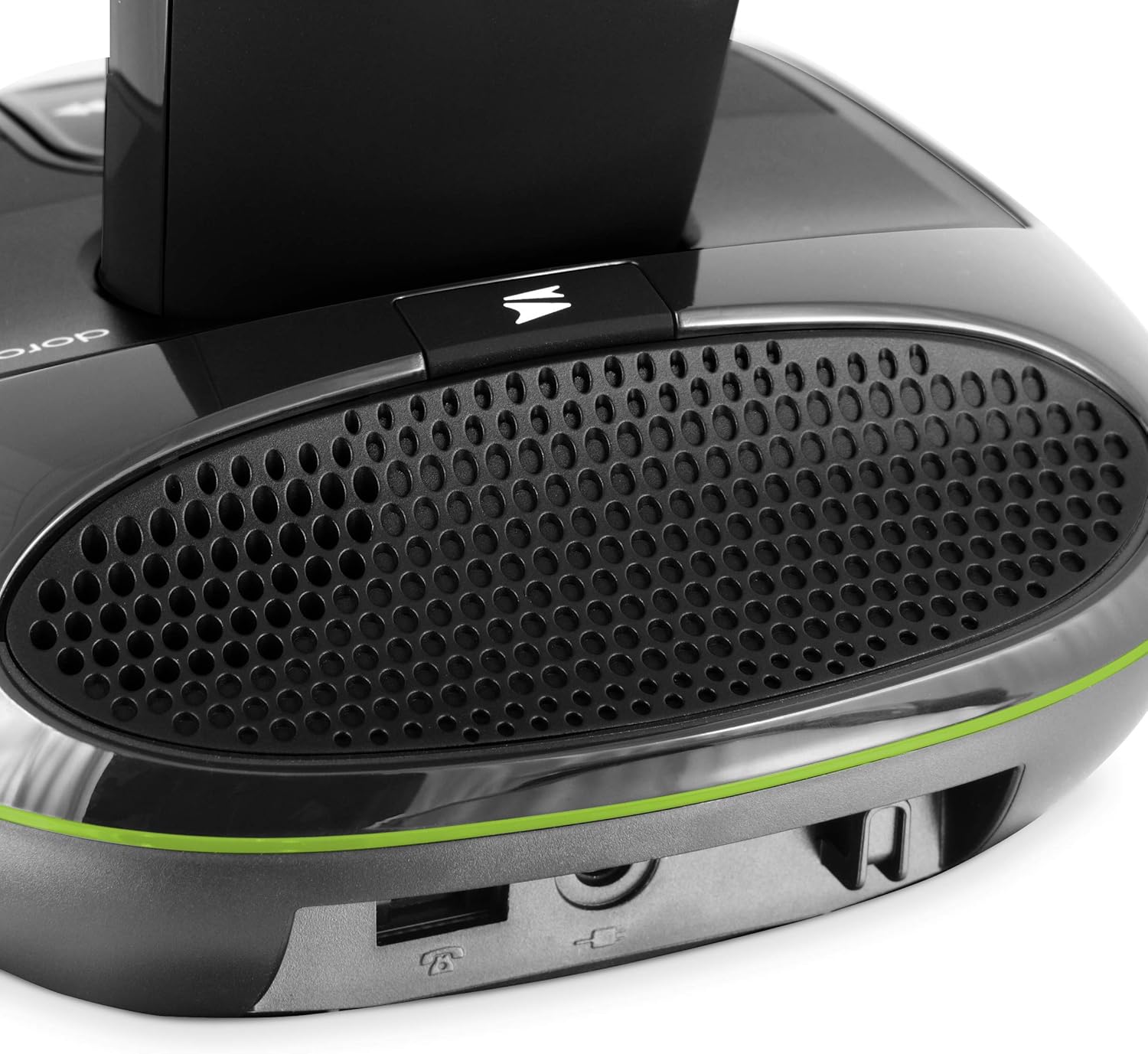
Image: Rear view of the base unit showing power and telephone line connections.
- Plug the small end of the power adapter into the 'DC IN' socket on the back of the base unit.
- Plug the other end of the power adapter into a wall power outlet.
- Connect one end of the telephone line cord to the 'LINE' socket on the base unit.
- Plug the other end of the telephone line cord into your telephone wall socket.
4.3. Charging the Handset
Place the handset on the base unit. Ensure the charging contacts on the handset align with those on the base. The battery icon on the handset display will indicate charging. For optimal battery performance, charge the handset for at least 24 hours before initial use.

Image: The Doro PhoneEasy 105wr handset correctly placed on its charging base.
5. Operating Instructions
5.1. Handset Overview

Image: Front view of the Doro PhoneEasy 105wr handset, highlighting the large, well-spaced buttons and clear display.
- Display: 23x38 mm backlit display for easy readability.
- M1/M2 Buttons: Speed dial keys for frequently called numbers.
- Green Call Button: To make or answer a call.
- Red End Call Button: To end a call or return to standby.
- Navigation Buttons: For menu navigation and volume adjustment during a call.
- Amplification Button: Located on the right side of the handset, press to increase call volume up to +10 dB.
5.2. Making and Receiving Calls
- To Make a Call: Press the green call button, then dial the number. Alternatively, dial the number first, then press the green call button.
- To Answer a Call: When the phone rings, press the green call button.
- To End a Call: Press the red end call button or place the handset back on the base unit.
- Redial: Press the down arrow button to view the last 5 dialed numbers. Select a number and press the green call button to redial.
5.3. Answering Machine
The integrated answering machine can record up to 15 minutes of messages. Most functions are accessible from both the handset and the base unit.

Image: Close-up of the base unit showing the answering machine controls, including play/pause, skip, and volume buttons.
- Activating/Deactivating: Refer to the on-screen menu on the handset or the dedicated button on the base unit to activate or deactivate the answering machine.
- Recording a Greeting: Follow the menu prompts on the handset to record your personalized outgoing message.
- Retrieving Messages: Press the play button on the base unit or access the answering machine menu on the handset.
- Remote Access: You can access your answering machine remotely from any other phone by dialing your number and entering your PIN when prompted.
5.4. Phonebook and Speed Dial
- Storing Contacts: The phonebook can store up to 20 contacts. Navigate to the phonebook menu on the handset to add, edit, or delete entries.
- Speed Dial (M1/M2): Assign frequently called numbers to the M1 and M2 buttons for one-touch dialing. Refer to the handset menu for programming instructions.
5.5. Hearing Aid Compatibility
The Doro PhoneEasy 105wr is compatible with hearing aids. To activate this feature, select the 'T' mode on your hearing aid device.
6. Maintenance
6.1. Cleaning
Wipe the handset and base unit with a soft, slightly damp cloth. Do not use harsh chemicals or abrasive cleaners. Ensure the phone is disconnected from power before cleaning.
6.2. Battery Care
To prolong battery life, avoid exposing the handset to extreme temperatures. If the phone will not be used for an extended period, remove the batteries.
7. Troubleshooting
| Problem | Possible Cause | Solution |
|---|---|---|
| No dial tone | Telephone line cord not connected or faulty. | Ensure the telephone line cord is securely connected to both the base unit and the wall socket. Test with another phone if possible. |
| Handset not charging | Handset not correctly placed on the base; dirty charging contacts; faulty batteries. | Ensure the handset is properly seated. Clean charging contacts with a dry cloth. Replace batteries if old. |
| Poor sound quality | Handset out of range; interference; low battery. | Move closer to the base unit. Avoid placing the base near other electronic devices. Charge the handset. |
| Answering machine not recording | Answering machine is off; memory full. | Activate the answering machine. Delete old messages to free up memory. |
8. Specifications
- Model: PHONEEASY105WR
- Type: DECT Cordless Phone with Answering Machine
- Display: Backlit, 23x38 mm
- Phonebook Capacity: Up to 20 contacts
- Answering Machine Recording Time: Up to 15 minutes
- Amplified Reception: Up to 30 dB
- Ringer Volume: Up to 90 dB at 1 meter
- Hearing Aid Compatibility: Yes (T-mode)
- Indoor Range: Up to 50 meters
- Outdoor Range: Up to 300 meters
- Batteries: 2 x AAA rechargeable (Alkaline composition)
- Material: Plastic
- Color: Black
9. Warranty and Support
For warranty information and technical support, please refer to the warranty card included in your product packaging or visit the official Doro website. Keep your proof of purchase for warranty claims.


